Part 5 Installation
Before install the devices please read these notices:
①Suggested panel height 1.4m-1.8m;
②
③
④To reduce silhouetting of camera image, avoid installing panel in areas that receive direct sunlight.
Do not install the devices with high voltage, high temperature, a strong magnetic field, corrosive, or
humid atmospheres.
Make sure the lens and microphone are protected from dust.
14
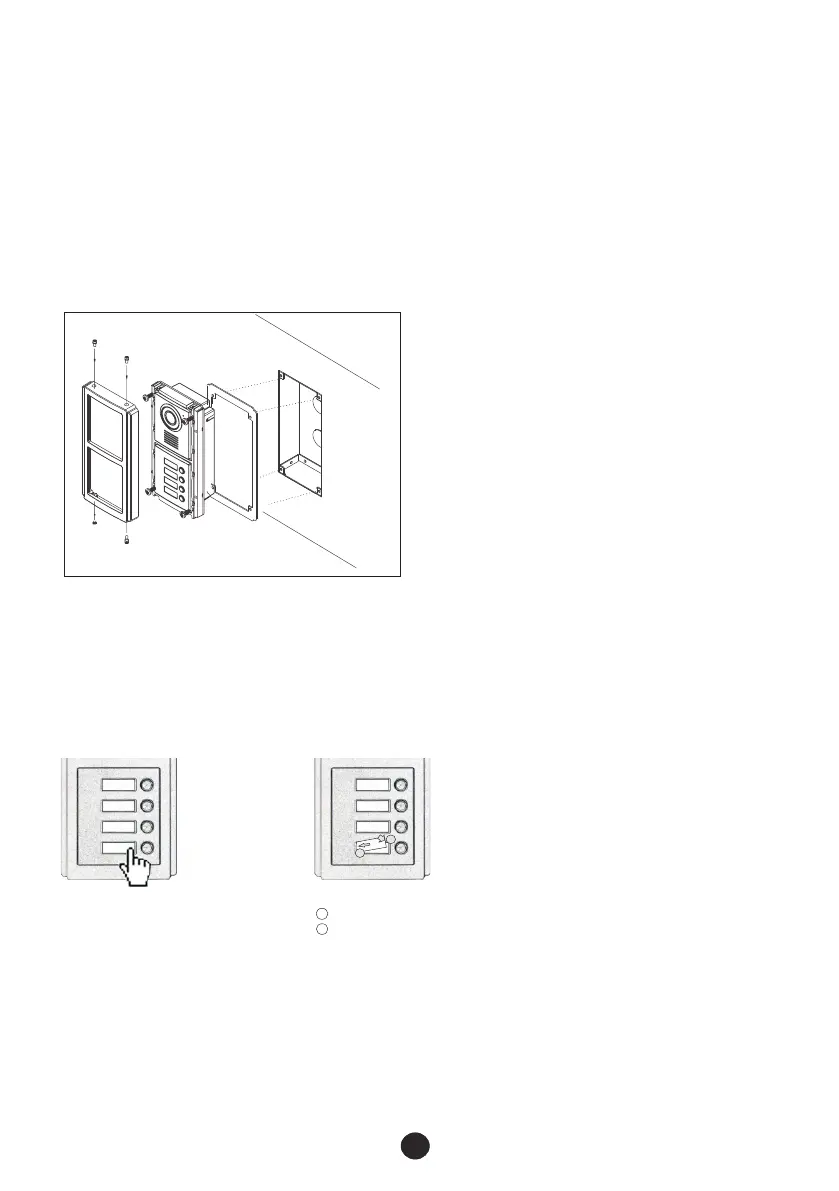
a. Cut out a rectangular hole as the installation size (104x214x50mm) on a suitable position and then
fix the box in it with cement or screws(①).
b. Take off the screws and then the frame(②).
c. Put the rubber seal on the back of door panel(③).
d. Put the door panel into the box and fix it with the screws(③) after connection.
e. Put the frame on the door panel and fix it with the screws(②).
Dismantle:
Press the right or left
edge hard.
1
2
Insert the name tag.
Press the edge.
Install:
1
2
5.1 Installation of door station
①
②
③
Frame
Panel
Seal
Box
Screws
5.1.1 Dismantle/install name tags



 To Next Page