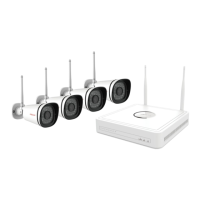
4.4.8 WiFi Settings
On this page, you can see the SSID of the wifi connected to your Device.
4.4.9 Advanced Settings
Click on advanced settings to enter the advanced settings page, where you can set Security Settings,
Light Settings, Power Frequency, Wi-Fi Detection, Sync Time, Restart Device,Reset Device, Video
Settings, Prompt Settings, Screen Flip and Device Speaker Volume settings.
Security Settings
You can modify the username and password of the camera here.
Light Settings
On this page You can set night vision mode, Auto, Full color night vision and Infrared night vision
Auto: At night, the live broadcast is in black and white: the alarm video is in color
Full color night vision: Night vision, alarm recording and live footage are in color.
Infrared night vision:At night alarm recordings and live broad casts are in back and white.


 To Next Page