Need help?
Do you have a question about the Foscam SD2 and is the answer not in the manual?
Lists the key features and capabilities of the Foscam Outdoor IP Security Camera.
Provides essential instructions and checks to perform before installing and using the camera.
Details the items included in the camera package for user verification.
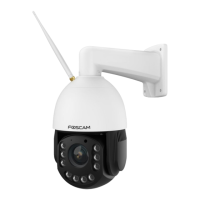
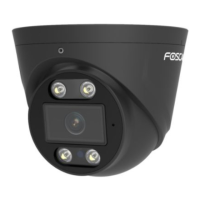
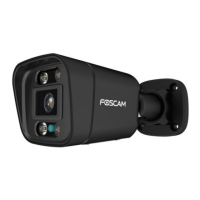
Identifies and describes the physical components and ports of the IP security camera.
Explains how to manage the Micro SD card for video storage and its specifications.
Provides guidance on the proper procedure for mounting the camera on a wall.
Step-by-step guide for connecting the camera to the Foscam App using a wired connection.
Describes the main interface and functions available within the Foscam App's surveillance window.
Details how to view and listen to the live video feed from the camera using the Foscam App.
Instructions for connecting the camera hardware and installing necessary software for web access.
Explains how to access the camera using its IP address and HTTP/HTTPS protocols within a local network.
Details how to access the camera remotely from the internet using its WAN IP address.
Guide on using the VLC media player to stream and view video from the IP camera via RTSP.
Explains how to connect the IP camera to a server or NVR using ONVIF protocol.
Details the functions and layout of the camera's web-based surveillance interface.
Guides users through the initial setup wizard for basic camera configuration.
Configures basic camera settings like name, time, and user accounts.
Manages network configurations for the camera, including IP, Wi-Fi, and ports.
Manages video encoding settings, including stream types, resolution, and frame rates.
Manages motion and sound detection features for security alerts.
Manages recording settings, including storage location and alarm/schedule recording.
Manages PTZ (Pan/Tilt/Zoom) parameters and cruise settings.
Configures firewall rules to control access based on IP addresses.
Manages system functions like backup, restore, firmware upgrade, and reboot.
Allows viewing and managing recorded video files stored on the camera.
Instructions for connecting hardware and installing the Foscam VMS software.
Step-by-step guide for installing the Foscam VMS application on a computer.
Enables the creation of a local administrator account for the Foscam VMS.
Guides on how to add IP cameras to the Foscam VMS for monitoring.
Overview of the graphical user interface (GUI) for the Foscam Surveillance Software.
Displays camera status information, including device details and logs.
Configures basic camera settings like name, time, and user accounts within the VMS.
Manages network configurations for cameras connected to the Foscam VMS.
Manages video encoding settings, including stream types, resolution, and frame rates.
Manages motion and sound detection features within the Foscam VMS.
Manages PTZ (Pan/Tilt/Zoom) parameters and cruise settings in the Foscam VMS.
Manages recording functions, including storage paths and alarm/schedule recording.
Manages system-level operations like backup, restore, and firmware upgrades.
Provides answers to common questions regarding camera setup, connectivity, and troubleshooting.
Troubleshooting steps for resolving issues with connecting the camera wirelessly to a router.
Instructions on how to reset camera credentials if the username or password is forgotten.
Steps to configure alarm recording directly to the Micro SD card.
Guides on setting up email alerts with snapshots upon motion detection.
Tips for troubleshooting remote connection issues with the Foscam mobile application.
 General
| Type | IP security camera |
|---|---|
| Antenna type | External |
| Certification | FCC, CE, RoHS |
| Day/night mode | Yes |
| Placement supported | Indoor & outdoor |
| Connectivity technology | Wireless |
| Audio system | 2-way |
| Bluetooth | - |
| Wi-Fi standards | 802.11a, 802.11b, 802.11g, Wi-Fi 4 (802.11n), Wi-Fi 5 (802.11ac) |
| Wi-Fi data rate (max) | 450 Mbit/s |
| Ethernet interface type | Fast Ethernet |
| Supported network protocols | IP, TCP, UDP, HTTP, HTTPS, DHCP, SMTP, FTP, RTSP |
| Minimum illumination | 0 lx |
| Optical zoom | 4 x |
| Number of lenses | 1 |
| Focal length range | 2.8 - 12 mm |
| Maximum aperture number | 3 |
| Minimum aperture number | 1.7 |
| Form factor | Dome |
| Mounting type | Wall |
| Product color | White |
| International Protection (IP) code | IP66 |
| Sensor type | CMOS |
| Optical sensor size | 1/2.9 \ |
| Total megapixels | 2 MP |
| Maximum resolution | 1920 x 1080 pixels |
| Supported video modes | 240p, 480p, 720p, 1080p |
| Video formats supported | H.264 |
| Image quality adjustment | Brightness, Contrast, Saturation, Sharpness |
| Supported graphics resolutions | 320 x 240, 640 x 480 (VGA), 1280 x 720 (HD 720), 1920 x 1080 (HD 1080) |
| LED type | IR |
| Night vision distance | 50 m |
| Number of illumination LEDs | 6 |
| Security algorithms | WPA, WPA2 |
| Alert notification type | |
| Built-in HDD | No |
| Compatible memory cards | MicroSD (TransFlash) |
| Maximum memory card size | 128 GB |
| Mobile operating systems supported | Android, iOS |
| Cables included | LAN (RJ-45) |
| Storage temperature (T-T) | -20 - 50 °C |
| Operating temperature (T-T) | -20 - 60 °C |
| Storage relative humidity (H-H) | 0 - 90 % |
| Operating relative humidity (H-H) | 20 - 85 % |
| Power consumption | 200 mA |
| Power consumption (max) | 20 W |
| Harmonized System (HS) code | 85258900 |
 Weight and Dimensions
| Width | 111 mm |
|---|---|
| Length | 180 mm |
| Weight | 1000 g |


 To Next Page