Section1 Menu Bar
Path to surveillance window. Click this button enter to Device List and back to the surveillance
window.
Playback the video recording, you can choose playback type and play video on local or
SD card.
Message,If you log in to a cloud account and your device experiences an alarm, you can find the
alarm push message here.
Here you can choose a 7-day free cloud service experience, and you can also purchase related
cloud packages according to your needs. After successful activation, you can enjoy storing videos on the
cloud anytime, anywhere.
Add Device, please refer chapter 5.4 for the detail setting.
More, You can choose Setting Personal Account, Preference, Left Bar and Switch Account.
Section2 Left Bar
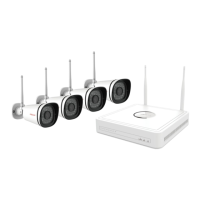
Add Group: Click the button, you can group the device list according to your needs.
Left Bar of Live: You can view the list of connected cameras.
1-----Reconnect
Click the settings button and the device will reconnect.
2----- Move To
Click this button, you can move the device to your group list.


 To Next Page