EasyManua.ls Logo

Foscam FI8919W - Page 6

Foscam FI8919W
79 pages
Print Icon
To Next Page IconTo Next Page
To Previous Page IconTo Previous Page
Loading...
5
w
w
w
w
w
w
w
w
w
w
w
w
w
w
w
w
ww.foscam.co
ww.foscam.co
ww.foscam.co
ww.foscam.co
ww.foscam.co
ww.foscam.co
ww.foscam.co
ww.foscam.co
m
m
m
m
m
m
m
m
Shenzhen
Shenzhen
Shenzhen
Shenzhen
Shenzhen
Shenzhen
Shenzhen
Shenzhen
Foscam
Foscam
Foscam
Foscam
Foscam
Foscam
Foscam
Foscam
Intelligent
Intelligent
Intelligent
Intelligent
Intelligent
Intelligent
Intelligent
Intelligent
Technology
Technology
Technology
Technology
Technology
Technology
Technology
Technology
Co.,
Co.,
Co.,
Co.,
Co.,
Co.,
Co.,
Co.,
Limited
Limited
Limited
Limited
Limited
Limited
Limited
Limited
Tel:
Tel:
Tel:
Tel:
Tel:
Tel:
Tel:
Tel:
86
86
86
86
86
86
86
86
755
755
755
755
755
755
755
755
2674
2674
2674
2674
2674
2674
2674
2674
5668
5668
5668
5668
5668
5668
5668
5668
Fax:
Fax:
Fax:
Fax:
Fax:
Fax:
Fax:
Fax:
86
86
86
86
86
86
86
86
755
755
755
755
755
755
755
755
2674
2674
2674
2674
2674
2674
2674
2674
5168
5168
5168
5168
5168
5168
5168
5168
5
5
5
5
Back
Back
Back
Back View
View
View
View
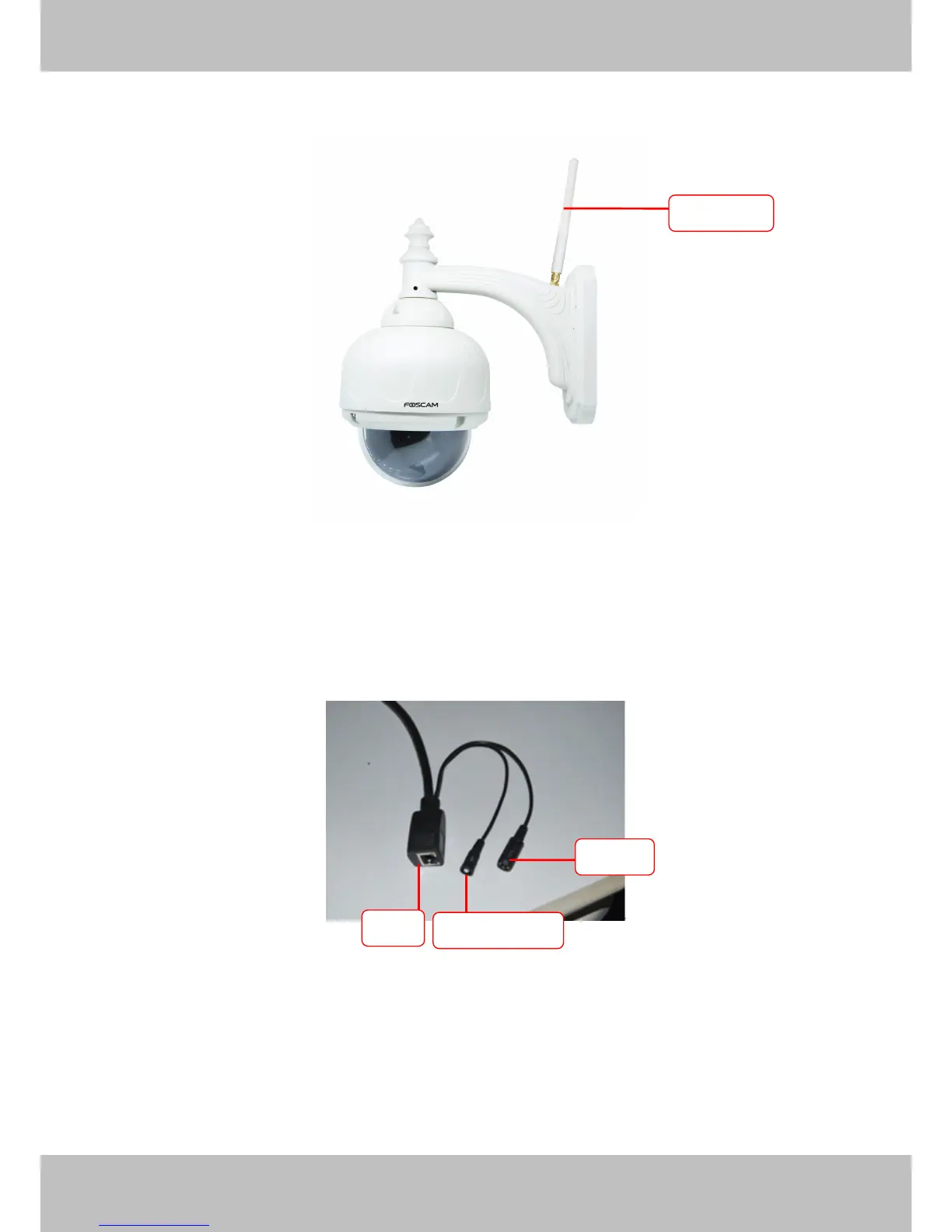
Figure 1. 2
W
W
W
W IFI
IFI
IFI
IFI Antenna
Antenna
Antenna
Antenna :
:
:
: Wireless Antenna
Interface
Interface
Interface
Interface View
View
View
View
Figure 1.3
LAN:
LAN:
LAN:
LAN: RJ-45/10-100 Base T
Power:
Power:
Power:
Power: DC 12 V/2A Power supply
Reset
Reset
Reset
Reset button:
button:
button:
button:
1) Press and hold down the RESET BUTTON about 10 seconds. when released the IP camera
will be reset back to factory default settings. You must power on the camera before reset.
2) Press and hold down the RESET BUTTON about 4 seconds, then press the WPS button on
Antenna
Antenna
Antenna
Antenna
Power
Power
Power
Power
LAN
LAN
LAN
LAN
Reset
Reset
Reset
Reset button
button
button
button

Other manuals for Foscam FI8919W

Related product manuals