EasyManua.ls Logo

Fosi Audio BOX X2 - User Manual

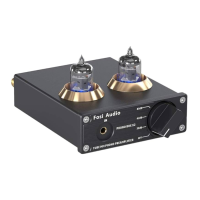
Fosi Audio BOX X2
14 pages
Print Icon
To Next Page IconTo Next Page
Loading...
Thanks for choosing us!
Fosi Audio BOX X2 User Manual

Questions and Answers

  • Z
    zbowenJul 29, 2025
    What to do if there is no audio output from my Fosi Audio Amplifier BOX X2?
    • B
      bstoneJul 29, 2025
      If all cables are connected but there's no audio output, verify that your audio source, BOX X2, amplifier, and powered speakers are turned on and functioning. Check the vacuum tube to ensure its light is on after powering on, and that the music source isn't paused. Ensure the correct input mode is selected on the BOX X2; the 3.5mm AUX input will interrupt the MM input. If the BOX X2 still doesn't work, try another DC12V power adapter. If it works after replacing the adapter, the original adapter is likely broken; otherwise, the BOX X2 may be broken.
  • E
    Edward FosterAug 6, 2025
    How to fix noise or humming when I turn on my Fosi Audio Amplifier BOX X2?
    • S
      Stephen LesterAug 6, 2025
      If you experience noise or humming when turning on the BOX X2, try the following: First, unplug all inputs to check if the noise persists in MM input mode. If not, the noise may originate from the audio source or cable; try exchanging them. The noise could also be from the BOX X2 or connected amplifier/speakers; exchange audio cables and the amplifier to identify the source. Ensure the gain isn't too high, as this can amplify the noise. Check that all cables are fully inserted, and if using a turntable, confirm it's MM output and properly connected, using the 3.5mm AUX input if it has a built-in preamp. Ensure the grounding wire is securely connected and keep the device away from other electronics.
  • H
    Heather VanceAug 13, 2025
    What to do if the sound quality is not good on my Fosi Audio BOX X2?
    • R
      rogersleslieAug 14, 2025
      If the sound quality isn't satisfactory, ensure all cables are fully connected. Adjust the gain on the BOX X2 to fine-tune the tone. Try changing the sound source and cables to identify any potential issues.
  • E
    Eric HaysAug 20, 2025
    Why did my Fosi Audio Amplifier BOX X2 come with a broken vacuum tube?
    • J
      Joe QuinnAug 20, 2025
      If the vacuum tube arrived broken, it may be due to long-distance transportation. Contact Fosi Audio after-sales support immediately for a replacement.

Summary

Product Specifications

Product Overview and Control Functions

Package Contents

Quick Setup Guide

Troubleshooting and Frequently Asked Questions

Troubleshooting Noise and Humming

Addresses issues of noise or humming when the BOX X2 is powered on and provides solutions.

Troubleshooting No Audio Output

Guides users on diagnosing and resolving issues when no audio output is produced from the device.

Distinguishing Power and Gain Controls

Explains how to differentiate between the power switch and gain adjustment functions on the multi-function knob.

Switching Between Audio Inputs

Details how to switch between the MM turntable input and the 3.5mm AUX input on the BOX X2.

Ground Wire Connection for Turntables

Addresses whether a ground wire connection is necessary for turntables without one.

Attaching the Ground Wire

Provides instructions on how to properly attach the ground wire to the grounding post.

Grounding Post with Fork Spade Terminals

Explains how to connect fork spade type terminals to the grounding post for proper grounding.

Analog to Digital Conversion

Clarifies that the product does not perform analog to digital conversion, functioning as a phono preamp.

Gain Support for MC Cartridges

Confirms that the BOX X2 is designed for MM cartridges and not MC cartridges.

Using with Turntables with Built-in Preamp

Guides on using the BOX X2 when the turntable has an optional built-in phono preamp.

Connecting to Power Amplifier

Explains how to connect the BOX X2 to a power amplifier via the RCA output for system integration.

Compatibility with Headphones

States that the BOX X2 does not have a headphone output and cannot be used directly with headphones.

Direct Connection to Speakers

Details how to connect the phono preamp directly to powered speakers or with an amplifier for passive speakers.

RIAA Equalization

Confirms that the preamp incorporates RIAA equalization for accurate phono playback.

Connecting a Subwoofer

Explains how to connect powered or passive subwoofers to the BOX X2, noting the need for a sub amplifier.

Vacuum Tube Replacements

Lists compatible vacuum tube substitutions for the BOX X2 for DIY customization.

Troubleshooting Poor Sound Quality

Provides steps to improve sound quality, including checking connections, adjusting gain, and testing sources/cables.

Continuous Operation of BOX X2

Confirms the BOX X2 can be left connected safely with the power switch turned off when not in use.

Damaged Vacuum Tube Issues

Addresses issues with damaged vacuum tubes due to transportation and provides contact information for replacement.

Comparison Section

Warranty Information

About Fosi Audio

Fosi Audio BOX X2 Specifications

General IconGeneral
SNR≥110dB
Frequency Response20Hz - 20kHz
InputRCA
Power SupplyDC12V
Input Sensitivity200mV
Output Impedance300Ω

Related product manuals