EasyManua.ls Logo

Fosi Audio BL20A - User Manual

Fosi Audio BL20A
14 pages
Print Icon
To Next Page IconTo Next Page
Loading...
BL20A Bluetooth Power Amplifier Users Manual
Red:AUX/USB
Blue:BT
- Treble +
- Bass +
IR
BL20A BLUETOOTH POWER AMPLIFIER
MODE
/VOL
Question and Answer IconNeed help?

Do you have a question about the Fosi Audio BL20A and is the answer not in the manual?

Summary

Product Overview

Remote Control

Package Contents

Quick Setup

Q&A; Troubleshooting

1. Get noise when playing music?

Troubleshoot common causes of noise during music playback for Bluetooth, U-Disk, and AUX inputs.

2. All cables are connected, but there is no audio output?

Diagnose and resolve issues where no audio output is present despite all connections being made.

3. My Bluetooth device cant pair with the BL20 A?

Steps to resolve problems when a Bluetooth device fails to pair with the amplifier.

4. Why Bluetooth is intermittent?

Identify and fix intermittent Bluetooth connection problems.

5. One channel does not work?

Diagnose why one audio channel might not be producing sound.

6. U-Disk cannot be played?

Troubleshoot issues preventing music playback from a U-Disk.

7. U-Disk play rustling?

Address rustling or static noise issues when playing from U-Disk.

8. Cant power on?

Steps to diagnose and fix problems related to the amplifier not powering on.

9. The BL20 A can be used as a pre-amp?

Confirms if the BL20A can function as a preamplifier and where the PRE-OUT is located.

10. Do I have to connect all the outputs of BL20 A? Can I only connect 2 speakers? Or just use it as a preamp?

Clarifies connection options: 2 speakers, preamp, or simultaneous connections.

11. Sound quality is not good?

Tips to improve sound quality, including cable checks and EQ adjustments.

12. Why the sound cut in and cut out?

Diagnose and resolve issues with audio cutting in and out during playback.

13. Does the BL20 A support Bluetooth aptX and Low Latency?

States whether the BL20A supports advanced Bluetooth codecs like aptX and Low Latency.

14. Can this amp be left on all the time?

Addresses the safety and feasibility of leaving the amplifier powered on continuously.

15. Can I listen to two audio inputs at the same time?

Clarifies that only one audio input mode can be active at a time.

Warranty Information

About Fosi Audio

Overview

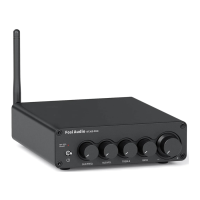
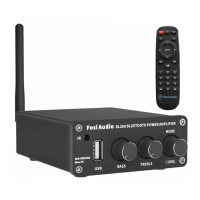
The Fosi Audio BL20A is a versatile Bluetooth 5.0 HiFi stereo amplifier designed to enhance your home audio experience. This device serves as a powerful amplifier for passive speakers and can also function as a pre-amplifier, offering flexibility in your audio setup. With its integrated Treble and Bass controls, the BL20A allows for precise sound customization, enabling you to tailor the audio output to your preferences. The inclusion of a remote control further enhances convenience, allowing you to manage various functions from a distance.

Function Description

The primary function of the BL20A is to amplify audio signals for passive speakers, delivering a robust and clear sound. It supports multiple input sources, including AUX, U-Disk, and Bluetooth, making it compatible with a wide range of audio devices. The amplifier utilizes two low-distortion TPA3116 high-performance chips, ensuring ultra-high-definition sound quality.

As an amplifier, the BL20A connects directly to your passive speakers, driving them to produce rich, immersive sound. The speaker outputs are clearly marked for easy connection. For those who wish to use it as a pre-amplifier, the BL20A features a 3.5mm AUX pre-output. This allows you to connect the BL20A to a separate power amplifier or directly to powered speakers, effectively using its Treble and Bass controls and input switching capabilities to manage your audio signal before it reaches the final amplification stage.

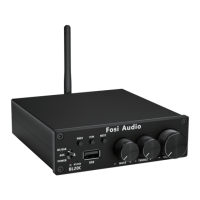
The device's multi-function knob on the front panel serves several purposes: it acts as a power switch (long press to turn on/off), a mode switch (short press to cycle through AUX, U-Disk, and Bluetooth inputs), and a volume control (turn left to decrease, turn right to increase). Input indicator lights (red for AUX/U-Disk, blue for Bluetooth) provide visual feedback on the currently selected mode.

Usage Features

Setting up the BL20A is straightforward. First, install the Bluetooth antenna to ensure optimal wireless connectivity. Next, connect your speakers:

  • For passive speakers, use speaker wire to connect the speaker's output terminals on the BL20A to your speakers.
  • To use the BL20A as a pre-amplifier with another amplifier, connect the 3.5mm AUX pre-out of the BL20A to your amplifier's input, then connect your passive speakers to that amplifier.
  • To use the BL20A as a pre-amplifier with powered speakers, connect the 3.5mm AUX pre-out of the BL20A directly to your powered speakers.

Once the speakers are connected, plug the power adapter into the BL20A and then into a power socket. Long press the multi-function knob to power on the device. The input mode indicator light will initially be red. Before playing any audio, it is recommended to turn down the bass and treble controls to their minimum (fully left) to prevent sudden loud sounds that could damage your hearing.

Connecting audio sources:

  • AUX Input: Use a 3.5mm audio cable to connect your device to the BL20A's AUX input. The input indicator light will remain red.
  • U-Disk Input: Insert a U-Disk (up to 32GB, supporting MP3/WMA/APE/FLAC/WAV formats) into the U-Disk input interface. The input indicator light will flash red continuously.
  • Bluetooth Input: Short press the multi-function knob to switch to Bluetooth mode (the blue input mode indicator light will flash). On your device, enable Bluetooth and select "BL20A" for pairing. Once successfully connected, the input mode indicator light will turn solid blue.

The BL20A prioritizes the latest input mode selected. After setting up your preferred input, adjust the volume, bass, and treble controls to achieve your desired sound.

The included infrared remote control offers comprehensive control from a distance of up to 15 meters. It allows you to power on/off the device, switch between single cycle and all loop playback (in U-Disk mode), mute the audio, adjust volume (V-/V+), switch input modes, control treble (H-/H+), adjust bass (B-/B+), navigate tracks (previous/next), and play/pause audio. In Bluetooth mode, a long press of the play/pause button will disconnect the Bluetooth connection. For U-Disk mode, the remote also allows direct selection of songs using number buttons (0-9).

Maintenance Features

To ensure optimal performance and longevity of your Fosi Audio BL20A, several maintenance considerations are important:

  • Cable Connections: Always ensure that all cables (speaker wires, audio cables, power adapter) are fully and securely pushed into their respective ports. Loose connections can lead to noise, intermittent audio, or no audio output.
  • Environmental Factors: Keep the BL20A away from other electric devices to prevent interference, especially when using Bluetooth or U-Disk modes. Avoid placing obstacles between your Bluetooth device and the BL20A to maintain a stable connection.
  • Troubleshooting Noise: If you experience noise, try using different Bluetooth devices, U-Disks, or audio cables. Ensure U-Disk audio formats are compatible and the capacity does not exceed 32GB. Check that the treble volume is not set too high.
  • No Audio Output: Verify that the input indicator light is on and the power supply is connected. Check if the volume knob is at the minimum and turn it up if necessary. Confirm that the BL20A is in the correct play mode (red for AUX/U-Disk, blue for Bluetooth). If using U-Disk, ensure it's working normally and the audio source isn't paused. Try changing the sound source, cables, or speakers, and restart the BL20A and your device.
  • Bluetooth Pairing Issues: Ensure the BL20A is powered on and its power adapter's LED light is on. Make sure the BL20A is not already paired with another device. Reduce the distance between your device and the BL20A, and remove any obstacles. Try a different Bluetooth audio source or restart the BL20A and your mobile phone.
  • Intermittent Bluetooth: Use another Bluetooth device to test. Ensure no interference from other electronic equipment. Keep your device close to the BL20A and replug the power adapter.
  • One Channel Not Working: Test if the issue occurs across all input modes (Bluetooth, U-Disk, AUX). If so, swap the speaker cables of the left and right channels or try another speaker. Ensure speaker output poles do not touch to avoid short circuits.
  • U-Disk Playback Issues: Try different U-Disks and ensure they meet capacity and format requirements. If WAV files cause rustling, convert DTS multi-channel audio to stereo using software like Foobar2000, as the BL20A supports stereo only.
  • Power On Issues: Long press the power switch button. Check the LED light on the power adapter. If it doesn't light up, unplug it from the BL20A and plug it directly into an AC power source to check if the adapter is faulty. You can also test with another DC12-24V power adapter (e.g., from a camera or router).
  • Sound Quality: Ensure all cables are fully connected. Adjust treble and bass controls to achieve the desired tone. Try changing the sound source and cables.
  • Sound Cutting In/Out: Reduce the sound level of the audio source. Change the audio source. Reduce the treble and bass knob volume on the BL20A. Ensure speaker output positive and negative poles do not touch.

The BL20A is designed for continuous operation without power consumption concerns, making it safe to leave connected. However, it can only process one audio input mode at a time. The device does not support Dolby, aptX, aptX HD, or aptX Low Latency Bluetooth codecs.

Fosi Audio BL20A Specifications

General IconGeneral
Power Output100W x 2 (4Ω)
Input Impedance47kΩ
Amplifier TypeClass D
Input ModeRCA
Frequency Response20Hz - 20kHz
Terminating Impedance4Ω - 8Ω

Related product manuals