2
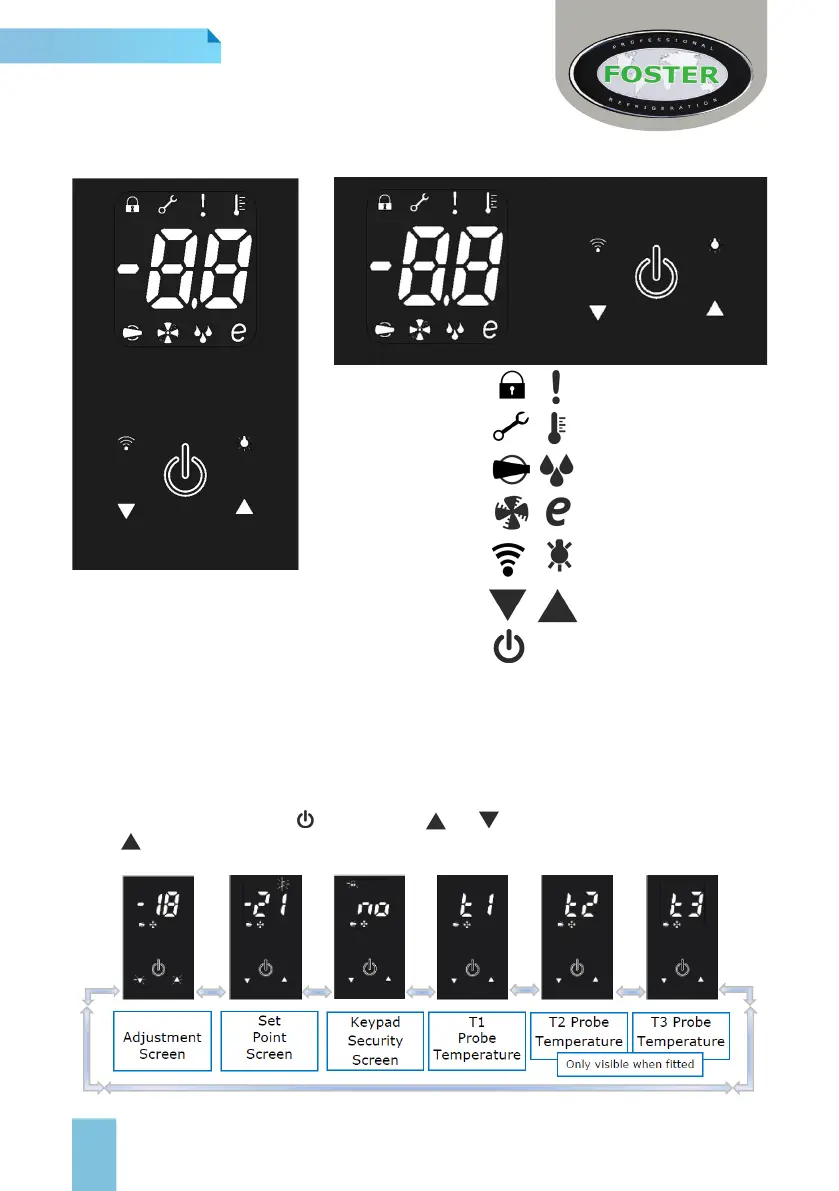
You are required to enter this mode to make any setup changes.
These include Set Point, Keypad Security and display of T1, 2 or 3 probe temperatures.
Press and immediately release after which the and switches will ash/pulse together.
Press to scroll through the following screens:
User Adjustment Mode
Service Mode
Compressor Function
Evaporator Fan Function
Warning/ Alarm
Temperature Setting
Defrost Function
Reduced Energy Mode
Data Download Switch
Power Switch
Decrease Switch
Light Switch
Increase Switch
(Some icons or switches are only visible during adjustment, when activated by parameters or
through operation/manual selection).
Keypad Lock
(Counter Version)
(Cabinet Version)
Display Icons and Switches
GB



 To Next Page