EasyManua.ls Logo

Fostex 250 - Inserts (Punch-In Recording)

Fostex 250
28 pages
Print Icon
To Next Page IconTo Next Page
To Previous Page IconTo Previous Page
Loading...
section
8
INSERTS
(PUNCH-IN
RECORDING)
Inserts
are
useful
for
replacing
portions
of
an
otherwise
satisfactory
recording
(e.g.
p
re-recording
one
stanza
of
a
lead
vocal
track
without
affecting
the
others):
Inserts
are
essentially
the
same
as
an
overdub;
they
are
recordings
of
new
material
made
in
synchronization
with
one
or
more
previously
recorded
tracks.
The
difference
is
that
while
an
overdub
is
made
on
a
different
track,
the
insert
(or
punch-in)
is
made
on
the
same
track
as
previously
recorded
material.
Thus,
wherever
the
insert
is
located,
previous
material
is
erased.
For
this
reason,
one
cannot
'‘layer”
new
material
on
top
of
an
existing
track
during
the
insert;
combin¬
ing
tracks
(or
ping-pong)
would
be
required
to
obtain
this
result;
refer
to
Section
6.
1.
Connect
a
mic
or
instrument
to
an
input
channel,
and
assign
that
channel
so
its
signal
goes
to
the
track
on
which
the
insert
will
be
made
(use
the
4
CHAN
BUSS
selector
and
PAN
pot).
2.
Depress
the
RECORD
TRACK
button
for
the
track
onto
which
the
insert
will
be
made.
3.
Set
all
MONMIX
to
scale
7.
4.
Set
the
METER
function
switch
to
RECORDER
position.
5.
Press
PLAY,
monitoring
the
existing
track(s)
in
the
head¬
phones.
At
the
moment
you
wish
to
begin
the
insert,
either:
a)
Press
PLAY
and
RECORD
simultaneously,
or
b)
S
tep
on
the
REMOTE
PUNCH-IN/PUNCH-OUT
foot
switch.
When
one
is
listening
to
the
existing
track(s),
ready
to
begin
the
insert,
it
is
obvious
that
precise
timing
is
essential.
If
the
person
operating
the
Model
250
is
also
the
performer,
it
might
be
difficult
to
press
the
RECORD
and
PLAY
buttons,
and
to
also
be
ready
to
perform.
Fortunately,
the
Model
250
has
a
foot
switch
jack
for
remote
punch-ins.
One
need
simply
place
the
unit
in
play
mode,
with
the
appropriate
RECORD
TRACK
selector
depressed,
then
step
on
the
foot
switch
at
the
moment
the
insert
must
begin;
a
second
actuation
of
the
foot
switch
ends
the
insert,
returning
the
unit
to
play
mode.
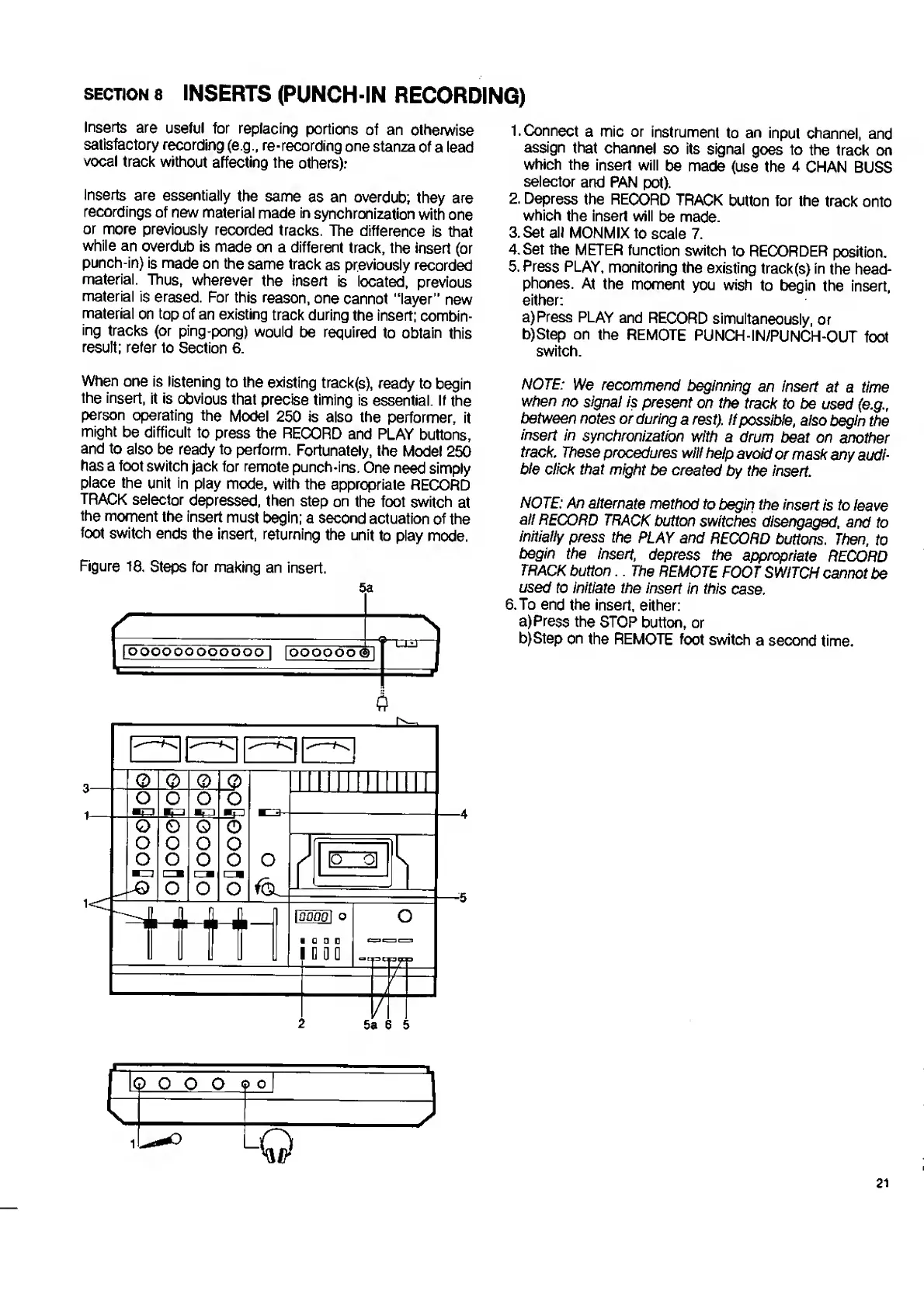
Figure
18,
Steps
for
making
an
insert.
5a
(
|
IOOOOOOOOOOOO
|
IOOOOOO
<3
1
s
-
—-V
NOTE:
We
recommend
beginning
an
insert
at
a
time
when
no
signal
is
present
on
the
track
to
be
used
(e.g.,
between
notes
or
during
a
rest).
If
possible,
also
begin
the
insert
in
synchronization
with
a
drum
beat
on
another
track.
These
procedures
will
help
avoid
or
mask
any
audi¬
ble
click
that
might
be
created
by
the
insert.
NOTE:
An
alternate
method
to
begin
the
insert
is
to
leave
all
RECORD
TRACK
button
switches
disengaged,
and
to
initially
press
the
PLAY
and
RECORD
buttons.
Then,
to
begin
the
insert,
depress
the
appropriate
RECORD
TRACK
button
..
The
REMOTE
FOOT
SWITCH
cannot
be
used
to
initiate
the
insert
in
this
case.
6.
T
o
end
the
insert,
either:
a)
P
ress
the
STOP
button,
or
b)
S
tep
on
the
REMOTE
foot
switch
a
second
time.
21

Related product manuals