EasyManua.ls Logo

Fostex E-2 - Page 11

Fostex E-2
22 pages
Print Icon
To Next Page IconTo Next Page
To Previous Page IconTo Previous Page
Loading...
REOSP/ORG
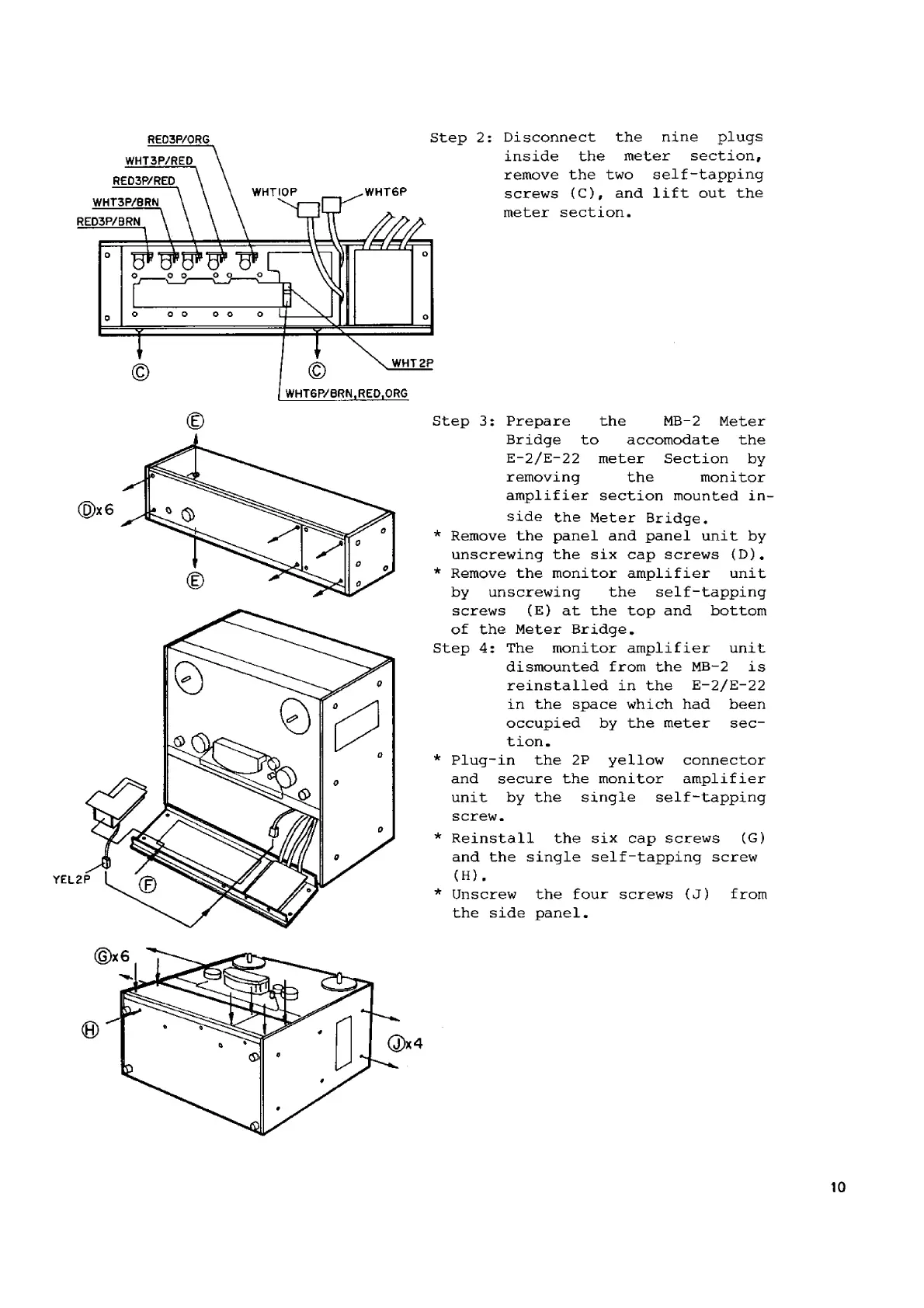
Step
2:
Disconnect
the
nine
plugs
WHT
3P/RED
inside
the
meter
section,
ВЕОЗРУВЕО
remove
the
two
self-tapping
WHTIOP
WHT6P
1
е
WHT3P/BRN
Screws
(с),
and
lift
out
th
meter
section.
RED3P/BRN
Step
3:
Prepare
the
MB-2
Meter
Bridge
to
accomodate
the
E-2/E-22
meter
Section
by
removing
the
monitor
amplifier
section
mounted
in
side
the
Meter
Bridge.
*
Remove
the
panel
and
panel
unit
by
unscrewing
the
six
cap
screws
(D).
*
Remove
the
monitor
amplifier
unit
by
unscrewing
the
self-tapping
screws
(Е)
at
the
top
and
bottom
of
the
Meter
Bridge.
Step
4:
The
monitor
amplifier
unit
dismounted
from
the
MB-2
15
reinstalled
in
the
E-2/E-22
in
the
space
which
had
been
occupied
Бу
the
meter
sec-
tion.
*
Plug-in
the
2P
yellow
connector
and
secure
the
monitor
amplifier
unit
by
the
single
self-tapping
Screw.
(
*
Reinstall
the
six
cap
screws
(С)
and
the
single
self-tapping
screw
(H).
*
Unscrew
the
four
screws
(Ј)
from
the
side
panel.
10

Related product manuals