EasyManua.ls Logo

Fostex E-2 - Transport Tape Motion

Fostex E-2
22 pages
Print Icon
To Next Page IconTo Next Page
To Previous Page IconTo Previous Page
Loading...
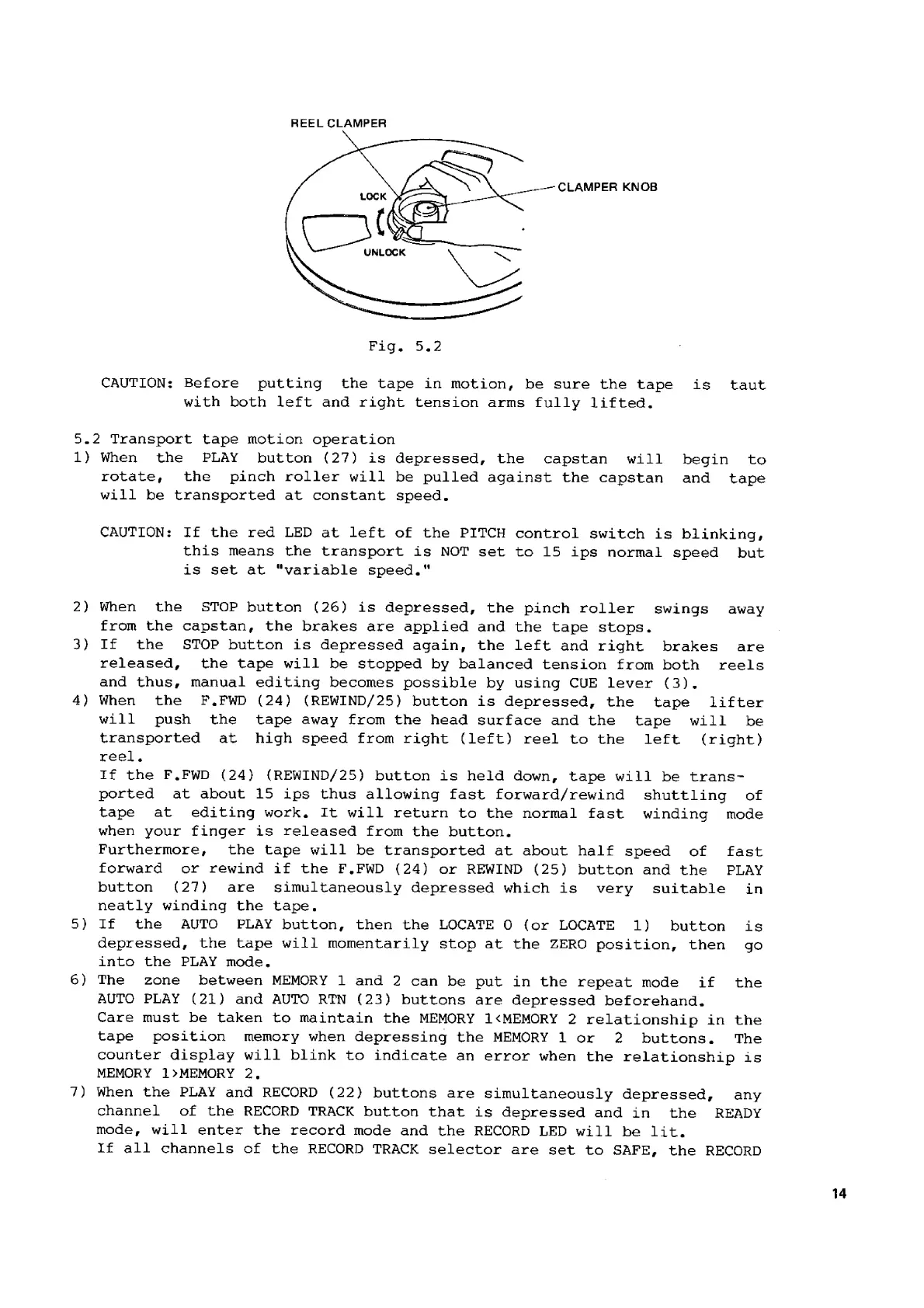
HEEL
CLAMPER
CLAMPER
KNOB
Pig.
5.2
CAUTION:
Before
putting
the
tape
in
motion,
be
sure
the
tape
is
taut
with
both
left
and
right
tension
arms
fully
lifted.
5.2
Transport
tape
motion
operation
1)
2)
3)
4)
5)
6)
7)
When
the
PLAY
button
(27)
is
depressed,
the
capstan
will
begin
to
rotate,
the
pinch
roller
will
be
pulled
against
the
capstan
and
tape
will
be
transported
at
constant
speed.
CAUTION:
If
the
red
LED
at
left
of
the
PITCH
control
switch
is
blinking,
this
means
the
transport
is
NOT
set
to
15
ips
normal
speed
but
is
set
at
“variable
speed."
When
the
STOP
button
(26)
is
depressed,
the
pinch
roller
swings
away
from
the
capstan,
the
brakes
are
applied
and
the
tape
stops.
If
the
STOP
button
is
depressed
again,
the
left
and
right
brakes
are
released,
the
tape
will
be
stopped
by
balanced
tension
from
both
reels
and
thus,
manual
editing
becomes
possible
by
using
CUE
lever
(3).
When
the
F.FWD
(24)
(REWIND/25)
button
is
depressed,
the
tape
lifter
will
push
the
tape
away
from
the
head
surface
and
the
tape
will
be
transported
at
high
speed
from
right
(left)
reel
to
the
left
(right)
reel.
If
the
F.FWD
(24)
(REWIND/25)
button
is
held
down,
tape
will
be
trans-
ported
at
about
15
ips
thus
allowing
fast
forward/rewind
shuttling
of
tape
at
editing
work.
It
will
return
to
the
normal
fast
winding
mode
when
your
finger
is
released
from
the
button,
Furthermore,
the
tape
will
be
transported
at
about
half
speed
of
fast
forward
or
rewind
if
the
F.FWD
(24)
or
REWIND
(25)
button
and
the
PLAY
button
(27)
are
simultaneously
depressed
which
is
very
suitable
in
neatly
winding
the
tape,
If
the
AUTO
PLAY
button,
then
the
LOCATE
O
(ог
LOCATE
1)
button
is
depressed,
the
tape
will
momentarily
stop
at
the
ZERO
position,
then
go
into
the
PLAY
mode.
The
zone
between
MEMORY
1
and
2
can
be
put
in
the
repeat
mode
if
the
AUTO
PLAY
(21)
and
AUTO
RTN
(23)
buttons
are
depressed
beforehand.
Care
must
be
taken
to
maintain
the
MEMORY
1<MEMORY
2
relationship
in
the
tape
position
memory
when
depressing
the
MEMORY
1
or
2
buttons.
The
counter
display
will
blink
to
indicate
an
error
when
the
relationship
is
MEMORY
1
>
МЕМОКУ
2.
When
the
PLAY
and
RECORD
(22)
buttons
are
simultaneously
depressed,
any
channel
of
the
RECORD
TRACK
button
that
is
depressed
and
in
the
READY
mode,
will
enter
the
record
mode
and
the
RECORD
LED
will
be
lit.
If
all
channels
of
the
RECORD
TRACK
selector
are
set
to
SAFE,
the
RECORD
14

Related product manuals