8
Preparation
MENU
INPUT
SEL
MUTE
REC
RC-N1
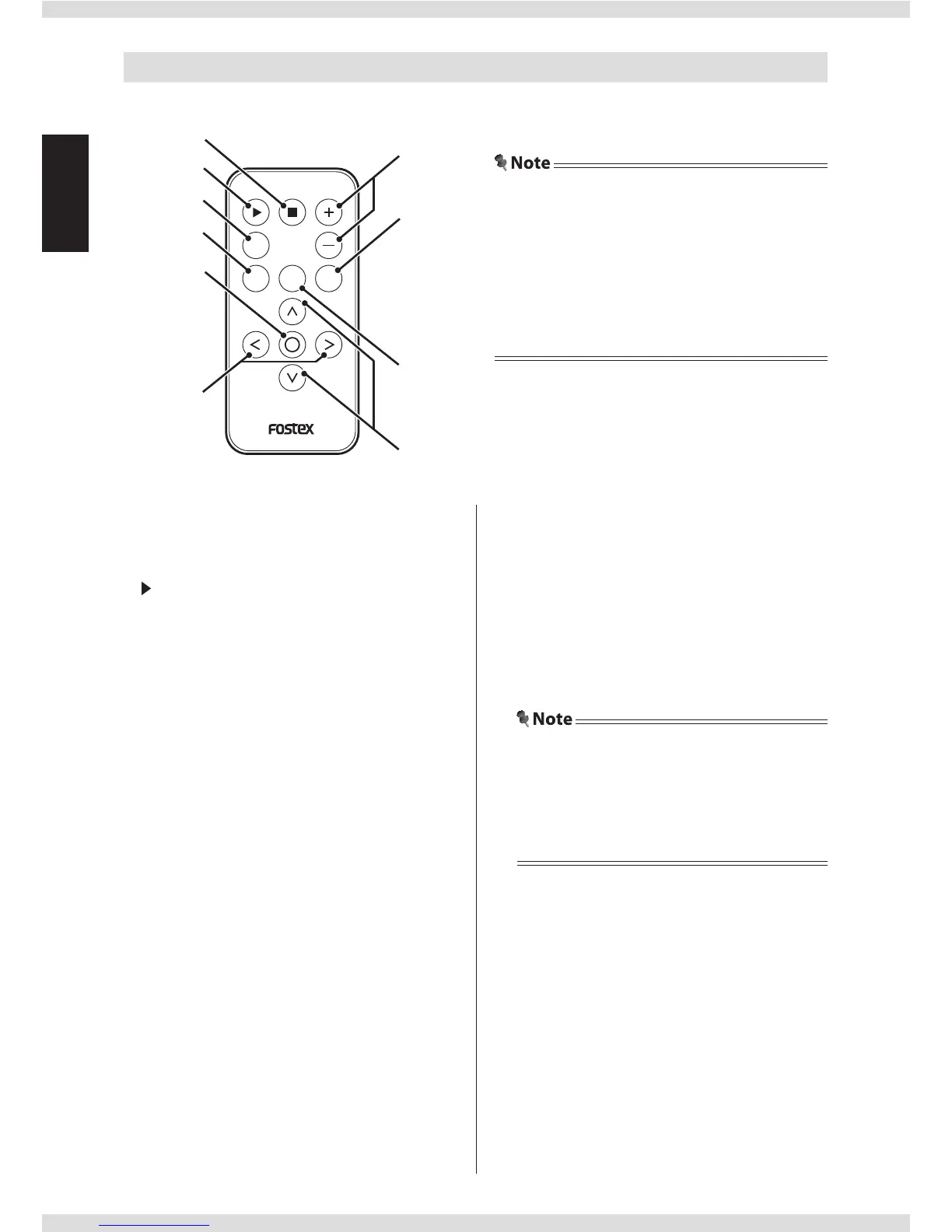
Remote controller
key
Playback stops when the input source is set
to SD (SDHC) card ("SD").
key
Playback starts when the input source is set
to SD (SDHC) card ("SD").
REC key
Not used.
MENU key
Menu screen is displayed. Press again to
exit the menu.
key
Unmounts the SD card.
In the menu screen, selects the displayed
menu item.
</> keys
Selects the previous/next le when the
input source is set to SD (SDHC) card ("SD").
In the menu screen, switches the menu
item or the setting value.
+/− keys
Adjusts the volume of the headphones or
the analog output. It has the same function
as the volume knob of the main unit.
MUTE key
Mutes the sound of the headphones or the
analog output temporarily. Press again to
return the sound.
• Mute is cancelled when you change the
volume.
• You cannot mute the analog output sound
when the "DIRECT" setting is set to "ON"
(page 14).
INPUT SEL key
Switches the input source (page 11). It has
the same function as the input sel knob of
the main unit.
<
/
<
keys
Selects the previous/next folder when the
input source is set to SD (SDHC) card ("SD").
• The included battery is for checking operation.
Replace it as soon as possible.
• Read "Safety information for Fostex product
using electricity" (attached sheet) and handle the
battery correctly.
• Dispose of the battery in the proper manner
according to the local regulations.


 To Next Page