9
Model VM88 Owner’s Manual
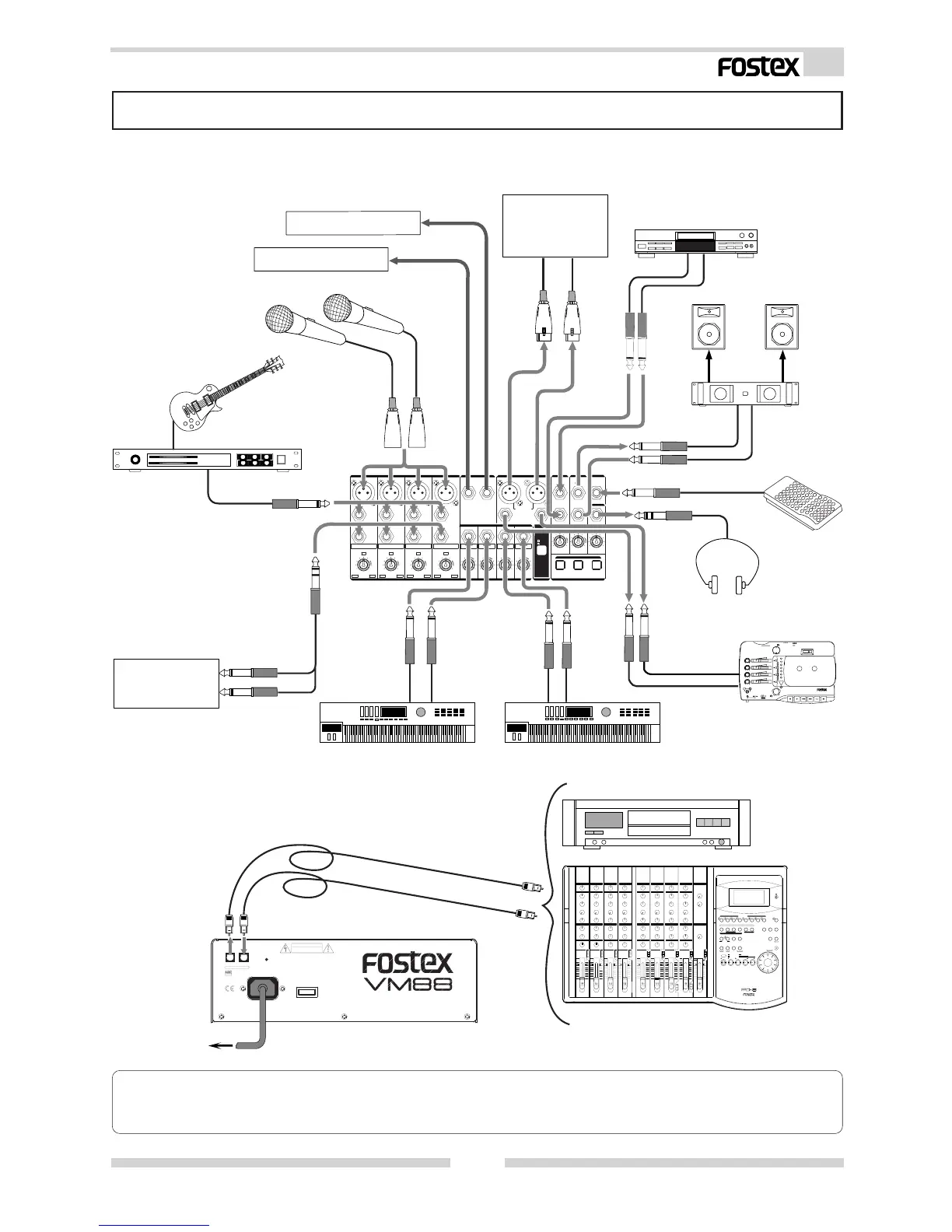
Peripheral Equipment Connection
Sound sources and external equipment shown in the examples below can be connected to the VM88’s
input and output connectors. When connecting external equipment to the in/out connectors, be
sure to switch off power to the VM88.
<Please remember!>
If external digital equipment to be connected is provided with only COAXIAL (RCA pin jack) type IN/
OUT connectors, use the optional Fostex COP-1/96k optical-coaxial converting adaptor sold separately.
2:HOT2:HOT
2:HOT
2:HOT
MICMIC
[dB][dB]
GAIN
GAINGAIN
GAIN
OFF
ON
UNBAL/-10dBVUNBAL/-10dBV
R
L
BAL/+4dBu
R
MAXMAXMINMIN
-∞
+6+6
[dB][dB]
+6+6
-∞
AUX 2AUX 1ST
RR
L (MONO) (MONO)L (MONO) (MONO)
21
[dBu][dBu]
+4+4 -40-40
[dBu][dBu]
+4+4 -40-40
[dBu][dBu]
+4+4 -40-40
[dBu][dBu]
+4+4 -40-40
8
765
[dBu][dBu]-10-10
+10+10
-50-50
-30-30
[dBu][dBu]-10-10
+10+10
-50-50
-30-30
[dBu][dBu]
-10-10
+10+10
-50-50
-30-30
MICMIC
LINELINE
MICMIC
LINELINE
MICMIC
LINELINE
INSERT
INSERTINSERT
LINELINELINELINE
[dBu][dBu]-10-10
+10+10
-50-50
-30-30
MICMIC
LINELINE
INSERT
LINE
MICMIC
4
3
2
1
2:HOT
MICMIC
2:HOT
MICMIC
AUX SENDAUX SEND
STST OUT OUT
MON INMON IN MON OUTMON OUT
FOOTFOOT SW SW
PHONESPHONES
STST OUT OUT
MON SELMON SEL
MONITMONITOROR
TRIMTRIM
INPUTINPUT
INPUTINPUT
2:HOT
L
Guitar & Guitar Processor
Compressor/Limitter
Amplifier
Monitor Speaker System
CD Player
External Equipment
X-14
multitracker
Keyboard
Keyboard
Multitracker
Headphones
Foot Switch
Microphones
External Equipment
Other Mixing Console
or Amplifier
RESETRESET
AC INAC IN
POWERPOWER
CAUTIONCAUTION
ININOUTOUT
DIGITDIGITALAL
OPTICALOPTICAL
Digital Master Recorder
AC outlet
DIGITAL MULTITRACKER
FD-8



 To Next Page