
 Need help?
Do you have a question about the Fotric 326 and is the answer not in the manual?
Details warranty service, terms, and conditions for FOTRIC thermal imagers.
FOTRIC reserves the right to collect anonymous usage statistics for product improvement.
Covers reproduction rights for software and documentation, and trademarks.
Highlights ISO 9001 certification and commitment to continuous development.
Lists export-controlled products and restrictions on use in certain countries.
Defines warning, caution, and notice symbols for user guidance and safety.
Advises on class A product interference and battery safety precautions.
Instructions on handling battery fluid and avoiding direct laser beam exposure.
Cautionary notes on thermal sensor sensitivity, device handling, and storage conditions.
Advises on operating temperature limits and data backup to prevent loss.
Prohibits unauthorized modification and outlines FCC compliance statement.
Explains the necessary warm-up time for accurate measurements and factory calibration.
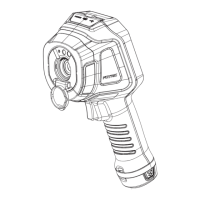
Identifies buttons and indicators on the front of the thermal imager.
Identifies ports and features on the rear of the thermal imager.
Identifies interfaces on the top of the thermal imager.
Identifies the focus ring and notes its availability for specific models.
Explains the function of the laser pointer and how to activate it.
Details the laser warning label and relevant safety rules and compliance.
Lists power adapter, battery, charging dock, and power supply specifications.
Mentions USB cables as an accessory for the device.
Details HDMI cable specifications and the use of anti-interference magnetic rings.
Explains the components of the main interface display: Status Bar, Measurement Result, Palette, etc.
Details the system menu options: Temperature scale, Parameters, Image mode, Measurement tools.
Explains Palette options and Settings for capture, connection, and device configuration.
Describes how to view, favorite, tag, analyze, and delete images and videos.
Details settings for Capture Mode, Connection, Temperature Range, and Device Set.
Step-by-step instructions for initial setup, including battery, TF card, and operation.
Guides on downloading, installing, and using the AnalyzlR PC software for analysis.
Provides advice on focal length adjustment, resolution limits, and measurement techniques.
Lists specifications for power, temperature, safety, vibration, shock, EMC, drop, and enclosure rating.
Details Wi-Fi transmission performance metrics for different bands and rates.
Details Wi-Fi reception performance metrics for different bands and rates.
Provides website links for downloading user manuals and operation videos.
Provides website link for downloading the AnalyzlR PC software and its user manuals.
Provides a table of emissivity values for various materials and conditions.
Details FCC Declaration of Conformity, RF exposure, and device compliance statements.
 General
| Battery Life | 4 hours |
|---|---|
| Spatial Resolution (IFOV) | 1.36 mrad |
| Focus | Manual |
| Display | 3.5" LCD |
| Spectral Range | 8-14 μm |
| Operating Temperature | -15°C to 50°C |
| Storage Temperature | -40°C to 70°C |
| File Format | JPEG |
| Battery Type | Rechargeable Li-ion |

 To Next Page