Chapter 3 BIOS Description
28
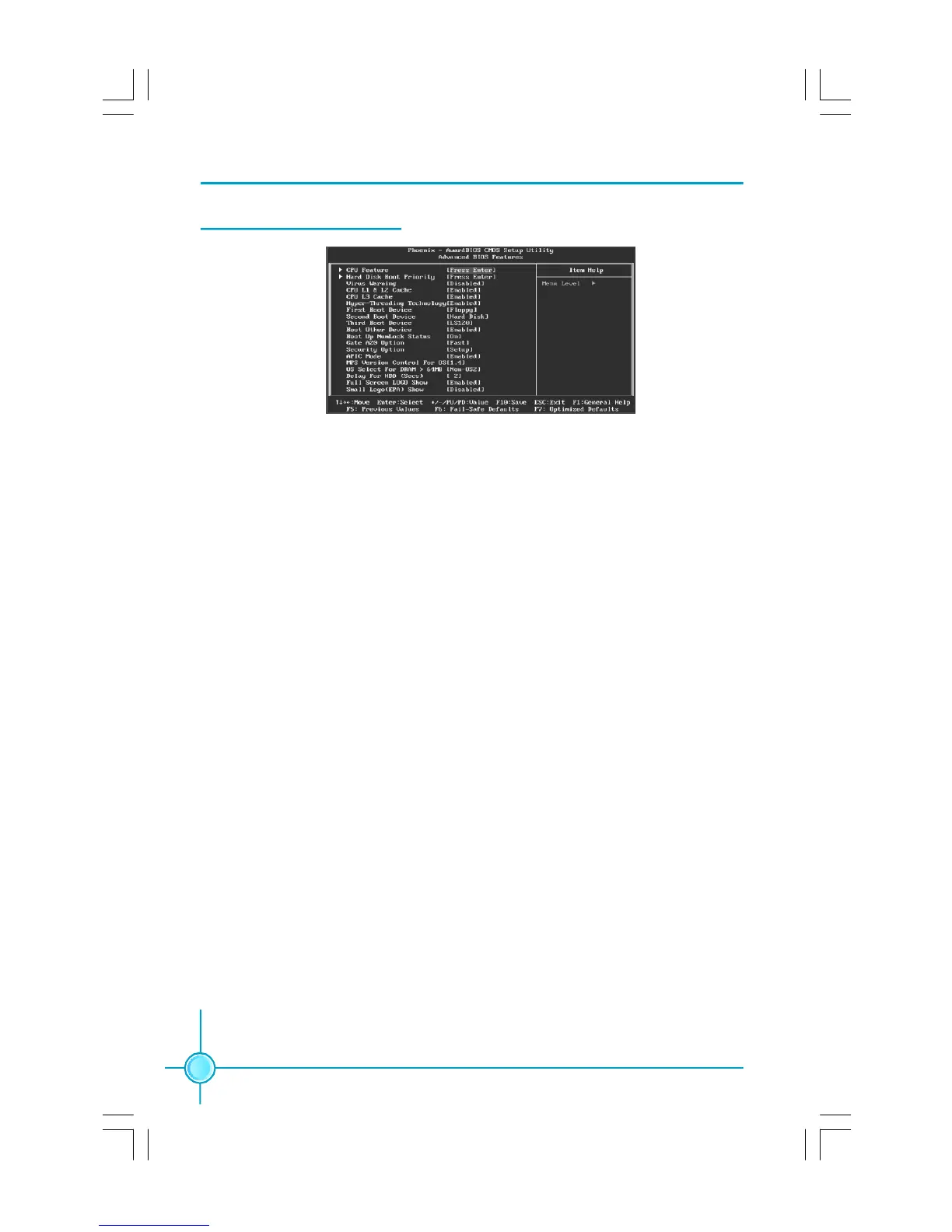
Advanced BIOS Features
vCPU Feature
Press enter to set the items of CPU feature.
vHard Disk Boot Priority
This option is used to select the priority for HDD startup. After pressing
<Enter>, you can select the HDD using the <PageUp>/<PageDn> or Up/
Down arrow keys, and change the HDD priority using <+> or <->; you can
exit this menu by pressing <Esc>.
vCPU L1 $ L2 Cache
This option allows you to turn on or off the L1 and L2 CPU Cache.
vHyper-Threading Technology
This option is used to turn on or off the Hyper-Threading function of the CPU.
Note: This function will not be displayed until a CPU that supports Hyper-
Threading has been installed.
vFirst/Second/Third Boot Device
This option allows you to set the boot device’s sequence.
vBoot Other Device
With this function set to enable, the system will boot from some other de-
vices if the first/second/third boot devices failed. The setting values are: Dis-
abled and Enabled.
vBoot Up NumLock Status
This item defines if the keyboard Num Lock key is active when your system is
started. The available setting values are: On and Off.
Advanced BIOS Features Menu
PDF 文件使用 "pdfFactory" 试用版本创建 Æ Æ www.fineprint.com.cn









 To Next Page