
 Need help?
Do you have a question about the Foxconn H61MX Series and is the answer not in the manual?
Covers manual statements, trademarks, version, symbol explanations, and additional information sources.
Details compliance with European CE standards and relevant directives.
Outlines compliance with FCC rules and operational conditions.
Provides critical warnings about electrostatic discharge and power supply handling during installation.
Offers general advice and precautions for installing components and connecting cables.
Lists support websites, contact information, and compatibility lists for CPU, Memory, and VGA.
Details core components like CPU, Chipset, Memory, Expansion Slots, Storage, LAN, Audio, and USB.
Covers back panel connectors, hardware monitor, PCI Express, Green Function, and bundled software.
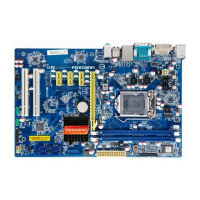
Visual guide showing component locations and detailed descriptions of back panel connectors.
Step-by-step guide for installing the CPU and its cooler, including precautions.
Instructions for installing RAM modules, including dual-channel configuration.
Guidance on installing expansion cards and connecting internal motherboard headers.
Explains jumper functions, including Clear CMOS, and the Intel ME jumper.
Instructions on how to enter BIOS setup and an overview of menu navigation.
Details the 'Main' BIOS screen, including System Date, Time, Access Level, Model Name, BIOS Version, Halt On, CPU Brand Name, Total Memory, and MAC Address.
Overview of F-Center options like Super BIOS Protect, Smart BIOS, and Fox Intelligent Stepping.
Explains Intel AES-NI, Intel XD Bit, CPUID Maximum, Virtualization Technology, CPU C-states, and Hyper-Threading.
Covers CPU Configuration, North Bridge Configuration, and EIST (Intel SpeedStep).
Explains CAS Latency (tCL), tRP, tRCD, tRAS, tWR, tRFC, tWTR, tRRD, tRTP, and tFAW.
Introduces North Bridge/ME Subsystem/Onboard Device/SATA/Trusted Computing/Super IO configurations.
Covers Onboard LAN Controller, PXE OPROM, USB Controller, Legacy USB Support, and Azalia HD Audio.
Explains SATA Configuration (Mode), TPM Support, and Serial/Parallel Port configurations.
Covers bootup numlock state, quiet boot, interrupt 19 capture, and boot device priorities.
Explains ACPI sleep states, wake-up sources, energy-using products, and restore AC power loss.
Covers CPU and system temperatures, fan speeds, voltages, and warning/shutdown settings.
Details administrator/user password setup and HDD boot sector write protection.
Options for saving changes, discarding changes, restoring defaults, and boot override.
Guide for installing drivers and utilities from the provided DVD.
Introduction to FOX ONE utility for system monitoring, tuning, and fan control.
Utility for backing up and updating BIOS, drivers, and utilities locally or online.
Utility for backup, change, and delete boot time logo.
Desktop Management Interface viewer for system analysis and troubleshooting.
Description of the Smart Charger feature for iPad recharging.
 General
| Form Factor | Micro ATX |
|---|---|
| Chipset | Intel H61 |
| Socket | LGA 1155 |
| Memory Slots | 2 |
| Memory Type | DDR3 |
| Maximum Memory | 16 GB |
| PCI Express x16 | 1 |
| SATA Ports | 4 x SATA 3Gb/s |
| Audio | Realtek ALC662 |
| LAN | Realtek RTL8111E |
| Expansion Slots | 1 x PCI Express x1, 1 x PCI |
| Video Outputs | VGA, DVI |











 To Next Page