11
5. Installation
5.1 Check for Physical Damage
Make sure the inverter is intact during transportation. If there is any visible damage, such as cracks,
please contact your dealer immediately.
5.2 Packing List
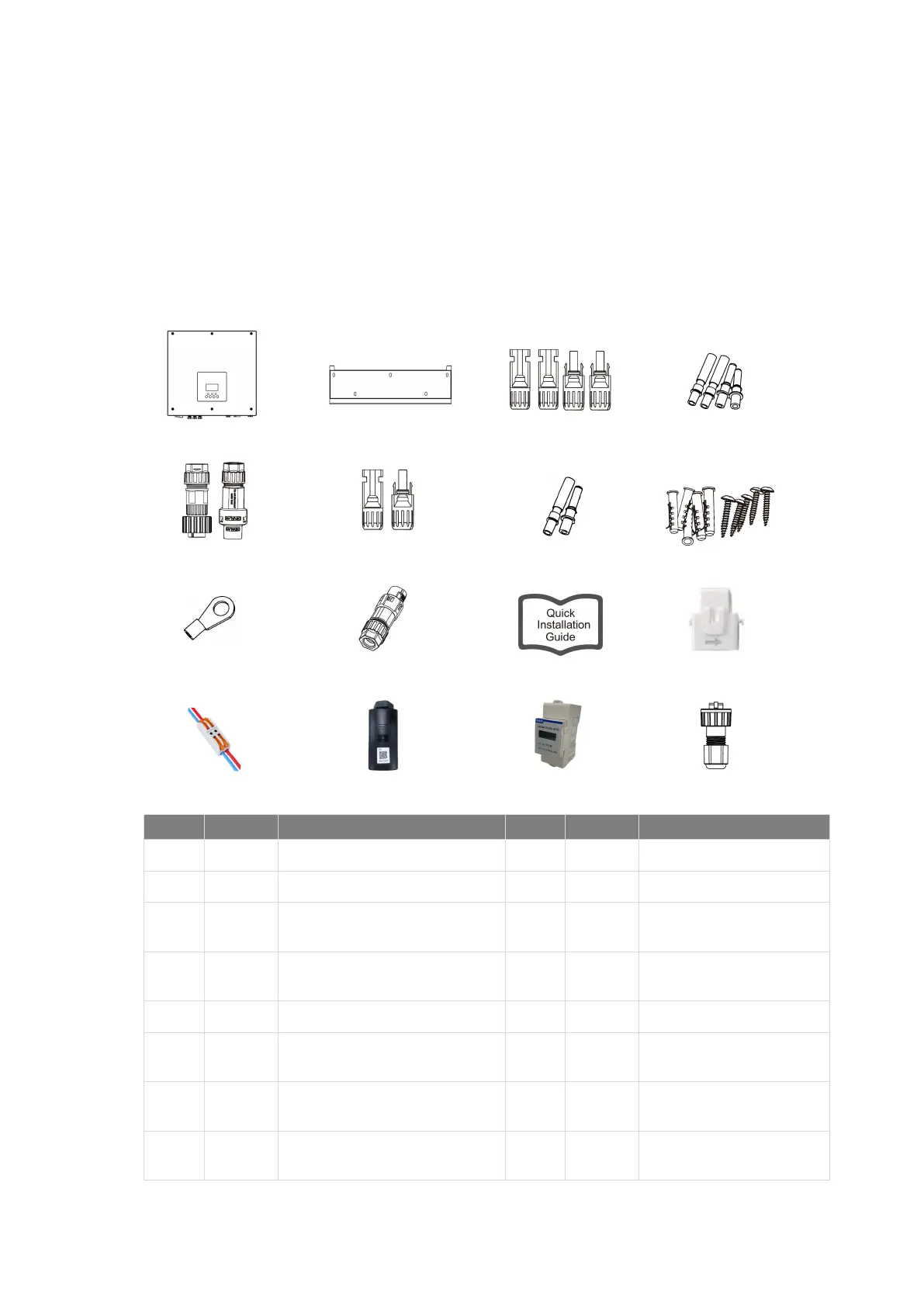
Open the package and take out the product, please check the accessories first. The packing list shown
as below.
A B C D
I J K L
E F G H
M N O P
Object Quantity Description Object Quantity Description
A 1 Inverter I 1 Earth terminal
B 1 Bracket J 1 Communication connector
C 4
PV connectors (for hybrid only)
(2*positive, 2*negative)
K 1 Quick installation guide
D 4
PV pin contacts (for hybrid only)
(2*positive, 2*negative)
L 1 CT (with 10m cable)
E 2 AC connectors M 1 CT extension connector
F 2
Battery connectors
(1*positive, 1*negative)
N 1 WiFi/LAN/4G (Optional)
G 2
Battery pin contacts
(1*positive, 1*negative)
O 1 Meter (Optional)
H 5
Expansion tubes&
Expansion screws
P 1 RJ45



 To Next Page