Displays either stand timer or real-time clock. When an alarm is
indicated, the background will blink red.
4-5 Accessing XWave Remote Configuration Menu
From the sounds screen, push the “Back/Menu” button a single time. This will get the XWave
configuration menu to appear. There are a total of five elements that will appear on this menu:
FOX FEATURES, Sound Settings, Display/Power, Date/Time(r), and TX1000 Settings. Each of
these items is displayed below with all possible values.
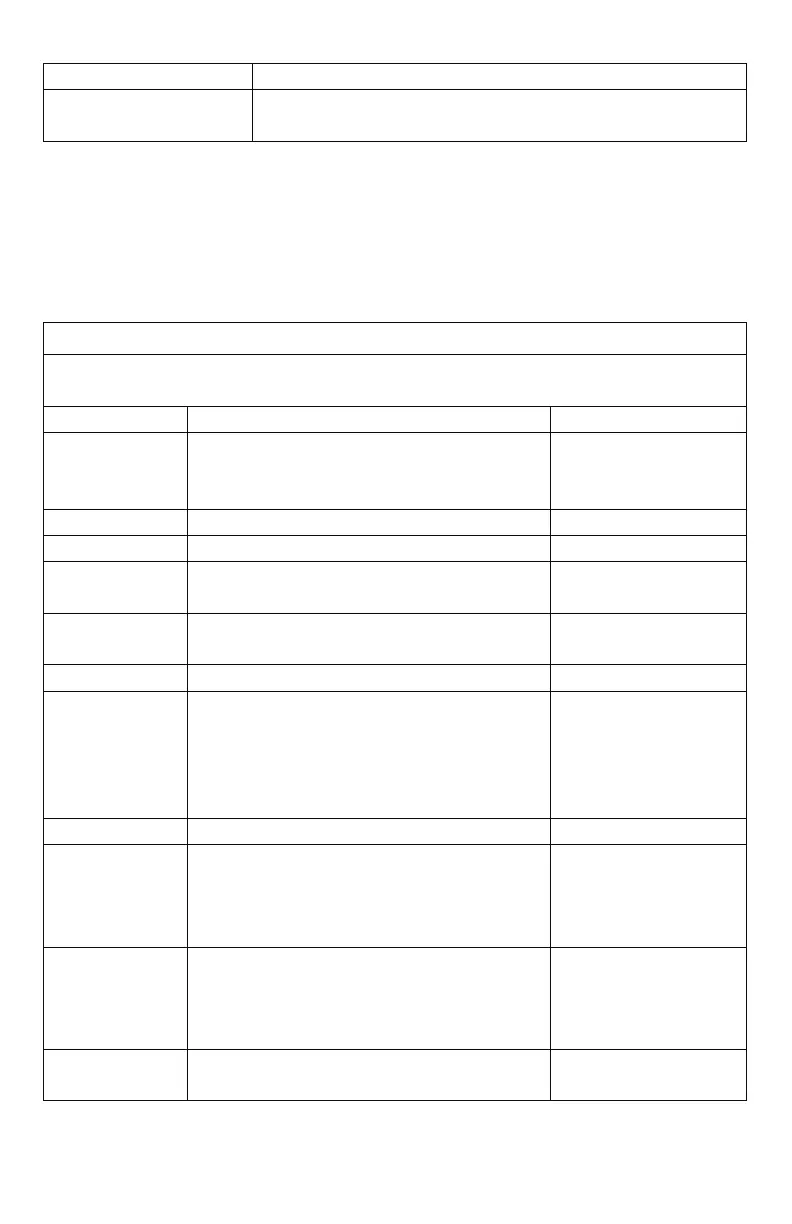
This menu item provides access to turning FOX FEATURES on or off and their respective
configurations.
Off, Mute, Aux, Preset
5, Preset 4, Preset 3,
Preset 2, Preset 1
Sets FOXBANG sensitivity.
Turns FOXMOTION on or off.
Sets the desired rate for speed of
FOXMOTION.
Turns FOXPITCH on or off and sets the pitch
adjustment level.
-9 through -1, off, 1
through 9
Turns auto volume on or off
Allows for assigning a function to the USER
button.
Theme, FOXBANG,
Preset 5, FOXMOTION,
Auto Volume, Time(r)
Toggle, Timer Reset,
Backlight
Assign FoxGrip button 1 Feature.
Preset 1, Preset 2,
Preset 3, Preset 4,
Preset 5, Aux, Mute,
FoxData
Assign FoxGrip button 2 Feature.
Preset 1, Preset 2,
Preset 3, Preset 4,
Preset 5, Aux, Mute,
FoxData
Displays the FoxGrip unit identification
number.



 To Next Page