EasyManua.ls Logo

Foxpro XWave - Xwave Remote: First Glance

Foxpro XWave
64 pages
Print Icon
To Next Page IconTo Next Page
To Previous Page IconTo Previous Page
Loading...
11
1-5 XWave Remote: First Glance
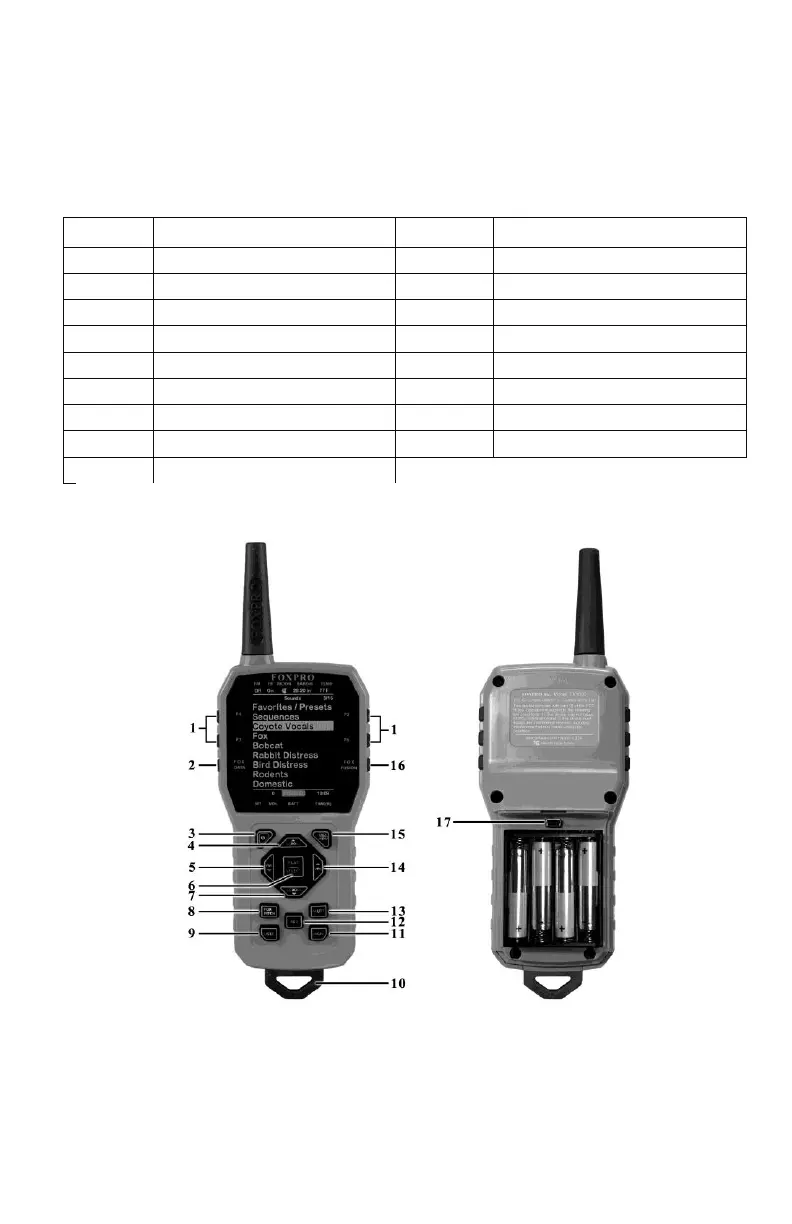
The following chart corresponds to a graphic on the next page that depicts the XWave remote.
Certain aspects of the XWave remote will be marked with a number which corresponds to the
chart defining that particular element.
Number
Description
Number
Description
1
Quick access preset buttons
10
Lanyard loop
2
FOXDATA button
11
Recall button
3
Power on/off button
12
Auxiliary button
4
Scroll up button
13
Mute button
5
Volume down button
14
Volume up button
6
Play / select button
15
Back / menu button
7
Scroll down button
16
FOXFUSION button
8
FOXPITCH
17
Mini USB Port
9
USER button
Figure 1-2 XWave Remote Control

Table of Contents

Related product manuals