7
EN
OPTIONS AND FUNCTIONS
OPTIONS can be selected directly by pressing the corresponding button (see CONTROL PANEL). If an option is not compatible with the selected
program see PROGRAMS TABLE, the corresponding LED ashes rapidly 3 times and beeps will sound. The option will not be enabled.
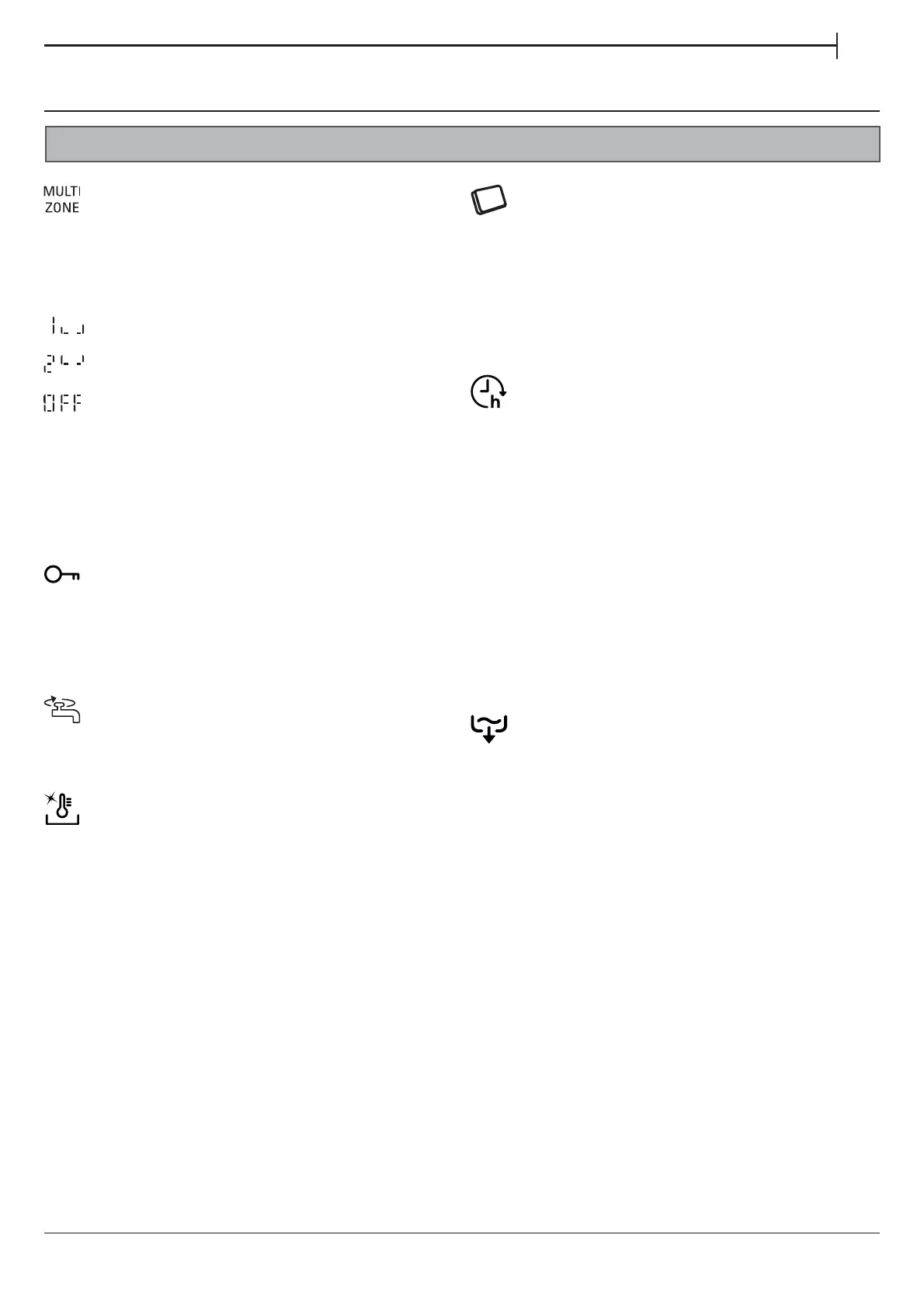
MULTIZONE
If there are not many dishes to be washed, a half loading may
be used in order to save water, electricity and detergent.
Select the program and then press the MULTIZONE button: the indicator
over the button lights up and the symbol of the chosen rack will appear
on the display. By default the appliance washes dishes in all racks.
To wash only the specic rack, press this button repeatedly:
shown on the display (only lower rack)
shown on the display (only upper rack)
shown on the display (option is OFF and the appliance will wash
dishes in all racks).
Remember to load the upper or lower rack only, and to reduce
the amount of detergent accordingly.
If upper rack is removed, please apply detergent directly to tub
instead of detergent dispenser.
. . . . . . . . . . . . . . . . . . . . . . . . . . . . . . . . . . . . . . . . . . . . . . . . . . . . . . . . . . . . . . . . . . . . . . . . .
DELAY
The start of the program may be delayed for a period of time
between 0:30 and 24 hours.
1. Select the program and any desired options. Press the DELAY
button (repeatedly) to delay the start of the program. Adjustable
from 0:30 to 24 hours. With each press of the button, the delay start
increases
by: 0:30 if selection below 4 hours, 1:00 if selection is below
12 hours,
4 hours if selection is above 12 hours. If 24 hours reached,
and the button is pressed, the delayed start is deactivated.
2. Press the START/PAUSE button: the timer will begin counting down;
3. Once this time has elapsed, the indicator light switches o
and the program begins automatically.
If at the time of the countdown the START/PAUSE button is pressed
again the DELAY option is cancelled and the selected program starts
automatically.
The DELAY function cannot be set once a program has been started.
TAB
This setting allows you to optimize the performance of the program
according to the type of detergent used.
Press the SANI RINSE button for 3 seconds (the corresponding symbol
will light up) if you use combined detergents in tablet form (rinse aid,
salt and detergent in 1 dose).
If you use powder or liquid detergent, this option should be o.
. . . . . . . . . . . . . . . . . . . . . . . . . . . . . . . . . . . . . . . . . . . . . . . . . . . . . . . . . . . . . . . . . . . . . . . . .
SANI RINSE
This option can be used to sanitize washed dishes.
It will increase nal rinse temperature and add antibacterial wash
to the selected program.
Select the washing program, press the SANI RINSE button; the indicator
light will light up. To deselect the option, press the same button again.
Ideal to clean crockery and feeding bottles. The dishwasher door must
be kept shut for the entire duration of the program in order to guarantee
reduction of germs. If the door is opened the indicator lamp starts
ashing.
WARNING: the crockery and plates could be extremely hot at the end
of the cycle.
. . . . . . . . . . . . . . . . . . . . . . . . . . . . . . . . . . . . . . . . . . . . . . . . . . . . . . . . . . . . . . . . . . . . . . . . .
CoolDry
CoolDry is a convection drying system which automatically opens
the door during/after drying phase to ensure exceptional drying
performance every day. Door opens at the temperature that is safe
to your kitchen furniture, thus door will not be opened when the option
of SANI RINSE is on.
As additional steam protection, special designed protection foil is added
together with the dishwasher (depending on the model type - can
be the need to buy it). To see how to mount protection foil please refer
to (INSTALLATION GUIDE).
CoolDry functionality could be disabled by the user as follows:
• To DISABLE: Switch On, then switch O the machine. Keep the P
button pressed for 5 sec., at the end of 5 sec the dishwasher plays
a short beep. Switch On the machine, the display shows „oOF”.
• To ENABLE: Switch On, then switch O the machine. Keep the P
button pressed for 5 sec., at the end of 5 sec the dishwasher plays
a short beep. Switch On the machine, the display shows „oOn”.
. . . . . . . . . . . . . . . . . . . . . . . . . . . . . . . . . . . . . . . . . . . . . . . . . . . . . . . . . . . . . . . . . . . . . . . . .
KEYLOCK
A long press (for 3 seconds) of MULTIZONE button, will activate
the KEYLOCK function. The KEYLOCK function will block the control panel
except the ON/OFF button. To deactivate the KEYLOCK, long press again.
. . . . . . . . . . . . . . . . . . . . . . . . . . . . . . . . . . . . . . . . . . . . . . . . . . . . . . . . . . . . . . . . . . . . . . . . .
WATER TAP CLOSED – Alarm
Flashes when there is no inlet water or water tap is closed.
. . . . . . . . . . . . . . . . . . . . . . . . . . . . . . . . . . . . . . . . . . . . . . . . . . . . . . . . . . . . . . . . . . . . . . . . .
DRAIN OUT
To stop and cancel the active cycle, the DRAIN OUT function can
be used. A long press of START/PAUSE button, will activate the DRAIN
OUT function. The active program will be stopped and the water
in the dishwasher will be drained out.


 To Next Page
 Loading...