CHAPTER IV
Driving
Driving the Freego 2-wheel self-balance vehicle is totally different from
anything you may have driven before. Freego does not have brakes,
accelerator or gear system. Please read the user manual or get instruction
from an experienced person before your first ride.
Freego is very addictive once you enjoy the fun of driving, you can’t help
yourself driving it whenever you get the chance, following these instructions
will be beneficial for your enjoyment.
1. Standing on Freego
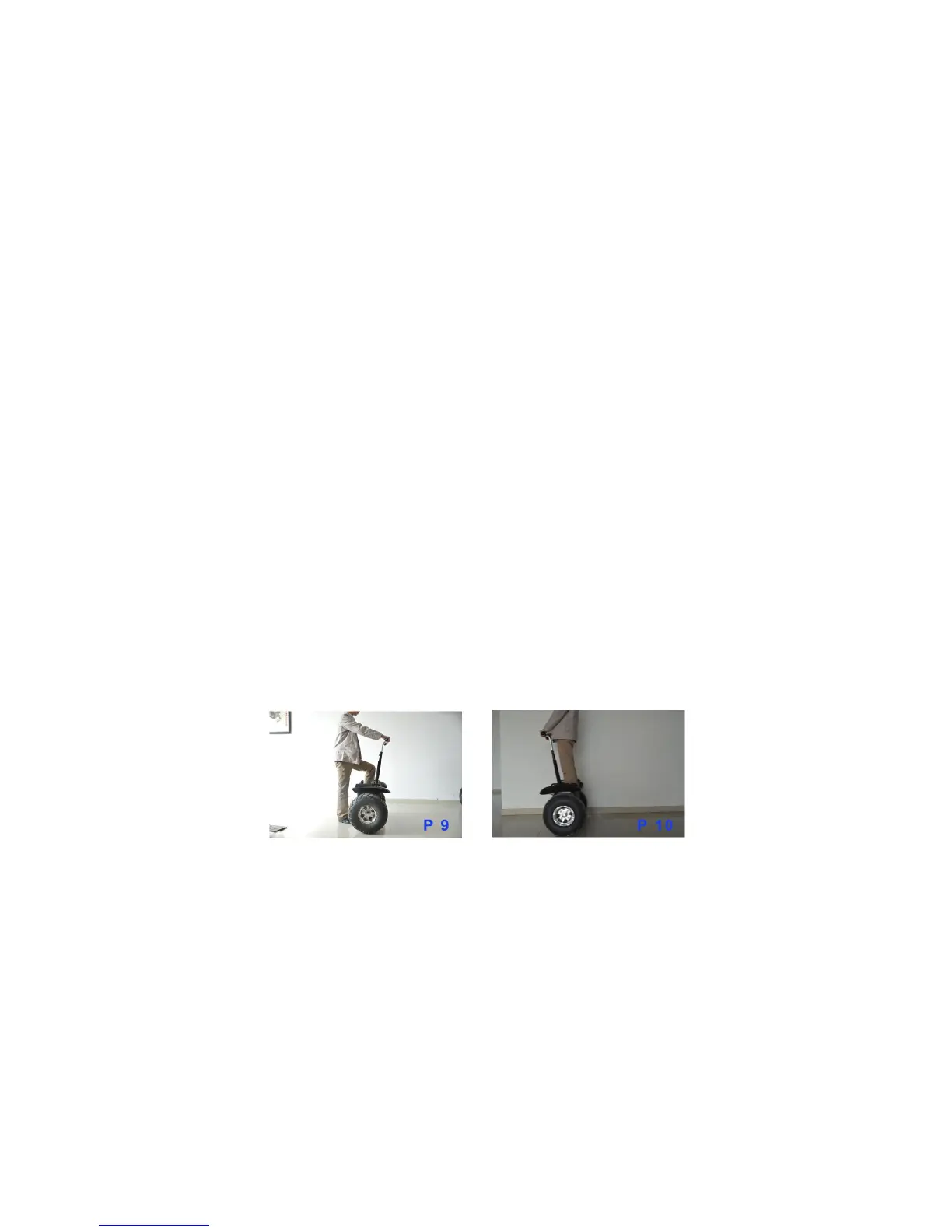
After switching on, hold the handlebar with your left hand while stepping
onto the pedal with your right foot (refer to picture 9); or hold the handlebar
with your right hand, while stepping onto the pedal with left foot. When you
press down the pedal switch, Freego will start computer balance, and you
will feel very secure. The order is the left hand is to the right foot or the
right hand is to the left foot. By this time you will have stood on the
balanced scooter. Stand upright without any action, just relax and keep your
balance, Freego will maintain stop in its original place (refer to picture 10)
Picture 9 Picture 10
2. Driving straight forward
Lean your body forward slowly using the centre of gravity, this will make
the Freego move forward (refer to picture 11). The driving speed is
controlled by the leaning angle of your body the more you lean the faster
you will go, the less the slower. For stable driving, we suggest leaning


 To Next Page