X
Use the u or t button to scroll to ä
settings.
X
Use the r or s button to scroll to the
SystemsSystems menu window.
X
Press the 9 button.
X
Use the r or s button to select
Sideguard AssistSideguard Assist.
X
Press the u button to deactivate.
The gray
indicator lamp lights up in
the AssistanceAssistance menu window of the on-
board computer.
Levelcontrol
Important safety notes
G
WARNING
When you drive with the chassis lowered or
raised, the vehicle's braking and driving
characteristics can be significantly impaired.
You could also exceed the permissiblevehi-
cle height if the chassis is raised. There is a
risk of an accident.
Adjust the vehicle level before pulling away.
Observe the applicable legal requirements for
each individual country for the permissible
vehicle height.
You must raise/lower the chassis frame to
pick up/set down demountable bodies.
If you continue ajourney after having changed
the chassis height, it is necessary to lower/
raise the chassis frame to driving level.
If the yellow ¸ indicator lamp in the instru-
ment cluster lights up, the chassis is not at
driving level or the level control is malfunction-
ing. Observe the additional information in the
event window.
When loading/unloading the vehicle with the
ignition switched off, observe the information
in the "Loading and unloading the vehicle
when the ignition is switched off" section
(Y page 142).
Activating/deactivating the control
panel
!
When securing the control panel in the
holder or behind the driver's seat, take care
that the connecting cable doe not:
R
become trapped in the driver's door or
R
become trapped by the driver's seat.
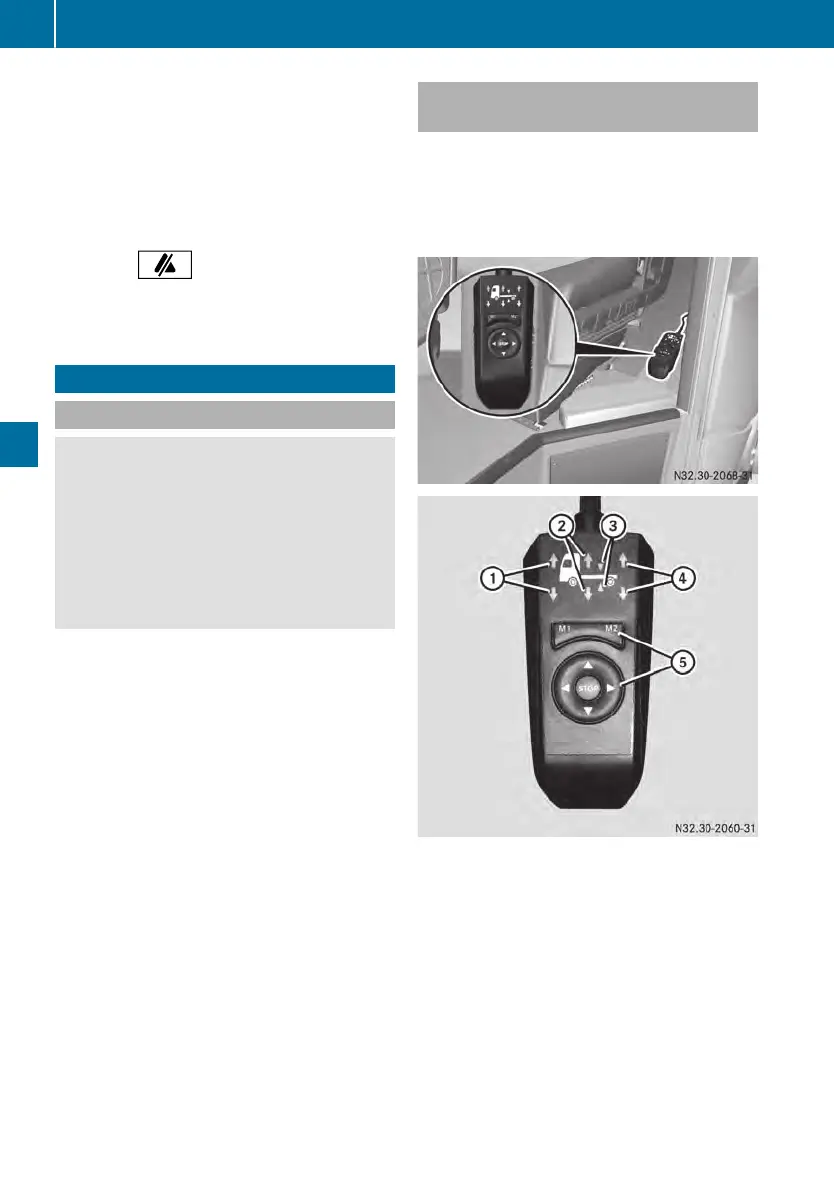
Example: control panel for fully air-sprung vehi-
cles
:
Preselection: to raise/lower the front
axle
;
Preselection: to raise/lower the entire
vehicle
=
Preselection: to set the driving level
?
Preselection: to raise/lower the rear
axle
A
Buttons
u
To activate the control panel, make a
preselection for the front/rear axle,
entire vehicle or driving level
140
Levelcontrol
Driving mode












 To Next Page