Monitoring
info ãã
(YY page 80)
Reserve pres‐Reserve pres‐
suresure
Displays the reservoir
pressure in brake circuits
\ and ^
CoolantCoolant
Displays the coolant tem-
perature
EngineEngine
Displays the engine oil
level and engine operat-
ing hours
EventsEvents
Displays events
DiagnosisDiagnosis
Displays diagnostics data
Settings ää
(YY page 81)
MenuMenu
Sets the units system
(displayofe.g. †or‡)
LightingLighting
R
Adjusts the brightness
of the instrument light-
ing and the audio dis-
playlighting
R
Sets/switches off the
exterior lighting
delayed switch-off
LanguageLanguage
Sets the display language
Service prod‐Service prod‐
uctsucts
Displays/sets service
product values
Trip data menu
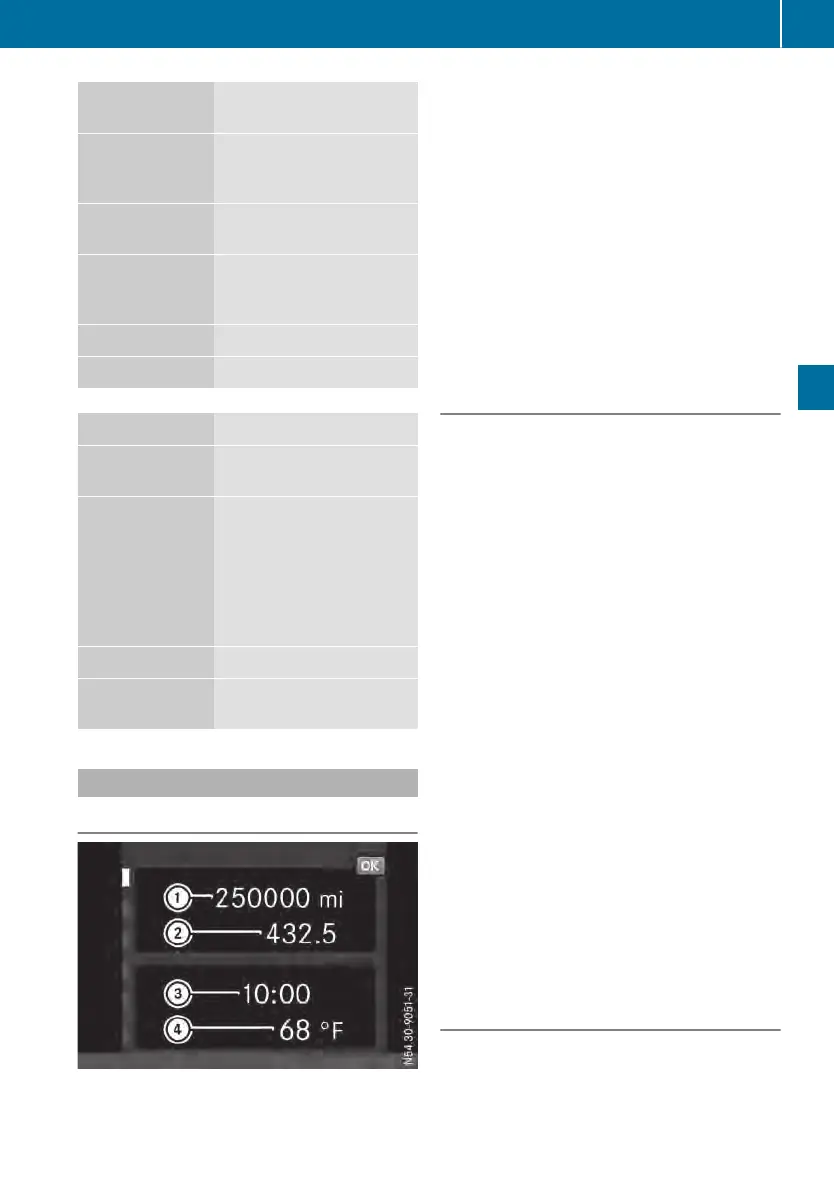
Truck info menu window
Truck info menu window
:
Total distance recorder
;
Trip meter
=
Time
?
Outsidetemperature
X
To display the total distance recorder,
trip meter, time and outside tempera-
ture: use the u or t button to scroll
to ß trip data.
X
To reset the trip meter: press 9.
The inputwindowdisplaysthe message
Reset trip meter?Reset trip meter? NoNo/YesYes.
X
Use the r button to select the YesYes menu
bar and press the u or 9 button to con-
firm.
Menu window from start -all/from
reset -all/from reset -drive
The Since start -allSince start -all trip data contains
performance data from the start of the jour-
ney. If you leave the vehicleparked for more
than 4hours, the values are reset automati-
cally.
The Since reset -allSince reset -all or Since reset -Since reset -
drivedrive trip data contains performance data
from the lasttime the menu windowwas
reset.
X
Use the u or t button to scroll to ß
trip data.
X
To display trip data: use the r or s
button to scroll to the Since start -allSince start -all,
Since reset -allSince reset -all or Since reset -Since reset -
drivedrive menu window.
The menu windowshows:
R
the distance covered
R
the driving time
R
the average vehiclespeed
R
the average fuel consumption
X
To reset the trip data: press 9.
The inputwindowshows, for example,
Reset values for: Since start -allReset values for: Since start -all
NoNo/YesYes.
X
Use the r button to select the YesYes menu
bar and press the u or 9 button to con-
firm.
Range menu window
The on-board computer calculates the approxi-
mate range basedoncurrent levelsoffuel and
DEF. The range depends largely on yourdriv-
ing style.
On-board computer
75
On-board computer and displays
Z












 To Next Page