R
Limiter: the È symboland the set limit
speed,e.g. 30 miles/h30 miles/h (Y page 120)
R
Lane Keeping Assist: the lane marking
(Y page 134)
The status of the driving system, e.g. on or off,
is represented in color.
When automatic transmission is in the neutral
position, status area = shows the Ü
(Y page 114) symbol.
In addition, status area = contains an indica-
tor lamp panel.Inthe event of amalfunction,
warning or operating information, an indicator
lamp automatically lights up in status area =
of the on-board computer. Depending on the
priority of the malfunction, warning or operat-
ing information, the indicator lamp lights up in
different colors. The indicator lamp may also
lightupinaddition to the event window.
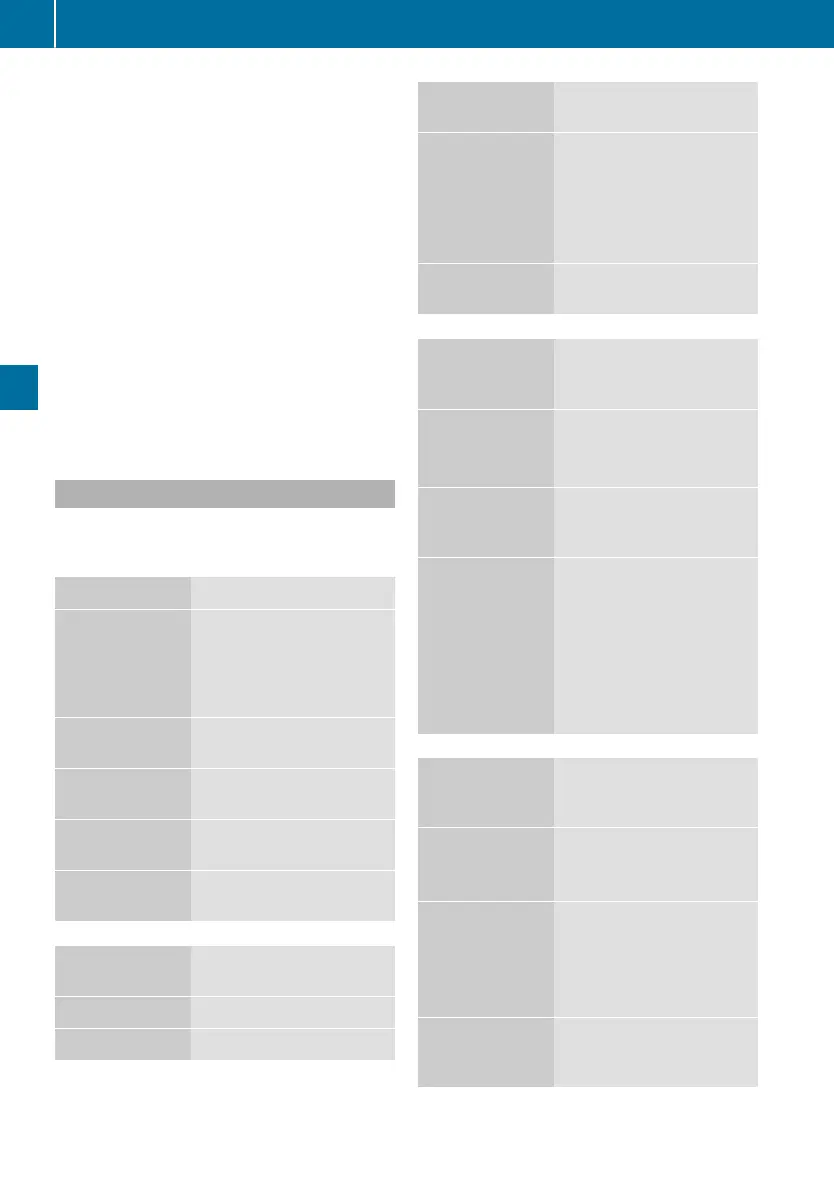
Menus at aglance
The number and order of the menus depends
on yourvehicle's equipment and the type of
vehicle itself.
Trip data ßß
(YY page 75)
Truck infoTruck info
Displays the time and
outsidetemperature,dis-
plays/resets the trip
meter and total distance
recorder
Since startSince start
-all-all
Displays/resets trip data
from start
RangeRange
Displays the range of fuel
and DEF levels
Since resetSince reset
-all-all
Displays/resets trip data
from reset 1
Since resetSince reset
-drive-drive
Displays/resets trip data
from reset 2
Drivingmode
àà
(YY page 76)
SpeedSpeed
Displays vehicle speed
NavigationNavigation
Displays route guidance
Drivingmode
àà
(YY page 76)
AssistanceAssistance
R
Displays the distance
to the vehicle in front
(distance control assis-
tant)
R
Displays lane markings
(Lane Keeping Assist)
VideoVideo
Displays/adjusts the
reversing camera
Audio and
communica-
tions áá
(YY page 76)
Alarm clockAlarm clock
R
Displays the alarm time
R
Sets the alarm clock
R
Switches off the alarm
TelephoneTelephone
Displays the telephone
book and the calls list/
calls numbers
AudioAudio
R
Controls the volume
R
Displays the audio
source
R
Changes the audio
source, title, station or
frequency
R
Operates the MP3
browser
Operation and
maintenance
ââ
(YY page 77)
AxlesAxles
R
Displays the axle loads
R
Sets the axle load indi-
cator
Level controlLevel control
R
Raises/lowers the
chassis
R
Sets the driving level
R
Stores/calls up achas-
sis height
MaintenanceMaintenance
Displays/resets the
maintenance point and
due date
74
On-board computer
On-board computer and displays












 To Next Page