the on-board computer. If there areseveral
messages, the on-board computershows
themone by one according to priority level.
If furtherinformation on the malfunctionis
availableinthe event window, the event
windowshows the Û symbol. Youcan
displaythe information using the u but-
ton.
X
Clearthe event windowbypressing the 9
button.
X
To scrollthrough the main menus: press
u or t.
X
To displayfurthermenuwindows in the
main menu: press r or s.
X
To openand closethe input window:
when amenu windowdisplaysthe 9 sym-
bol, press 9.
X
To select menubars in the input window:
press r or s.
X
To changethe value or select an entry in
the input window: press u or t.
i
If youcallupaparticular menu window
regularly,e.g.the engine oillevel check,
save it on the 4 button.
X
To saveafavorite menuwindow: callup
the desired menu windowand press the 4
button for approximately 2seconds.
X
To displaythe favorite menuwindow:
brieflypress the 4 button.
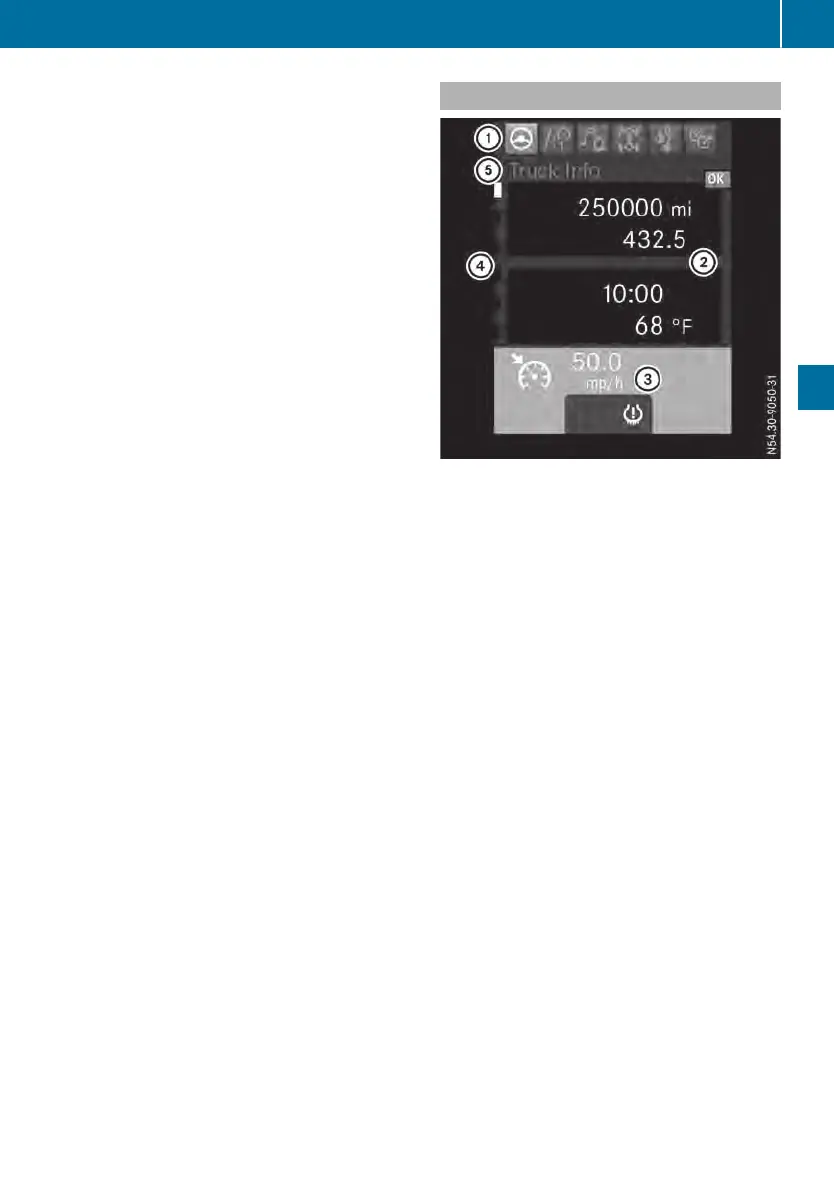
Areas in the display
Areasinthe display(example: Truck Info menu
window)
Register and titlebar: register : shows the
main menu.The activemainmenu is represen-
ted in white.Register ? shows youthe num-
berofmenu windows (submenus) and which
windowiscurrentlyselected.Title bar A
shows the nameofthe active menu window.
Display panel: the on-board computerdis-
playsthe menu windoworevent windowin
displaypanel ;.Event windows aredisplayed
automaticallyand contain messages, e.g. TopTop
up coolantup coolant,orinformation aboutmalfunc-
tions, e.g. Batterycharge level lowBatterycharge level low.In
additiontothe event window, an indicator
lamp maylight up in status area = of the on-
boardcomputerorinthe instrument cluster. If
youcan confirm the event windowusing the
9 button, the event windowishidden. An
indicator lamp thatlights up in status area =
of the on-board computerorinthe instrument
clusterdoesnot go outafter the event window
is confirmed.
Statusarea: status area = shows,for the
selected drivingsystem:
R
Cruise control: the é symboland the set
speed, e.g. 50 miles/h50 miles/h (Y page 122)
R
Distance controlassistant: the É symbol
and the setspeed, e.g. 50 miles/h50 miles/h
(Y page 124)
On-board computer
73
On-board computer and displays
Z












 To Next Page