Visually inspect the walking beam for cracks, or
other damage. If damage is found, see Group
32 of the
Business Class
®
Trucks Service
Manual
for replacement instructions.
Keep the vehicle supported by the jack stands
for the next operation.
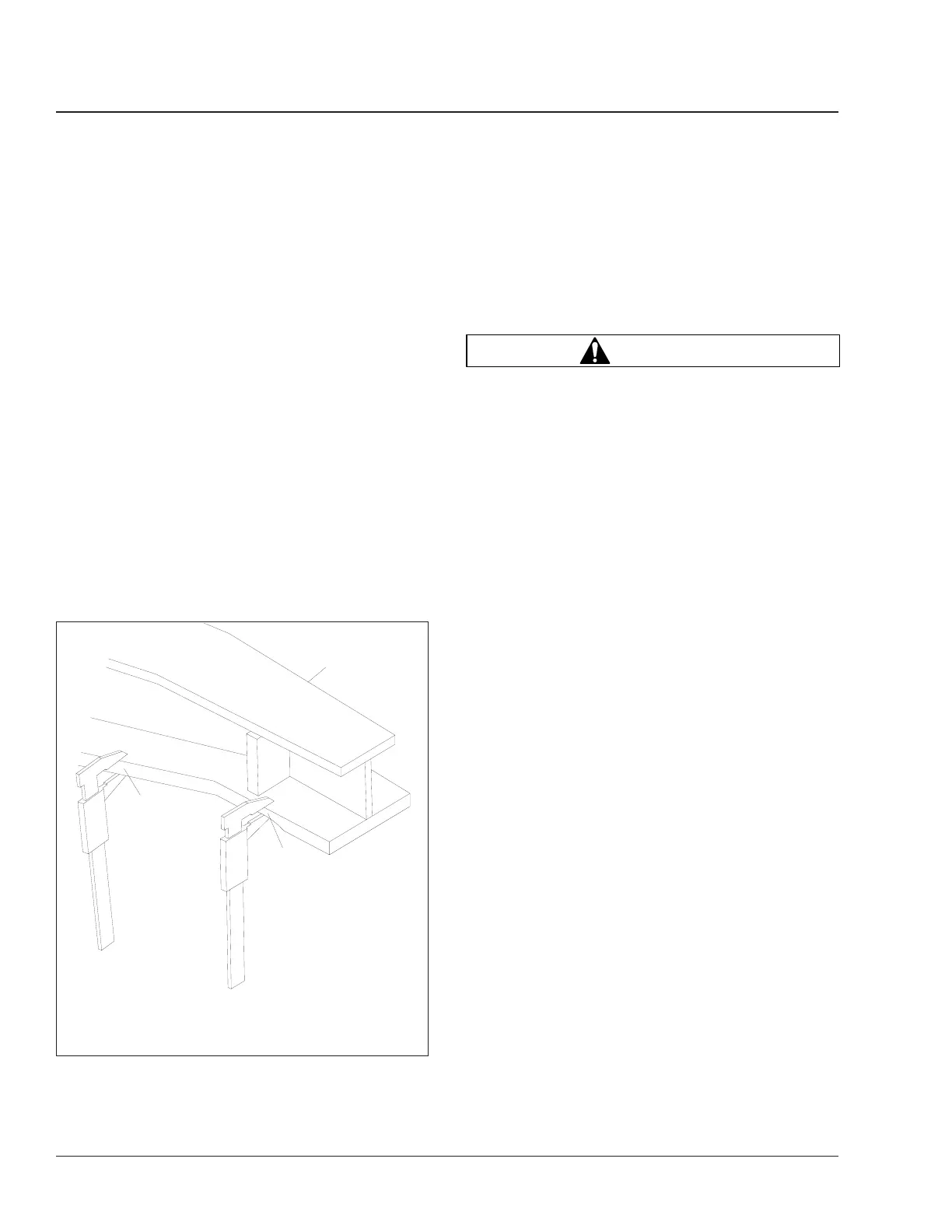
4. Manipulate the walking beam so that a microme-
ter, vernier, or dial caliper can be used to deter-
mine the wear area thickness on the bottom
face. See Fig. 8. Measurements should be taken
a minimum of 1/2 inch (13 mm) from the beam
flange edges to eliminate any edge wear that
may have occurred. Subtract the wear area
thickness (Fig. 8, Ref. B), from the non-wear
area (Fig. 8, Ref. A), to determine the amount of
wear.
If the beams show any wear greater than the
allowable 0.062-inch (1.5-mm) wear, a Chalmers
wear plate must be installed, or the walking
beam must be replaced. See Group 32 of the
Business Class
®
Trucks Service Manual
for re-
pair and replacement instructions.
5. Rotate the restrictor cans 360 degrees and visu-
ally inspect the cans for cracks, severe corro-
sion, and distortion. If any of these conditions are
present, or the restrictor can is missing, replace
the restrictor can. See Group 32 of the
Business
Class
®
Trucks Service Manual
for replacement
instructions.
WARNING
Replace all cracked or missing restrictor cans.
Failure to do so could lead to loss of vehicle con-
trol, which could result in property damage, seri-
ous personal injury or death. Vehicles with
cracked or missing restrictor cans may be driven
slowly to the nearest workshop for restrictor can
replacement.
6. Remove the jack stands, then lower the vehicle.
Check that the spring, or driveline brake is ap-
plied, then remove the wheel chocks.
Reyco 79KB Suspension Visual
Inspection
The Reyco 79KB suspension requires minimal main-
tenance. To provide trouble-free operation in over-
the-road applications, do the following visual inspec-
tion.
1. Park the vehicle on level ground. Apply the park-
ing brakes, and chock the tires.
2. Check that the torque rod clamps are directed
away from the spring to prevent possible interfer-
ence during operation. See Fig. 9.
3. Check the fit of springs to hangers to ensure
good ride characteristics.
4. Check for elongated holes in the suspension
components. See Group 32 of the
Business
Class
®
Trucks Service Manual
for proper repair
procedures.
5. Check bushing condition. Replace any bushing
that is worn, cracked, dry-rotted, or otherwise
damaged. See Group 32 of the
Business Class
®
Trucks Service Manual
for removal and installa-
tion instructions.
6. Check tire condition. If abnormal tire wear is
found, check and replace all worn or damaged
components, and check suspension alignment.
See Group 32 of the
Business Class
®
Trucks
Service Manual
for component removal and in-
09/27/95
f320432
1
A
B
1. Walking Beam
A. Non-Wear Area
B. Wear Area
Fig. 8, Walking Beam End Wear Thickness
Suspension32
Business Class Trucks Maintenance Manual, July 199932/6









 To Next Page