41 PB
REMOVE AND INSTALL THE CHASSIS
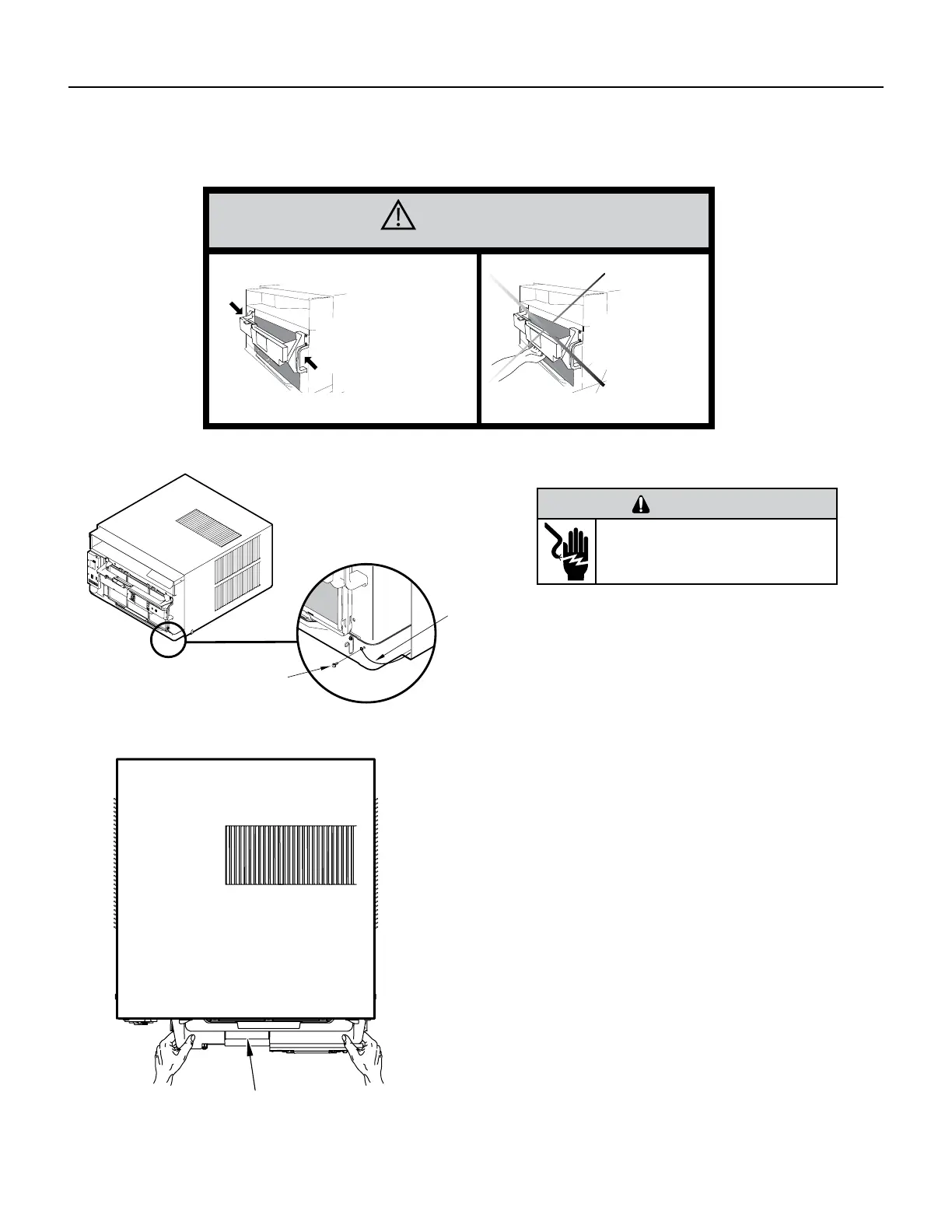
Remove The Chassis
CAUTION
Use Handle
Locations
(both sides)
Do not push, pull,
or lift from
center of support
1. Remove the decorative front cover. See Routine
Maintenance Figure 401.
2. Remove the chassis Entrygard Retainer Wire by
removing the screw at the front right bottom corner.
Save this screw for reattachment after reinstalling the
chassis.See Figure 501.
3. Hold the cabinet stationary then use the hand grips
on both ends of the control unit support bracket to
pull the chassis out of the cabinet .
FAR RIGHT
SCREW
ENTRYGARD
RETAINER
WIRE
WARNING
ELECTRIC SHOCK HAZARD
Disconnect power to the unit before
servicing. Failure to follow this warning
could result in serious injury or death.
Support Bracket
Figure 501 (Chassis Removal and Installation)
Figure 502 (Support Bracket)







 To Next Page