4.3.2 Power Pack terminal replacement
Required tools: Small flat screwdriver Procedure duration: 10 minutes
A. Remove the Power Pack from the Robomow.
B. Open the Power Pack as outlined in procedure 4.3.1.
C. Identify the defective terminal you would like to replace and disconnect both cables attached
to it.
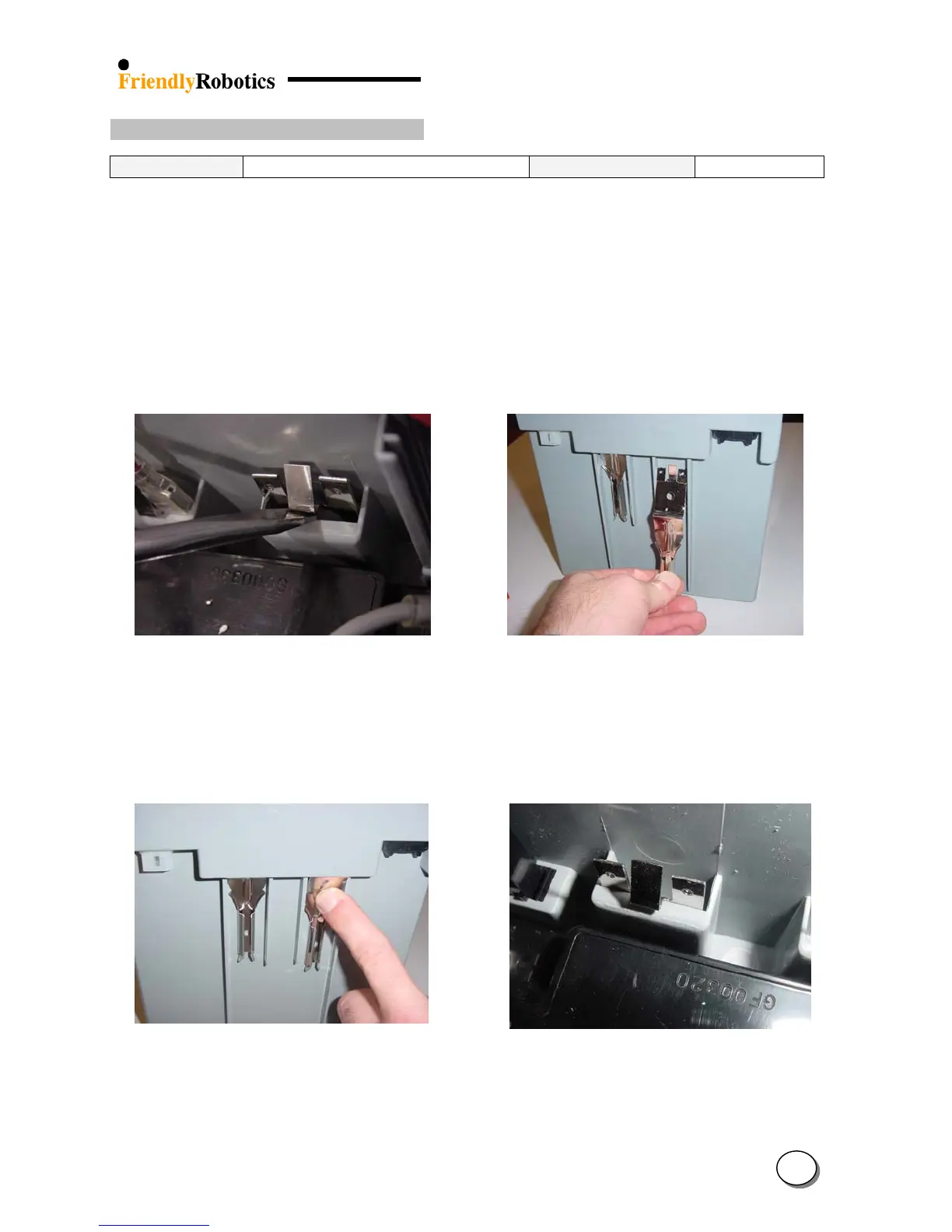
D. Using the screwdriver, force the center latch of the Power Pack terminal flat against the plastic
wall while pushing it down, as illustrated in Figure 4.3.2.1 below.
E. Take the defective terminal and discard it.
F. Take the new terminal and position it as illustrated in Figure 4.3.2.2 below, and slide it all the
way up until it is stopped when the terminal “knee” hits the plastic.
Figure 4.3.2.1 Figure 4.3.2.2
Releasing the power pack terminal Positioning the terminal for insertion
G. Press on the terminal “knee” simultaneously inside and up to bring it inside the positioning
hole, as illustrated in Figure 4.3.2.3 below.
H. Verify the proper positioning of the terminal by looking inside the case and observing that the
center latch is in its proper position, as illustrated in Figure 4.3.2.4 below.
Figure 4.3.2.3 Figure 4.3.2.4
Forcing the terminal into position Proper position of the terminal –
a look from the inside
4
48








 To Next Page