35 36
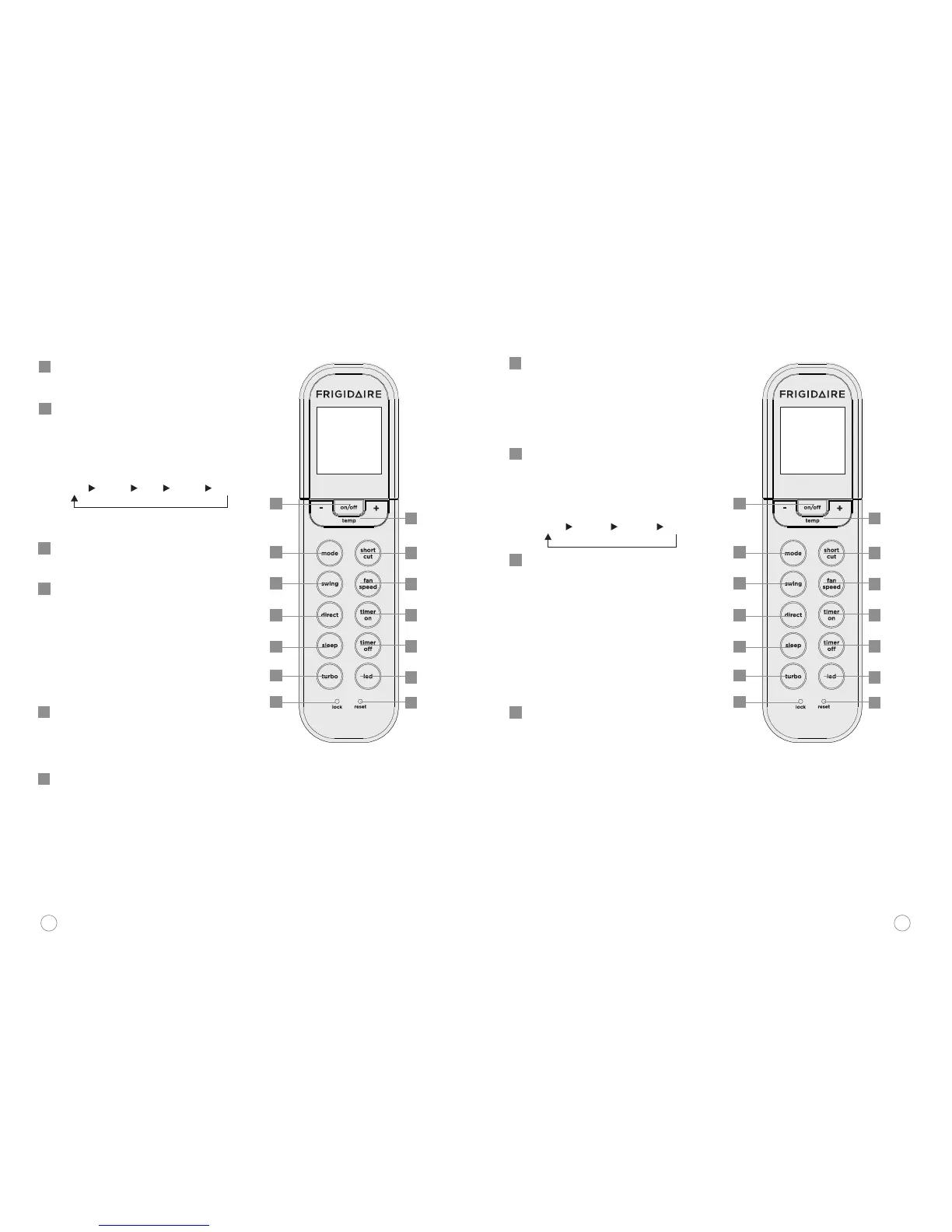
ON/OFF: Operation starts when
this button is pressed and stops
when this button is pressed again.
MODE: Each time you push the
button, a mode is selected in a
sequence that goes from AUTO,
COOL*, DRY, HEAT and FAN, as the
following figure indicates:
* Note: Only for heating and cooling
models.
SWING: Used to stop or start
horizontal louver auto swing
feature.
SLEEP: Active/Disable SLEEP
function. If pushing more than 2
seconds, the FRESH function will
be activated, pushing more than
2seconds again to disable.
Note: While the unit is running
under SLEEP mode, it would be
cancelled if press the MODE, FAN
SPEED or ON/OFF button.
DIRECT: Used to change the louver
movement and set the desired
up/down air flow direction. The
louver changes 6° in angle for each
press.
RESET: When you press the
recessed RESET button, all current
settings are cancelled and the
control will return to the initial
settings.
1
2
3
4
Remote control description
TEMP: Push the + button to
increase setting temperature or to
increase Hour during Timer
setting. Push - the button to
decrease setting temperature or
to decrease Hour during Timer
setting.
FAN SPEED: Used to select the
Fan Speed in four steps- AUTO,
LOW, MED or HIGH. Each time
the button is pressed, the fan
speed mode is shifted.
TIMER ON: Press this button to
initiate the auto-on time
sequence. Each press will
increase the auto-timed setting in
30 minutes increments. When the
setting time displays 10H, each
press will increase the auto-timed
setting60 minutes increments. To
cancel the auto-timed program,
simply adjust the auto-on time to
0:0.
TIMER OFF: Press this button to
initiate the auto-off time
sequence. Each press will
increase the auto-timed setting in
30 minutes increments. When the
setting time displays 10H, each
press will increase the auto-timed
setting 60 minutes increments. To
cancel the auto-timed program,
simply adjust the ON/OFF auto-
off time to 0:0
5
6
7
8
9
AUTO
COOL DRY HEAT* FAN
AUTO
LOW MED HIGH
1
2
3
4
5
6
7
8
9
10
11
12
13
13
10
1
2
3
4
5
6
7
8
9
10
11
12
13
13



 To Next Page