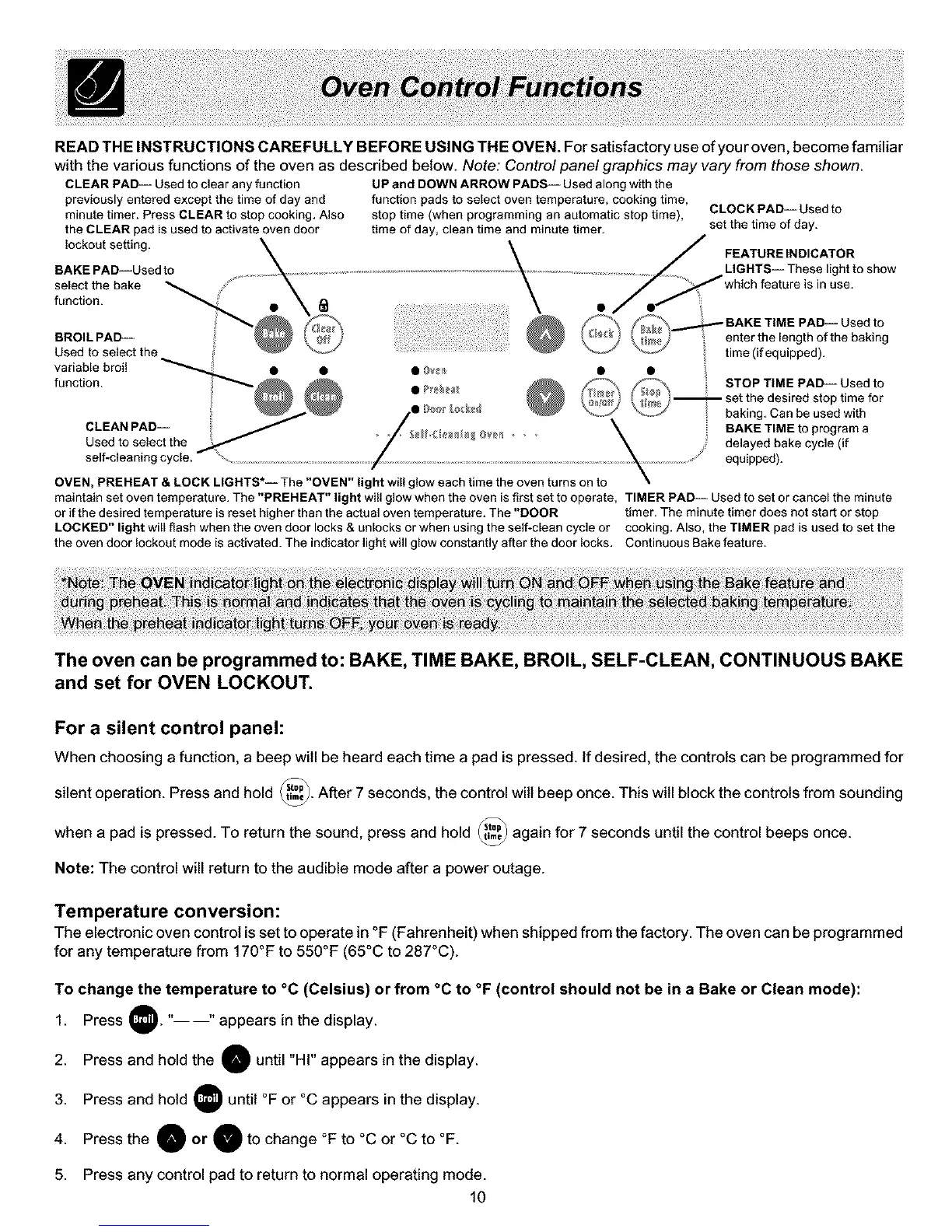
READ THE INSTRUCTIONS CAREFULLY BEFORE USING THE OVEN. For satisfactory use of your oven, become familiar
with the various functions of the oven as described below. Note: Control panel graphics may vary from those shown.
CLEAR PAD-- Used to clear any function UP and DOWN ARROW PADS_ Used along with the
previously entered except the time of day and function padsto select oven temperature, cooking time,
minute timer. Press CLEAR to stop cooking. Also stop time (when programming an automatic stop time), CLOCK PAD-- Usedto
the CLEAR pad isused to activate oven door time of day, clean time and minute timer, set the time of day.
lockout setting.
BAKE PAl_-Used to
select the bake
function.
BROIL PAD--
Used to select the
variable broil
function.
CLEAN PAD--
Used to select the
self-cleaning cycle.
time (if equipped).
set the desired stop time for
baking. Can be used with
BAKE TIME to program a
delayed bake cycle (if
equipped).
OVEN, PREHEAT & LOCK LIGHTS*-- The "OVEN" light will glow each time the oven turns on to
maintain set oven temperature. The "PREHEAT" light will glow when the oven is first set to operate, TIMER PAD-- Used to set or cancel the minute
or if the desired temperature is reset higher than the actual oven temperature. The "DOOR timer. The minute timer does not start or stop
LOCKED" light will flash when the oven door locks & unlocks or when using the self-clean cycle or cooking. Also, the TIMER pad is used to set the
the oven door lockout mode is activated. The indicator light will glow constantly after the door locks. Continuous Bake feature.
The oven can be programmed to: BAKE, TIME BAKE, BROIL, SELF-CLEAN, CONTINUOUS BAKE
and set for OVEN LOCKOUT.
For a silent control panel:
When choosing a function, a beep will be heard each time a pad is pressed. If desired, the controls can be programmed for
silent operation. Press and hold _. After 7 seconds, the control wilt beep once. This will block the controls from sounding
when a pad is pressed. To return the sound, press and hold _ again for 7 seconds until the control beeps once.
Note: The control will return to the audible mode after a power outage.
Temperature conversion:
The electronic oven control is set to operate in °F (Fahrenheit) when shipped from the factory. The oven can be programmed
for any temperature from 170°F to 550°F (65°C to 287°C).
To change the temperature to °C (Celsius) or from °C to °F (control should not be in a Bake or Clean mode):
1. Press )." "appears in the display.
2. Press and hold the O until "HI" appears in the display.
3. Press and hold until °F or °C appears in the display.
4. Press the O or O' to change °F to °C or °C to °F.
5. Press any control pad to return to normal operating mode.
10



 To Next Page