15
To Start the Self-Clean Cycle
*We recommend a 2 hour self-clean cycle for light soils and a 3 hour cycle for
average to heavy soils (to assure satisfactory results).
To Set the Controls for a Self-Clean Cycle:
1. Be sure the clock shows the correct time of day.
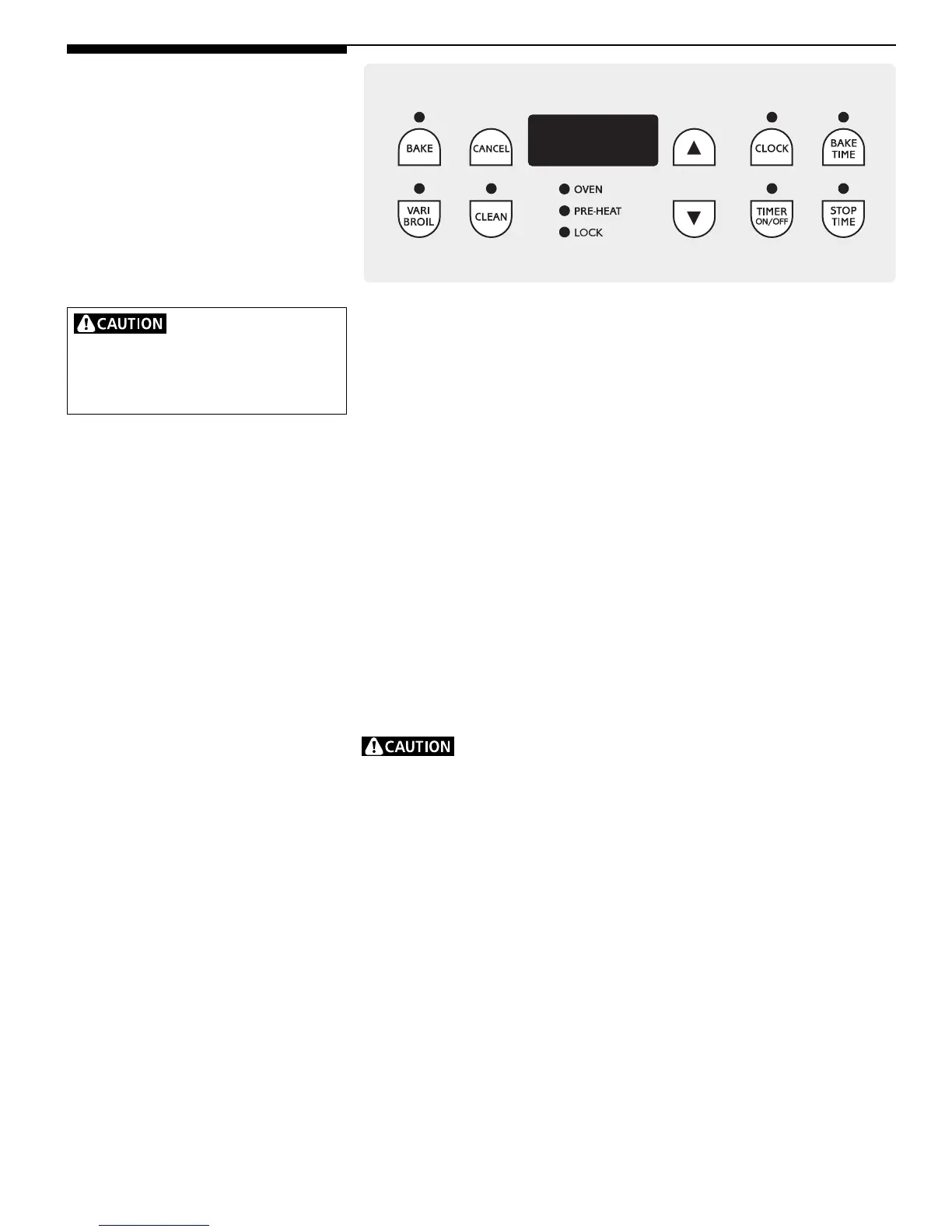
2. Push CLEAN. "— — —" appears in the display.
3. Push the UP ARROW until "3:00" appears in the display for a 3 hour cycle, or
push the DOWN ARROW until "2:00" appears in the display for a 2 hour
cycle.
4. As soon as the UP or DOWN ARROW is released, "CLn" appears in the display.
5. As soon as the controls are set, the motor driven lock will begin to close
automatically and the "Lock" indicator light will flash. DO NOT open the door
while the light is flashing (it takes about 15 seconds for the lock to close).
6. The "LOCK" light will glow until the cleaning cycle is completed or cancelled,
and the oven temperature has cooled.
When the Self-Clean Cycle is Completed:
1. The time of day will appear in the display window and the "LOCK" light will
continue to glow.
2. Once the oven has cooled down for about 1 HOUR and the "LOCK" light has
gone out, the oven door can be opened.
DO NOT force the oven door open. This can damage the automatic
door locking system. Use caution when opening the door after the self-cleaning
cycle is completed. The oven may still be VERY HOT.
Use care when opening
the oven door after the self-cleaning
cycle. Stand to the side of the oven when
opening the door to allow hot air or steam
to escape.
Oven Cleaning
(Right Oven, continued)



 To Next Page