16 OPERATING INSTRUCTIONS
°F/°C function
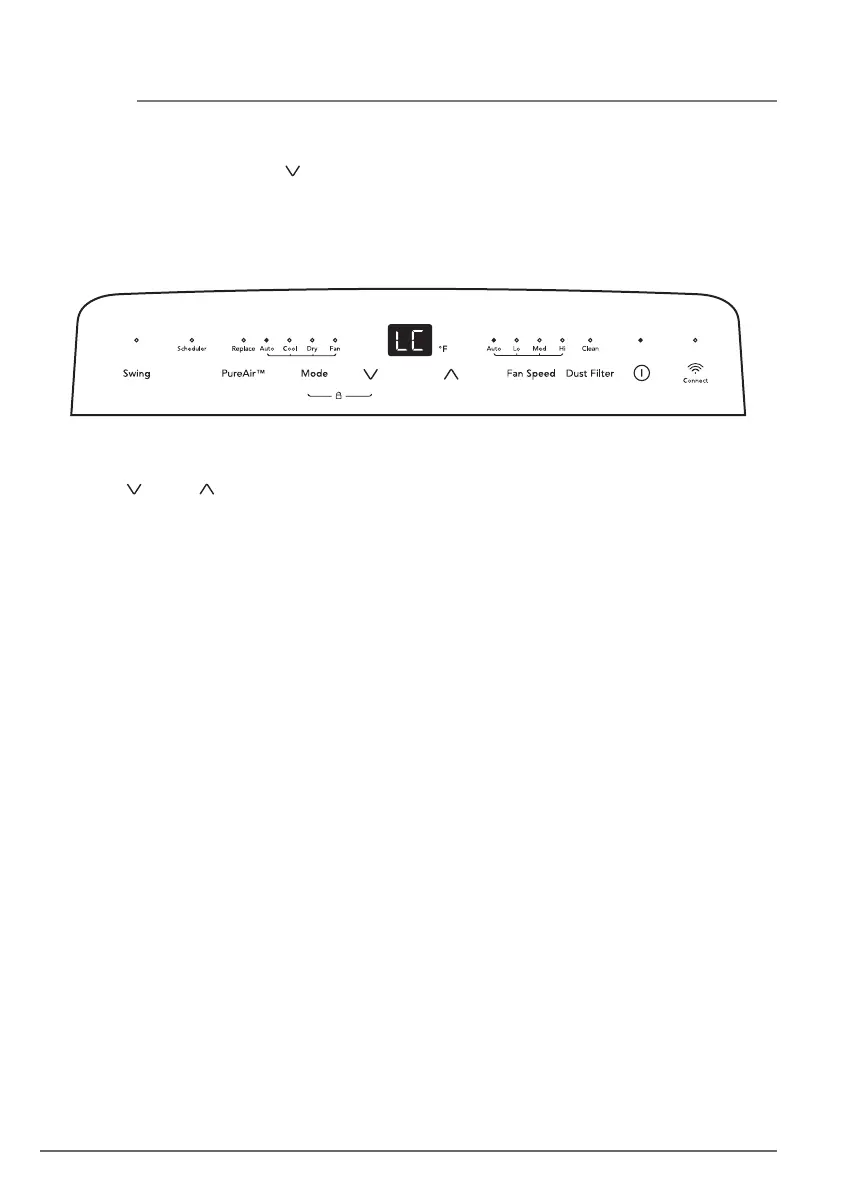
Press the “ ” and “ ” button at the same time for more than 3 seconds to switch between
degrees Fahrenheit and degrees Celsius.
Note: Under Dry/Fan mode, you cannot select °F/°C.
Ionizer function
The unit is equipped with an internal air cleaning device called an ionizer. This feature can
be activated and deactivated by pressing and holding the “Swing” button for 2 seconds or
via the Frigidaire app, which can be downloaded onto your smart phone device. By
activating this function, the ionizer will generate ions into the air, attracting and removing
impurities from the air. This provides cleaner, healthier air to breathe.
Child Lock
Press and hold the Mode and “ ” button for 3 seconds to activate the Child Lock mode. In
this mode, the unit’s setting cannot be changed by pressing the buttons on control panel.
The display will show “LC” for 5 seconds then return to the normal display. Press and hold
the Swing and Sleep button for another 3 seconds to quit this mode.
Note: After the child lock feature activated the setting can still be changed by remote
control or app.



 To Next Page