7
.devresersthgirllA.cnI,stcudorPemoHxulortcelE9002
Operating Instructions
Operating Instructions
(continued)
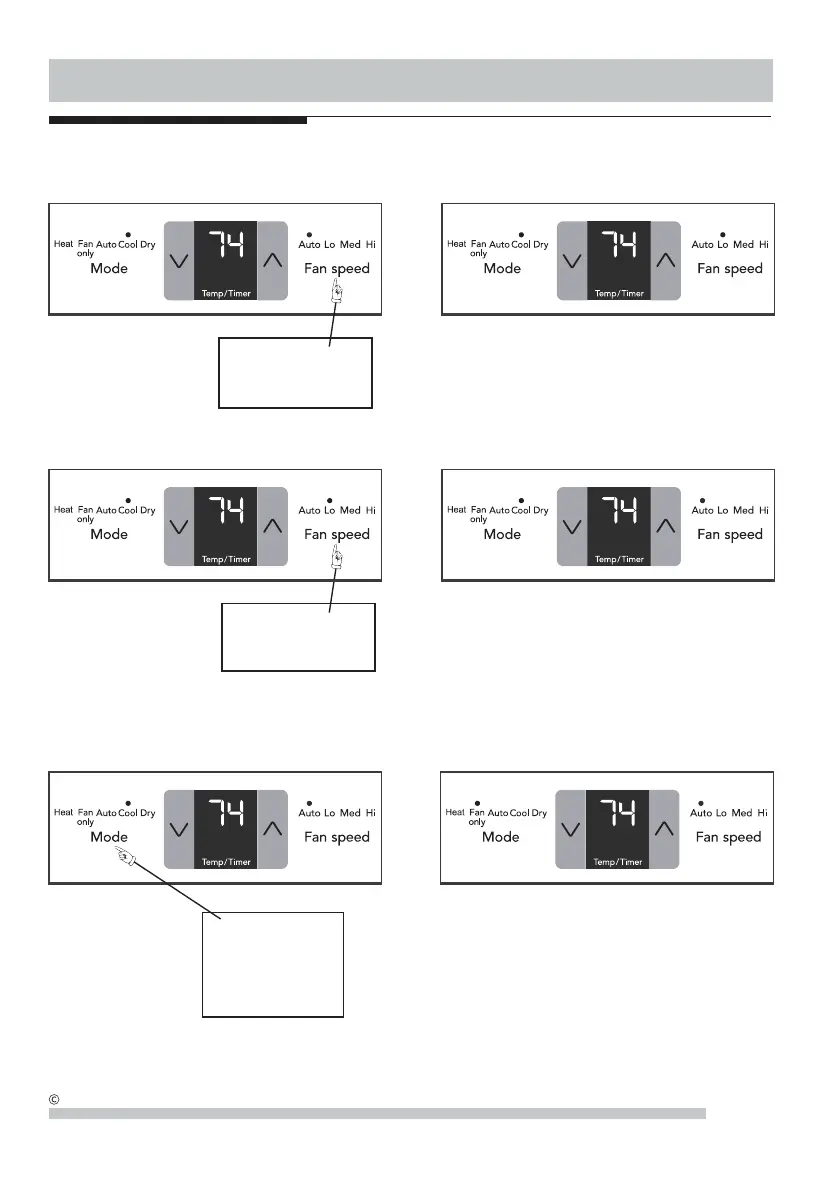
Note: Fan starts at Low Speed and adjusts to a proper speed
according to the room temperature dictates. For example, if
the room doesn't get too warm, it will stay at the slowest
speed. If the room temperature rises quickly, such as a door
being opened, it will automatically go to the highest speed.
The fan speeds will re-adjust back to the slowest speed as
the room returns to the original set temperature.
TO USE AUTO FAN FEATURE:
PRESS FAN BUTTON,
CHOOSE AUTO
DO THIS:
YOU WILL SEE:
YOU WILL SEE:TO ADJUST FAN SPEEDS:
Note: The fan speed can be selected among four settings:
Auto, Lo(Low), Med(Medium) and Hi(High), unless the unit
runs in "Auto" or "Dry" mode, or the Sleep feature is activated.
DO THIS:
PRESS TO SELECT
:EESLLIWUOY:YLNONAFNOETAREPOOT
DO THIS:
PRESS
MODE BUTTON
CHOOSE
FAN ONLY
Note: Use this function only when cooling is not desired,
such as for room air circulation or to exhaust stale air on
some models. (Remember to open the vent during this
function, but keep it closed during cooling for maximum
cooling efficiency.) You can choose any fan speed you
prefer.
During this function, the display will show the actual room
temperature, not the set temperature as in the cooling
mode.



 To Next Page