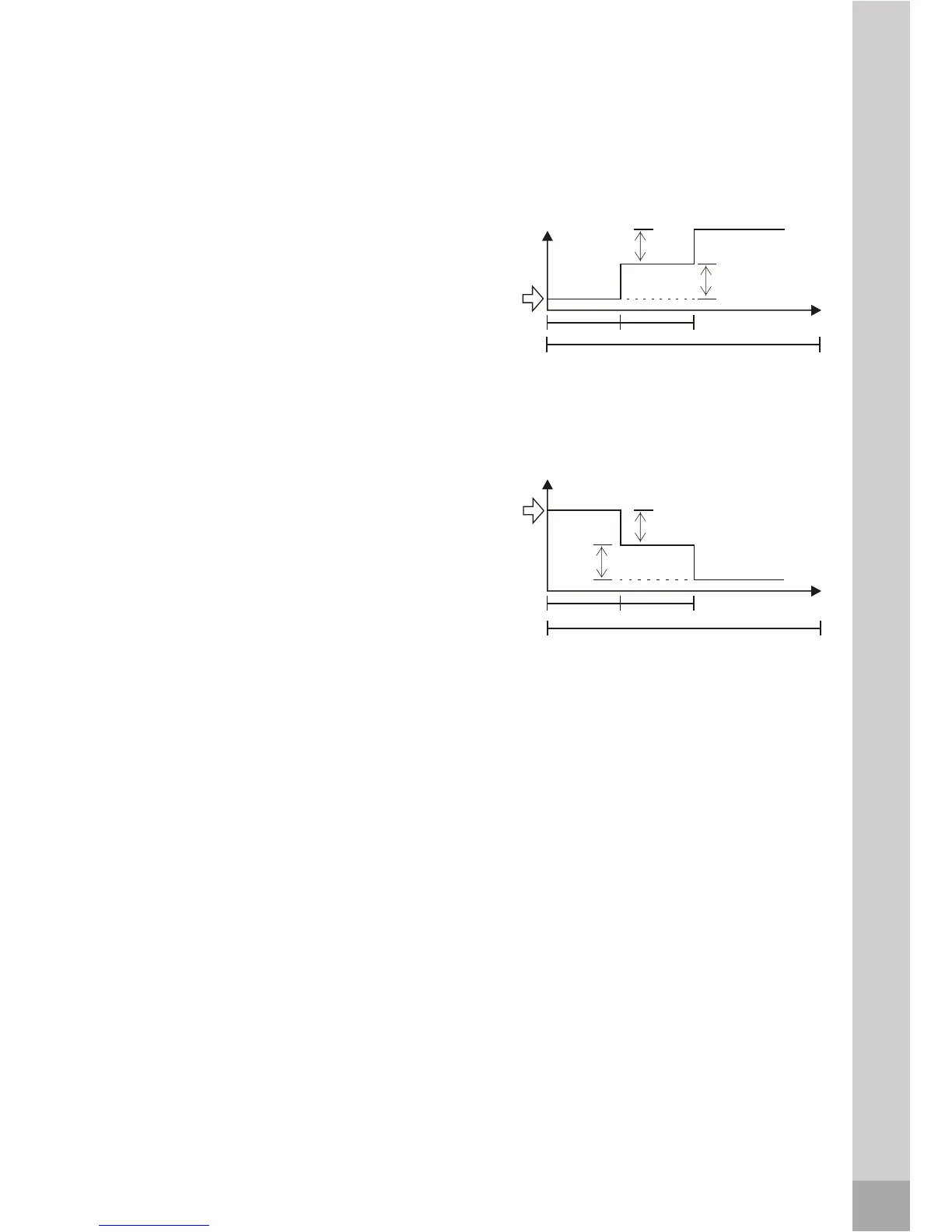
SLEEP mode
Press the sleep button to activate the
button again.
Set
temperature
SLEEP FUNCTION (Cooling mode)
1 hour 1 hour
SLEEP FUNCTION (Heating mode)
7 hours
Set
temperature
TIMER Operation
TIMER button can set the auto-on time of the unit.
To set the starting time
1. Press the TIMER ON button, then the remote controller shows TIMER ON,
the last set time for the starting operation and the signal "h" will be shown
on the DIGITAL DISPLAY area. You are now ready to reset the time to START
the operation.
2. Press the TIMER ON button again to set desired time for starting operation.
3. After setting the TIMER ON, there will be a one-half second delay before
the remote controller transmits the signal to the air conditioner. Then, after
approximately another 2 seconds, the signal "h" disappears and the set
temperature will re-appear on the digital display.
How the air conditioner works
sleep mode. To deactivate, press the
7KHIDQVSHHGZLOOEHDXWRPDWLFDOO\
FRQWUROOHG
7KHIDQVSHHGZLOOEHDXWRPDWLFDOO\
FRQWUROOHG
7KHDLUFRQGLWLRQHUZLOODXWRPDWLFDOO\
GHFUHDVH)SHUKRXULQDKRXUSHULRG
7KHVHWWHPSHUDWXUHZLOOEHVWHDG\IRU
WKHQH[WKRXUVWKHQWKLVPRGHZLOO
EHWHUPLQDWHG
In heating mode (only for models with
heating function):
In cooling mode:
7KHDLUFRQGLWLRQHUZLOODXWRPDWLFDOO\
LQFUHDVH)SHUKRXULQDKRXUSHULRG
7KHVHWWHPSHUDWXUHZLOOEHVWHDG\IRU
WKHQH[WKRXUVWKHQWKLVPRGHZLOO
EHWHUPLQDWHG
2 °F
2 °F
1 hour1 hour
2 °F
2 °F
7 hours
38



 To Next Page