Selecting the Radio Channel
Overview
Wireless LAN uses the frequency ranges at 2.4GHz and 5GHz for
transmission. Generally the FRITZ!Box automatically checks the wire
less environment and selects the optimum radio channel settings. In
some cases it may be necessary to adjust these radio channel settings
in order to adapt the wireless radio network to the circumstances at
your location.
Comparison of the Frequency Ranges
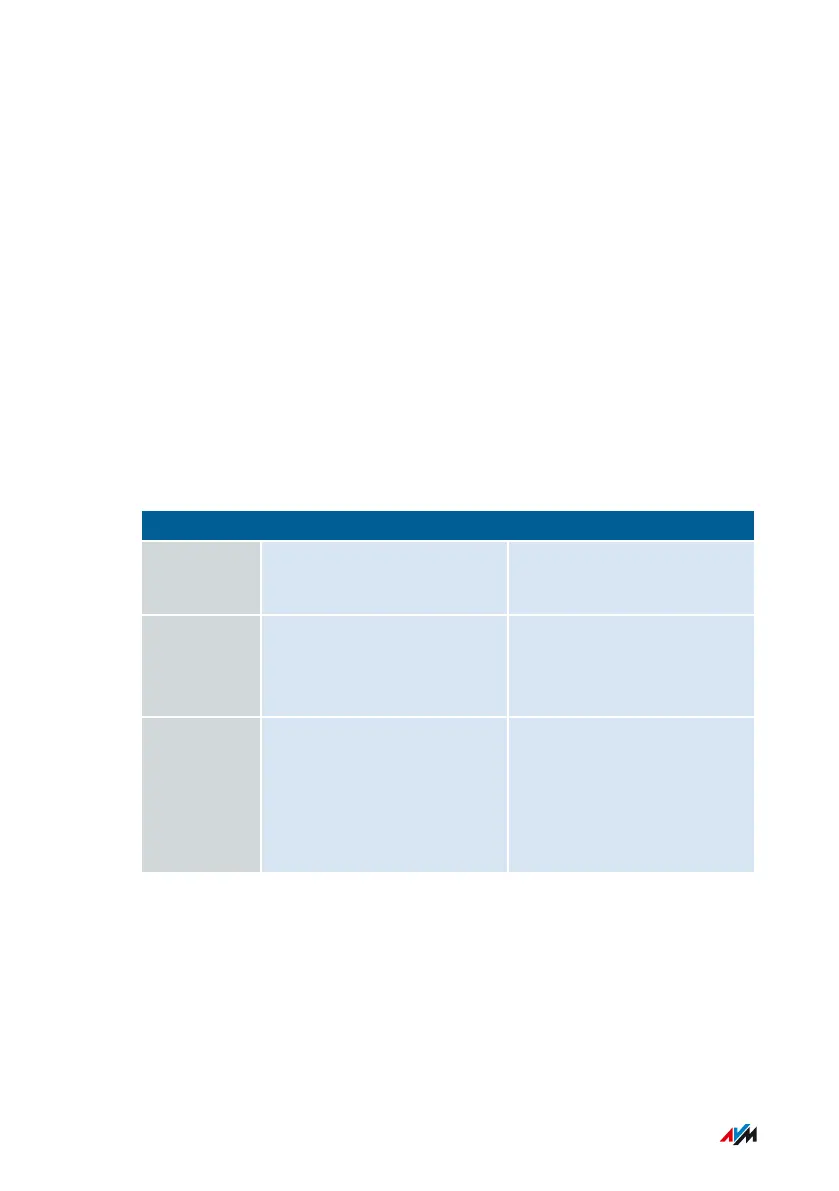
The following table compares the 2.4-GHz and 5-GHz frequency
ranges:
2.4GHz 5 GHz
Advantages Greater range – supported
by older and newer clients
Less busy, therefore less
interference
Dis
advantages
Subject to heavy use,
therefore often lots of
interference
Lower range – only sup
ported by newer clients
Recom
mendation
Use for applications that
require a low to normal
throughput rate (for
instance, reading and writ
ing email).
Use for applications that
rely on a steady, high
throughput rate (for
instance, streaming).
Wireless Auto Channel
With the “Set radio channel settings automatically” (wireless auto
channel) feature, the FRITZ!Box automatically searches for the channel
subject to the least interference. This process takes into consideration
interference from radio networks in the vicinity (wireless access
points) and potential sources of interference (for instance baby monit
User Interface: Wireless Menu
...............................................................................................
...............................................................................................
166FRITZ!Box6890


 To Next Page