No Meaning Function
1.
Button Connect
Press for 1 sec.: Connect (start
WPS)
Press for 6 sec.: Press for
Connect with other 15 sec.:
access point Load factory
settings
Press for 15 sec.:
Load factory settings
2.
LED displays the connection to
the FRITZ! Box (wireless
router)
on connected with FRITZ!Box (wireless router)
flashing
• slowly (every 2 seconds): not connected with FRITZ!Box
(wireless router), no wireless connection configured
• fast (twice per second): a procedure like WPS, restart or
update in progress
flashing connection to FRITZIBox (wireless router) interrupted
The FRITZ!Repeater 600
The FRITZ! Repeater 600 is a wireless repeater that extends the range of your Wi-Fi network.
Here are the most important instructions for starting operation with your FRITZIRepeater. A PDF manual with descriptions of all functions and instructions is
available on our website en.avm.de/service.
The FRITZ! Repeater 600 supports Mesh Wi-Fi. Thanks to Mesh Wi-Fi, the FRITZIRepeater combined with a FRITZ! Box with FRITZIOS 7 automatically
adopts the FRITZ! Box’s Wi-Fi settings, receive its updates via the FRITZ! Box and its wireless LAN performance is optimized. For more information on Mesh
Wi-Fi, see the PDF manual and our website at en.avm.de/mesh.
The FRITZIRepeater 600 has a user interface that you can open in a web browser on all connected devices.
Connecting the FRITZ! Repeater 600 to the Router at the Touch of a Button (WPS)
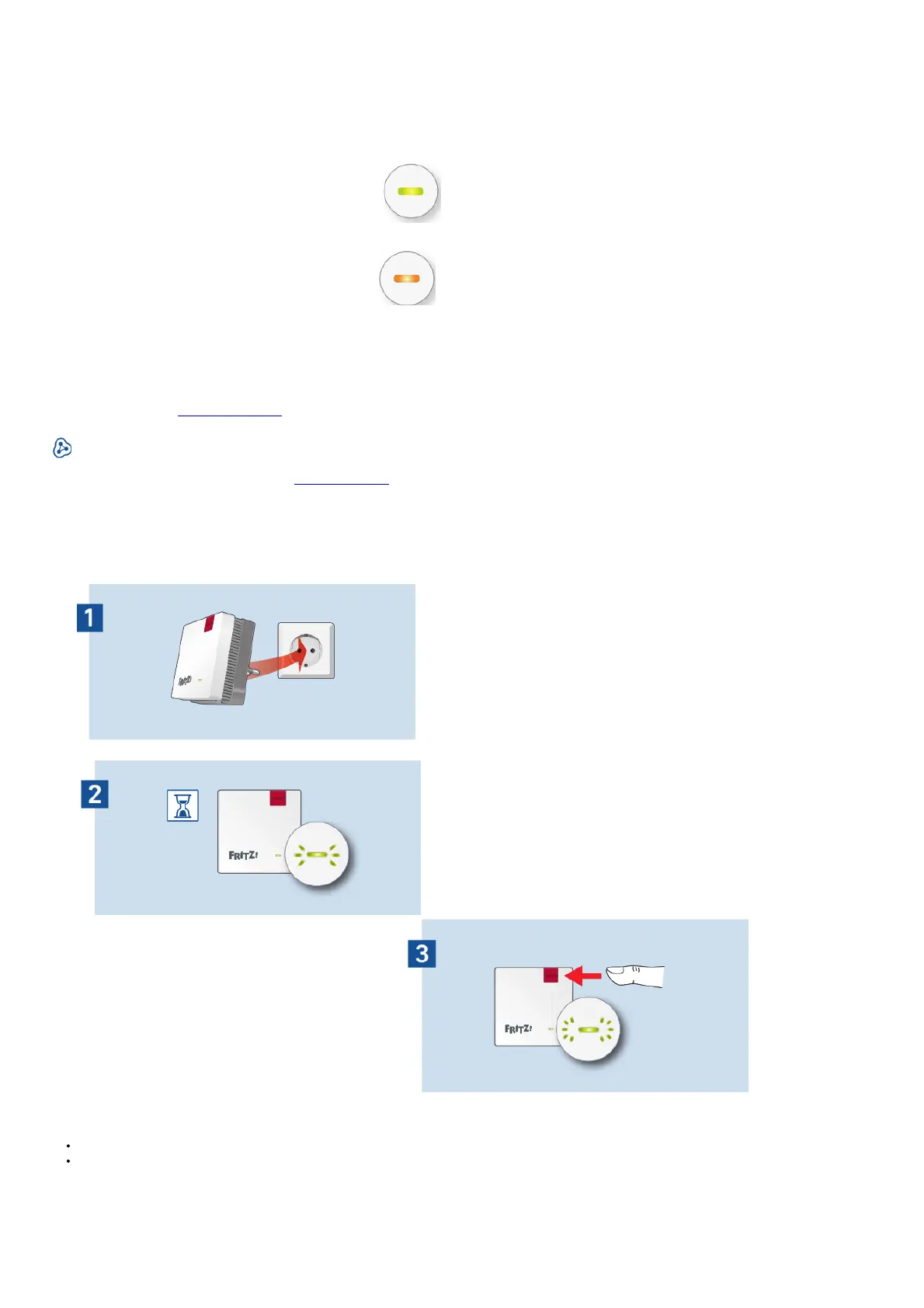
1. Plug the FRITZIRepeater into an outlet gi near your FRITZ! Box (wireless router). n The FRITZIRepeater starts operation.
2. Wait until the LED starts slowly flashing green. As soon as the LED slowly flashes green, the FRITZ! The repeater is ready for a connection.
3. Press the Connect button. The LED flashes green more rapidly.
4. Within 2 minutes, start WPS on your FRITZ! Box:
FRITZIBox with WPS or Connect/WPS button: press the button briefly
FRITZ!Boxes with WLAN or WLAN/ WPS button: press the button for about 6 seconds until the WLAN LED flashes.















 To Next Page