4
CE
Service
LED
fritz.box Internet
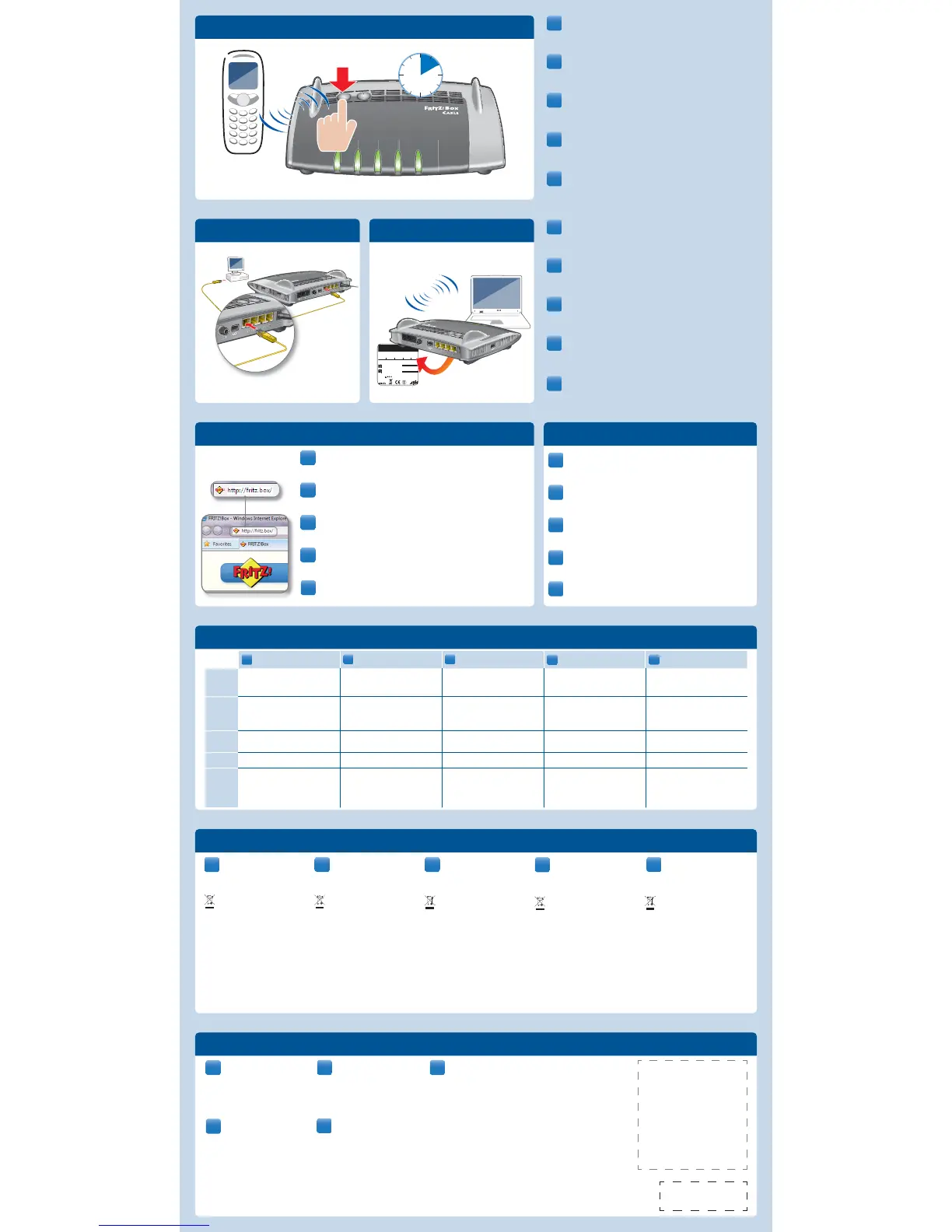
Die FRITZ!Box hat eine Benutzeroberfl äche, in der Sie alle erforderlichen
Einstellungen vornehmen. Sie können sie in jedem Internetbrowser
öff nen, indem Sie http://fritz.box eingeben.
FRITZ!Box a une interface utilisateur qui vous permet d’exécuter toutes
les confi gurations nécessaires. Vous pouvez ouvrir cette interface avec
http://fritz.box dans n’importe quel navigateur Internet.
The FRITZ!Box has a user interface. This is where you confi gure all of the
settings for operating. To open the user interface, enter http://fritz.box
in the address bar of your web browser.
Su FRITZ!Box tiene una interfaz de usuario, en la que podrá ajustar la
confi guración de acuerdo a sus necesidades. Digitando http://fritz.box
podrá abrirla con cualquier explorador de Internet.
Urządzenie FRITZ!Box posiada interfejs użytkownika, w którym wprowadza-
ne są wszystkie wymagane ustawienia. Interfejs można otworzyć w każdej
przeglądarce internetowej, wprowadzając adres http://fritz.box.
• Starten Sie einen Internetbrowser.
• Geben Sie die gewünschte Adresse ein.
• Démarrez un navigateur Internet.
• Saisissez l’adresse souhaitée.
• Start a web browser.
• Enter the desired URL.
• Inicie un explorador de Internet.
• Digite la dirección deseada.
• Uruchom przeglądarkę internetową.
• Wpisz dowolny adres.
• Faites passer votre téléphone DECT sur le mode d’enregistre-
ment.
• Saisissez le code confi dentiel «0000» sur le téléphone.
• Enfoncez la touche DECT de FRITZ!Box.
• Bringen Sie Ihr DECT-Telefon in den Anmeldemodus.
• Geben Sie am Telefon die PIN „0000“ ein.
• Drücken Sie die DECT-Taste auf der FRITZ!Box.
• Put your telephone in registration mode.
• Enter the PIN “0000” of on the telephone.
• Press and hold down the “DECT” button on the FRITZ!Box.
• Inicie en su teléfono DECT el proceso de conexión.
• Indique en el teléfono el PIN “0000”.
• Presione el botón DECT en su FRITZ!Box.
• Ustawić w telefonie DECT tryb logowania.
• Wpisać w telefonie kod PIN „0000“.
• Naciśnąć przycisk DECT na urządzeniu FRITZ!Box.
Connectez votre ordinateur à FRITZ!Box, soit avec un câble LAN,
soit via la connexion sans fi l (WLAN/WiFi).
Verbinden Sie Ihren Computer entweder mit einem LAN-Kabel oder
per WLAN-Verbindung mit der FRITZ!Box.
Connect your computer using a LAN cable or establishing a wire-
less connection with the FRITZ!Box.
Conecte sus ordenadores a FRITZ!Box con ayuda de un cable LAN o
sin cables, estableciendo una conexión inalámbrica (WiFi).
Połączyć komputer z urządzeniem FRITZ!Box za pomocą kabla LAN
lub za pośrednictwem sieci WLAN.
DE
EN
FR
ES
PL
Power/Cable
leuchtet: FRITZ!Box ist betriebsbereit
blinkt: Verbindung wird hergestellt oder ist
unterbrochen
on: FRITZ!Box is ready for operation
fl ashing: The connection is being established or
has ben interrupted
allumée: FRITZ!Box est en état de fonctionner
clignote: la connexion est en cours d’établissement
brilla: su FRITZ!Box está a disposición
parpadea: la conexión se está estableciendo o ha
sido interrumpida
świeci stałym światłem: FRITZ!Box jest gotowe do
pracy
miga: połączenie jest nawiązywane lub zostało
przerwane
Fon
leuchtet: Eine Telefonverbindung über das Internet
besteht
blinkt: Sie haben Nachrichten in Ihrer Mailbox
(die Funktion muss von Ihrem Anbieter unterstützt
werden)
on: a telephone connection to the Internet is active
fl ashing: you have new messages in your inbox
(this function must be supported by your provider)
allumée: une conversation téléphonique via
Internet est en cours
clignote: vous avez de nouveaux messages dans
votre boîte aux lettres (cette fonction doit être
prise en charge à la fois par votre opérateur)
brilla: se está realizando una conexión telefónica
vía Internet
parpadea: tiene mensajes en su buzón de correo
(esta función debe ser sustentada por su provee-
dor de telefonía)
świeci stałym światłem: Nawiązane jest połączenie
telefoniczne za pośrednictwem Internetu
miga: Są wiadomości w skrzynce odbiorczej poczty
elektronicznej (ta funkcja musi być obsługiwana
przez operatora)
DECT
leuchtet: Die DECT-Funktion ist aktiviert
blinkt: Der Anmeldevorgang für ein DECT-Hand-
gerät läuft
on:the DECT function is enabled
fl ashing: registration procedure for a DECT handset
in progress
allumée: la fonction DECT est activée
clignote: la procédure d’enregistrement d’un
appareilDECT est en cours
brilla: la función DECT se encuentra activa
parpadea: se esta llevando a cabo el proceso de
conexión de un teléfono inalámbrico DECT
świeci stałym światłem: funkcja DECT jest włączona
miga: trwa logowanie urządzenia DECT typu
handheld
WLAN
leuchtet: eine Internetverbindung besteht fl ashing: an Internet connection is active allumée: Une liaison Internet est en cours brilla: existe una conexión a Internet activa świeci stałym światłem: nawiązano połączenie z
Internetem
Info
leuchtet: frei einstellbar
blinkt: FRITZ!OS wird aktualisiert, der für den
Online-Zähler angegebene Wert ist erreicht oder
ein frei einstellbares Ereignis wird angezeigt
blinkt rot: es ist ein Fehler aufgetreten
on: confi gurable
fl ashing: updating FRITZ!OS, the Online Meter has
been reached or an event specifi ed by the user
occurred
red: error
allumée: confi gurable
clignote:FRITZ!OS en cours d’actualisation, la
valeur indiquée pour le compteur Internet est
atteinte ou un événement librement réglable est
signalé
clignote en rouge: une erreur s’est produite
brilla: confi gurable
parpadea: se está actualizando el FRITZ!OS, el con-
tador ha alcanzado el nivel indicado previamente o
se visualiza un evento preconfi gurado
parpadea rojo: se ha presentado un error
świeci stałym światłem: dowolne ustawienie
miga: trwa aktualizacja oprogramowania FRITZ!OS,
wartość podana w liczniku online została osiągnię-
ta lub wyświetla się dowolnie ustawiany wynik
miga na czerwono: wystąpił błąd
LAN WLAN
DE
CE-Konformitätserklärung
Hiermit erklärt AVM, dass sich das Gerät
in Übereinstimmung mit den grundlegen-
den Anforderungen und den anderen relevanten
Vorschriften der Richtlinien 2014/53/EU,
2009/125/EG sowie 2011/65/EU befi ndet.
Die CE-Konformitätserklärung in englischer Sprache
fi nden Sie unter der Adresse
en.avm.de/ce.
EN
Declaration of CE Conformity
AVM declares herewith that the device is
compliant with the basic requirements
and the relevant rules in directives 2014/53/EU,
2009/125/EC and 2011/65/EU.
The declaration of CE conformity is available at
en.avm.de/ce.
Déclaration de conformité CE
AVM déclare par la présente que l’appareil
est conforme aux exigences essentielles
et aux instructions pertinentes des directives
2014/53/UE, 2009/125/CE et 2011/65/UE.
La déclaration de conformité CE détaillée en langue
anglaise est disponible à l’adresse suivante:
en.avm.de/ce.
ES
Declaración de Conformidad CE
Por la presente declara AVM, que el dispo-
sitivo cumple con los requisitos esenciales
y las disposiciones pertinentes de las Directivas
2014/53/UE, 2009/125/EC y 2011/65/UE.
Podrá encontrar la declaración CE completa (en
idioma inglés) en la dirección web
en.avm.de/ce.
Deklaracja zgodnosci CE
Firma AVM oświadcza niniejszym, że
urządzenie jest zgodne zpodstawowymi
wymogami iinnymi obowiązującymi przepisami dy-
rektyw 2014/53/UE, 2009/125/WE i2011/65/UE.
Deklaracja zgodnosci CE wwersji angielskiej jest
dostepna pod adresem:
en.avm.de/ce.
DE
Lizenzbestimmungen
Die Lizenzbestimmungen Ihrer FRITZ!Box
fi nden Sie in der Benutzeroberfl äche unter
„Rechtliche Hinweise“.
Entsorgung
FRITZ!Box, Steckernetzteil und Kabel dürfen
nicht über den Hausmüll entsorgt werden.
Bitte bringen Sie sie nach der Verwendung zu
den zuständigen Sammelstellen für Altgeräte.
Handbuch
Die FRITZ!Box wird in einem ausführlichen Benut-
zerhandbuch beschrieben, das Sie auf unserer
Internetseite fi nden:
avm.de/service/handbuecher/fritzbox.
EN
Licensing terms
The licensing conditions are presented
in the FRITZ!Box user interface under the
“Legal Notice” heading.
Disposal
The FRITZ!Box, power supply unit and cables
may not be disposed of with household
waste. Please bring them to the relevant
collection facilities for electrical and electronic
equipment.
Manual
The FRITZ!Box is described in a comprehensive
user’s manual available on our web site:
en.avm.de/service/manuals/fritzbox.
FR
Dispositions de la licence
Vous trouverez les dispositions de la
licence sur l’interface utilisateur de
FRITZ!Box sous la rubrique «Mentions légales».
Élimination
Conformément aux prescriptions euro-
péennes, FRITZ!Box, le bloc d’alimentation et
les câbles ne peuvent être jetés dans les
ordures ménagères. Après les avoir utilisés,
veuillez les remettre aux services municipaux de
gestion des déchets.
Manuel
Pour de plus amples informations, veuillez consul-
ter le manuel détaillé que vous trouverez sur notre
site Internet:
be.avm.de/fr/service/manuels/fritzbox.
ES
Condiciones de la licencia
Encontrará las condiciones de licencia en
la interfaz de usuario de su FRITZ!Box
bajo “Nota legal”.
Reciclaje
FRITZ!Box, la unidad de alimentación de
corriente y los cables se deben reciclar de
acuerdo con las normas europeas de reciclaje
y no con los residuos urbanos normales. Lleve por
favor estas piezas a los centros de reciclaje de su
comuna.
Manual
Su FRITZ!Box se describirá detalladamente en el
manual de usuario que podrá descargar de nuestra
página web:
en.avm.de/service/manuals/manuales-en-
espanol/fritzbox.
PL
Warunki licencji
Warunki licencji urządzenia FRITZ!Box
znajdują się w interfejsie użytkownika w
punkcie „Informacje prawne”.
Utylizacja
Urządzenia FRITZ!Box, zasilacza i kabla nie
wolno usuwać wraz z odpadami domowymi.
Po zakończeniu użytkowania należy je
przekazać do punktu zbiórki starego sprzętu.
Instrukcja obsługi
Urządzenie FRITZ!Box jest opisane w szczegółowej
instrukcji obsługi, która znajduje się na naszej
stronie internetowej:
pl.avm.de/serwis/podreczniki/fritzbox.
DE
EN
FR
ES
PL
DE
EN
FR
ES
DE
EN
FR
ES
DE
EN
FR
ES
PL
GUA 56,5 x 56,5 mm
PEFC


 To Previous Page
 Loading...












