S
K
Y
B
E
L
L
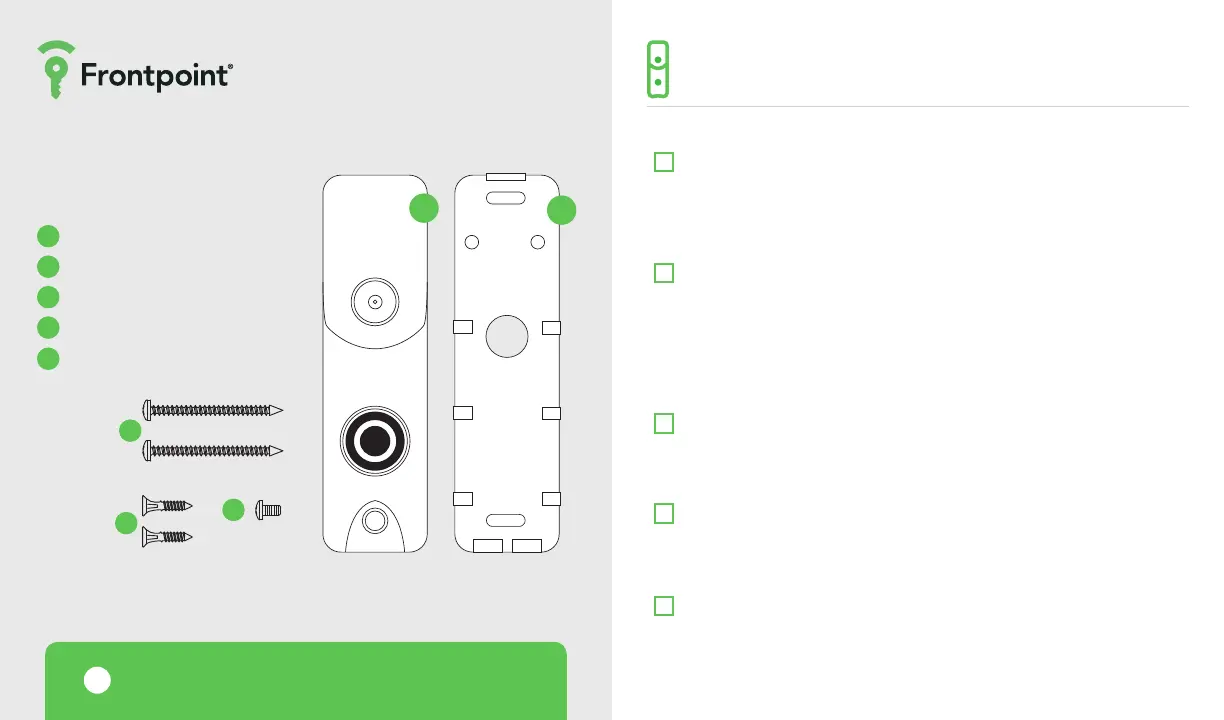
INCLUDED MATERIALS
The Doorbell Camera
Wall mounting bracket
Wall screws (2)
Masonry anchors (2)
Screw
COMPLETE THE FOLLOWING STEPS PRIOR TO
INSTALLING THE CAMERA IN ITS FINAL LOCATION
!
Working Doorbell Check
First check that the existing wired doorbell is working. There is a power
issue if the existing doorbell does not ring the indoor chime when the
button is pressed. This issue must be addressed before installing the
Doorbell Camera.
Wired Doorbell Check
Check that the existing doorbell is wired by visually inspecting the
doorbell button for wires. If necessary, the doorbell can be removed
from the wall to check for wiring. You can also inspect the chime inside
the home—a chime plugged into a power outlet might indicate an
incompatible wireless doorbell system is in place. See page 6 for more
information on the chime type.
WiFi and WiFi Password
In order to complete installation, you must have WiFi with upload speeds
of 5 Mbps and the password for the WiFi network. The WiFi signal must
reach where the Doorbell Camera will be placed.
Mounting
The mounting plate aixes to a flat surface and uses the existing doorbell
wiring. A power drill may be required depending on how your current
doorbell is set up.
Mobile App
You must have the Frontpoint app in order to complete installation.
PRE-INSTALLATION CHECKLIST
1
2
1
2
3
4
5
3
4
5



 To Next Page