
 Need help?
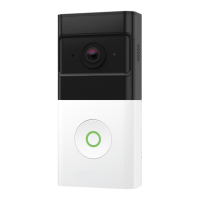
Do you have a question about the Frontpoint WIRELESS DOORBELL CAMERA and is the answer not in the manual?
Guide to connecting the doorbell camera to the Frontpoint app.
Selecting the optimal mounting location for the camera's view.
Instructions for installing the standard mounting bracket.
Instructions for installing the optional mounting wedge.
Steps to attach the doorbell camera to the mount.
Setting up custom push notifications for doorbell events.
Configuring person-detection using video analytics.
Customizing image quality, motion sensitivity, and audio volumes.
How to access and review live and recorded video footage.
How to use the two-way audio feature with guests.
Step-by-step instructions for charging the device battery.
Understanding LED indicators for battery status and camera operation.
Guidance for resolving setup/operation issues and contacting support.
 General
| Brand | Frontpoint |
|---|---|
| Model | WIRELESS DOORBELL CAMERA |
| Category | Accessories |
| Language | English |

 To Next Page