FOR ADDITIONAL HELP, CALL CUSTOMER CARE AT 1-877-602-5276
Prior to installation, confirm your existing doorbell is compatible with the
Frontpoint Doorbell Camera.
Mechanical Chime
If the chime has metal bars and a striker pin, it is mechanical and will work
without additional hardware.
Digital Chime
If the chime has a speaker that plays a tone when pressed, it is digital and will
require the installation of the Digital Doorbell Adapter and the enabling of the
digital doorbell setting in the app to function properly.
Please contact Customer Care to order a Digital Doorbell Adapter.
Tube Chime
If the chime has a series of tubular bells,
it is a tube chime and is incompatible with the Doorbell Camera.
Intercom System
If the doorbell button fixture includes a speaker, it is an intercom system and is
incompatible with the Doorbell Camera.
No Chime
If there is no chime in the system, you will only receive alerts on your phone and
a resistor (10 Ohm 10 Watt) must be used in-line with the Doorbell Camera.
!
!
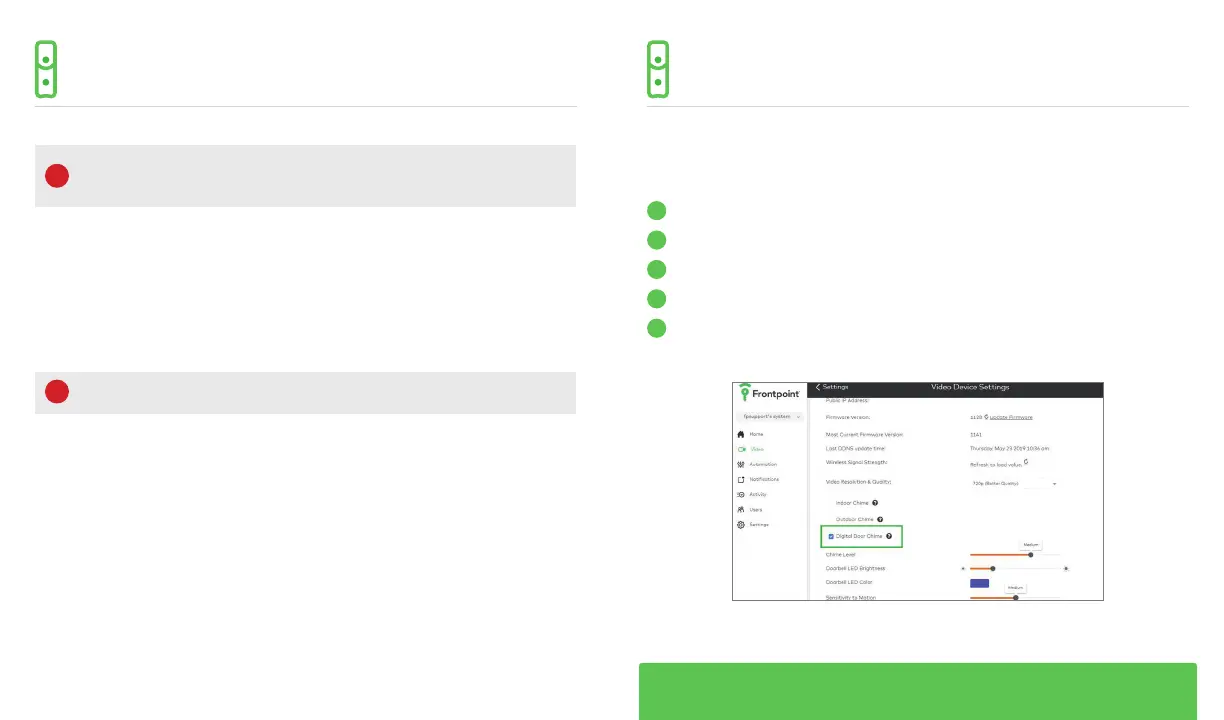
If you install the Doorbell Camera with a Digital Doorbell Adapter, you will
also need to enable the digital chime feature on your Frontpoint account.
1
Log into your account at my.frontpoint.com
2
Click on the “Video” tab on the left-hand side of the homepage
3
Select the “Settings” tab in the top-right corner
4
Choose the “Video Device Info” option
5
Click the check mark for the “Digital Door Chime” to enable the feature
DOORBELL CHIME TYPEDOORBELL CHIME TYPE



 To Next Page