IMPORTANT: If you have extra wires, do not connect them to the new thermostat. Please contact your local HVAC
professional for additional assistance. If you notice your wires are frayed, stranded, or damaged, it is also safer to contact
an HVAC professional to help you with the install.
12. Take a photo after you’ve rewired, before attaching the new thermostat. In the subsequent steps of installation, you will
need to confirm which wires you attached.
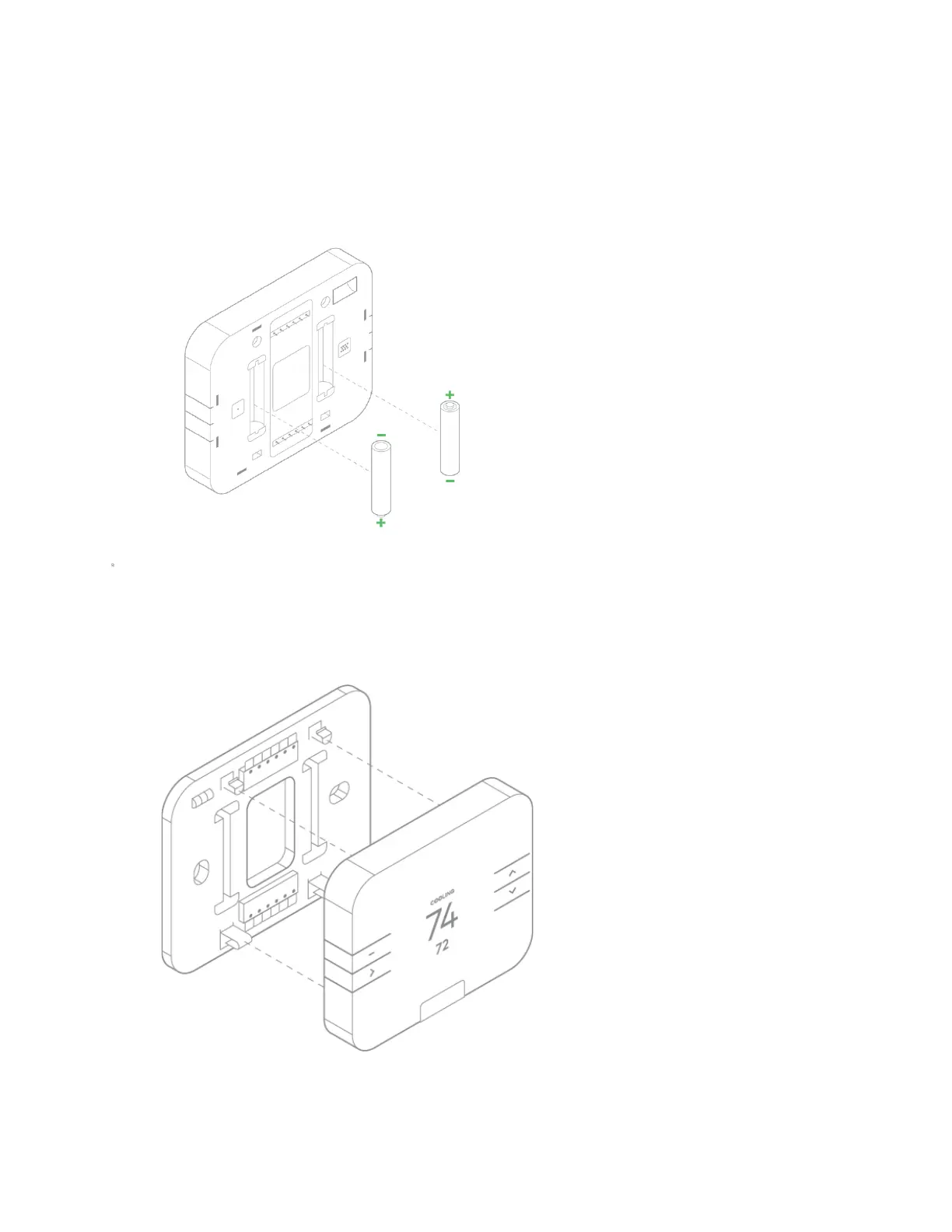
13. Install the batteries as per the below image:
14. Press the thermostat body firmly into the back plate mounted on the wall, verifying that the pins on the body are correctly
aligned with the back plate. Be sure any excess wire is tucked back into the wall to allow room for the thermostat to sit
flatly against the back plate.
15. Turn the power back on at the circuit breaker to finish your installation.
16. Proceed to the next section to setup your thermostat and use your Frontpoint App to learn in the thermostat.


 To Next Page