Version
1.0
Instruction Manual for FrSky ARCHER PLUS R8/GR8 Receiver
FrSky Electronic Co., Ltd. www.frsky-rc.com Contact us : frsky@frsky-rc.com
Add: F-4,Building C, Zhongxiu Technology Park, No.3 Yuanxi Road, Wuxi, 214125, Jiangsu, China Technical Support: sales4tech@gmail.com
A pre-flight range check should be done before every flight, in case the signal loss is caused by the reflection of
the signal by the nearby metal fence or concrete, and the shading of the signal by buildings or trees during the
actual flight.
1. Place the model at least 60 cm (2 feet) above the non-metal contaminated ground (such as on a wooden
bench). The receiving antenna should be in a vertical position.
2. Ener the ETHOS system, move to the "RF System", scroll the Encoder to select "RANGE" mode and press
Encoder. In range check mode, the effective distance will be decreased to 1/30.
Range Check
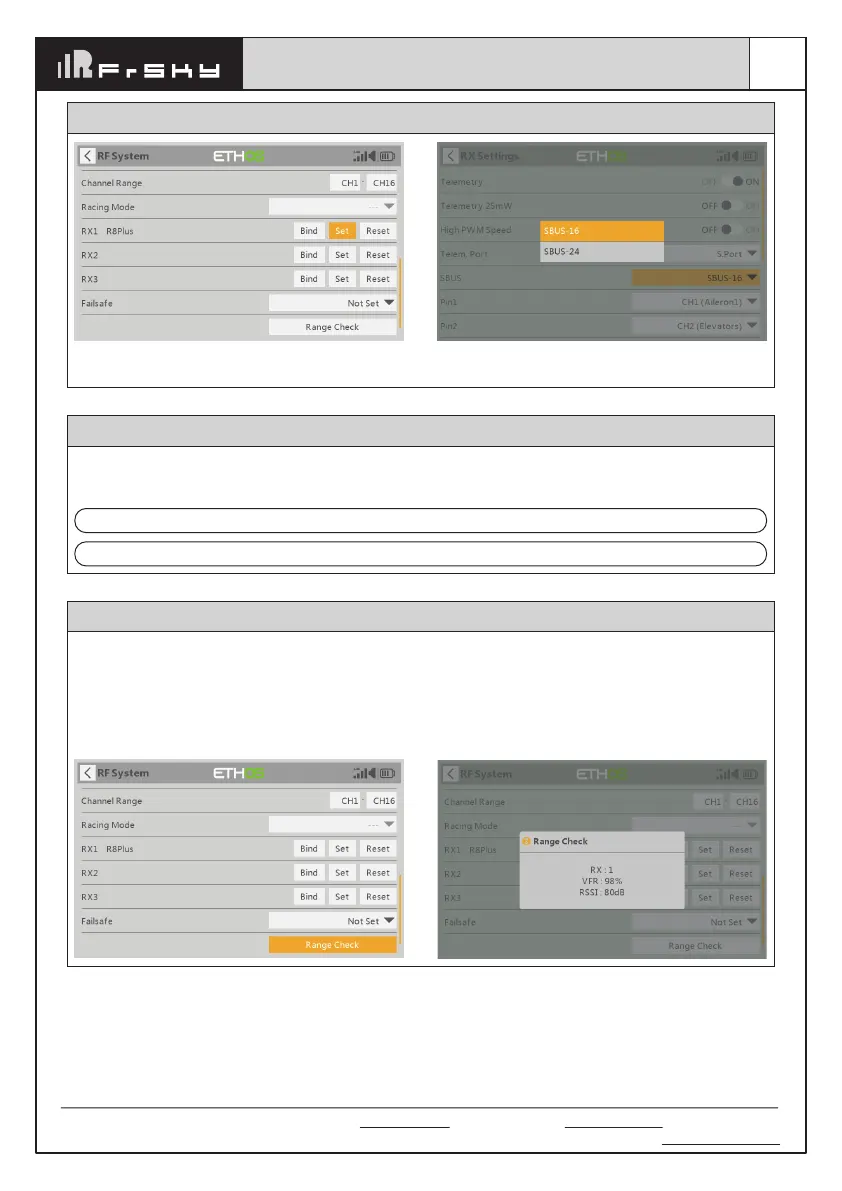
How to switch SBUS channel mode
Click [SBUS], then select SBUS-16 mode or SBUS-24
mode.
Enter into RX Settings.
Note: Please do not do the binding operation in the near range while the firmware upgrading in progress.
Note: Update the firmware after the receiver getting registered (OTA).
Go to the [File manager], and select the FW, press the enter button, select [Flash RX by int.OTA]. Power on the
receiver, select the RX, go to the [ENTER], complete the flash process, the transmitter will display [Success].
Wait for 3 seconds, the receiver works properly at the moment.
About OTA function



 To Next Page