How to set the flight modes
Quick Mode
It supports stabilization mode, auto-level mode, and manual (Gyroscope is off) mode and configured through
CH14. What’s more, an emergency mode is added to configure automatic level mode default through CH16.
The precise configuration is written below.
Version
1.0
Instruction Manual for FrSky ARCHER PLUS SR8 Receiver
FrSky Electronic Co., Ltd. www.frsky-rc.com Contact us : frsky@frsky-rc.com
Add: F-4,Building C, Zhongxiu Technology Park, No.3 Yuanxi Road, Wuxi, 214125, Jiangsu, China Technical Support: sales4tech@gmail.com
Self Check
1. Make sure the model is in a horizontal position on the ground, then put the throttle to 0, and keep the other channels
in the center position.
2. Move to [
System
] and enter the [SRX Stable] tool to turn on [Self Check], then the blue LED light turns on. Once the
blue LED starts flashing, we can calibrate the maximum travel of stick channels (excluding the throttle channel).
3. If the calibration is completed, the LED turns off and the servos react left and right to indicate that the calibration
process is completed.
Note: To do the Self-Check of the stabilization device, please ensure the stabilization function is
enabled. Enter the [SRX Stable] tool and turn On the [Stabilizing], then quit the [SRX Stable] tool and
back into this tool again, now the [Self-Check] function is capable to enable.
Do the Self-Check in the [SRX Stable] tool. [System] → [SRX Stable] → [Self-Check]
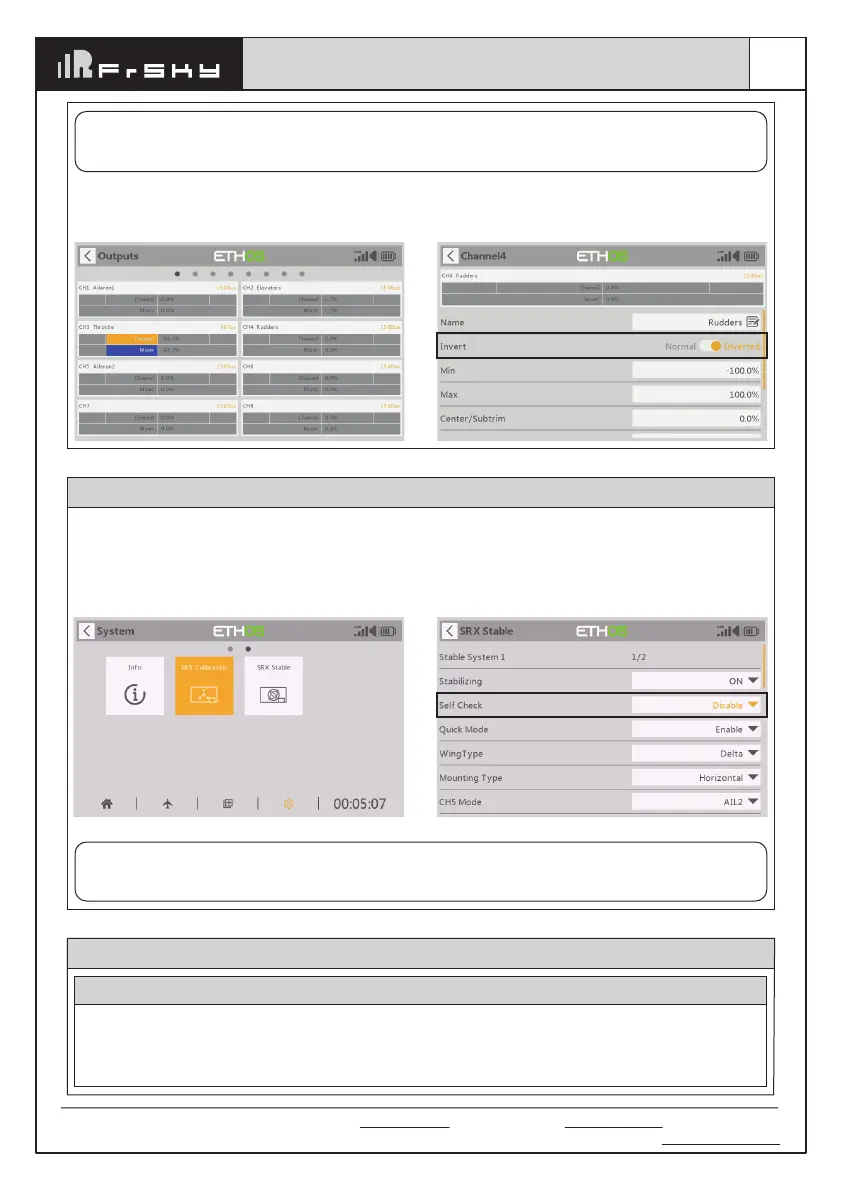
Check whether the reaction of the wing servo is in line with the radio stick operation in the [Manual]
mode. If not, please try to invert the corresponding channel output by pressing the channel bar in the
[Output] tool.
Note:
If the compensation direction is incorrect, please reverse the corresponding channel as illustrated
above through the
[SRX Stable] tool.



 To Next Page