17
10/2021
0,&,1
'9,,1387
021,725287
&$3785(
5(&25',1 287
*6',
,1387
*6',
/223287
9$&
+]
/,1(
3('$/
$
21
2))
0,&,1
'9,,1387
021,725287
&$37
5(&
,1 287
&9%6
,1387
*6',
,1387
*6',
/223287
9$&
+]
/,1(
3('
))
,
,
1,7
5
$37
(
,
9$
+]
/,1
('
#PPNPS4UBOE
%JTQMBZ.POJUPST
'9,,13
(
5',
'
,13
',
/
3
/,1
9$
+]
('$/
$
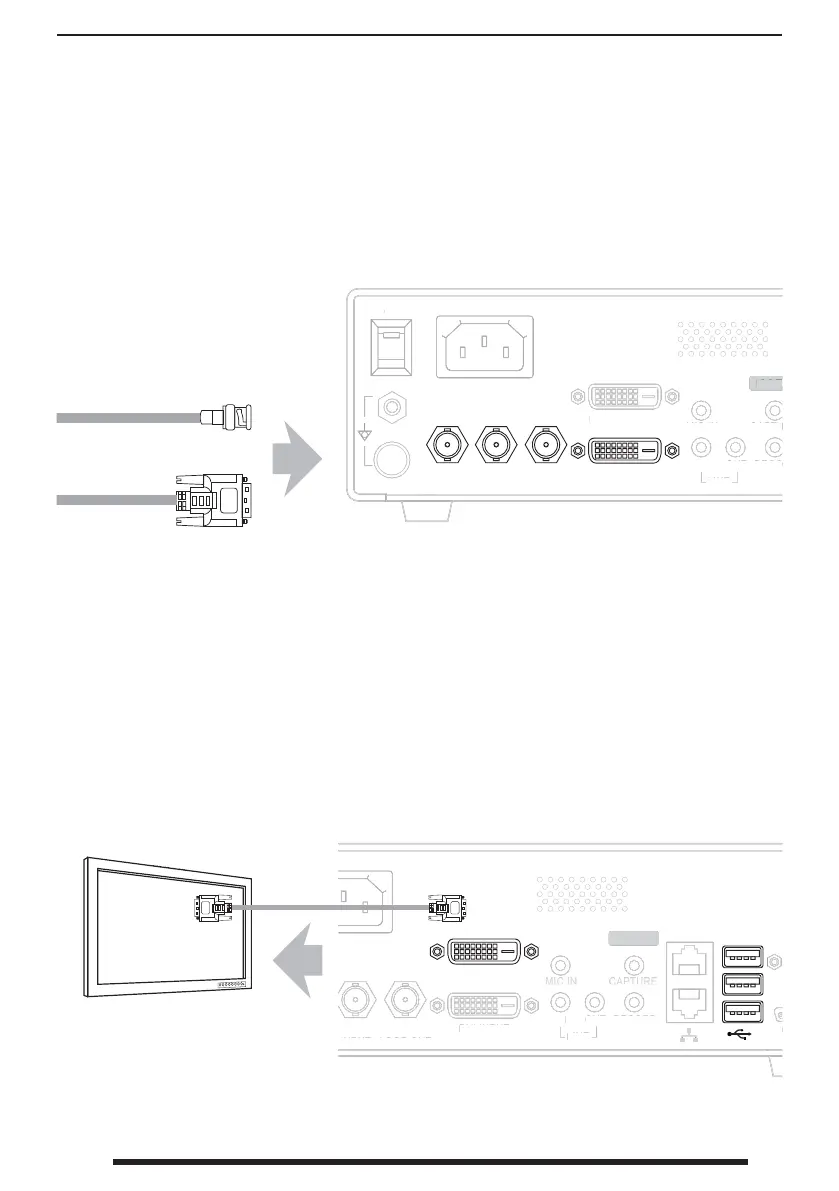
Connect Input Sources IPS710A
Connect External Monitor Output IPS710A
IPS710A has connections to receive signals as DVI-D, SDI and CVBS. Speci c applications
will determine the type of input signal sources that will be connected to IPS710A. Never use this
system with damaged cables. Keep all cables away from areas where they may cause tripping.
The Monitor Out connection on IPS710A is used to display the external monitor user
interface, including controls for: live video, recorded images, patient information, session
list, le formats, etc.
IPS710A back panel
IPS710A back panel
Connect video source
signals here.
Connect mouse and
keyboard, or touch-
screen, here if needed.
Connect external
display monitor
here.


 To Next Page