24
10/2021
External Monitor User Interface - Record IPS710A
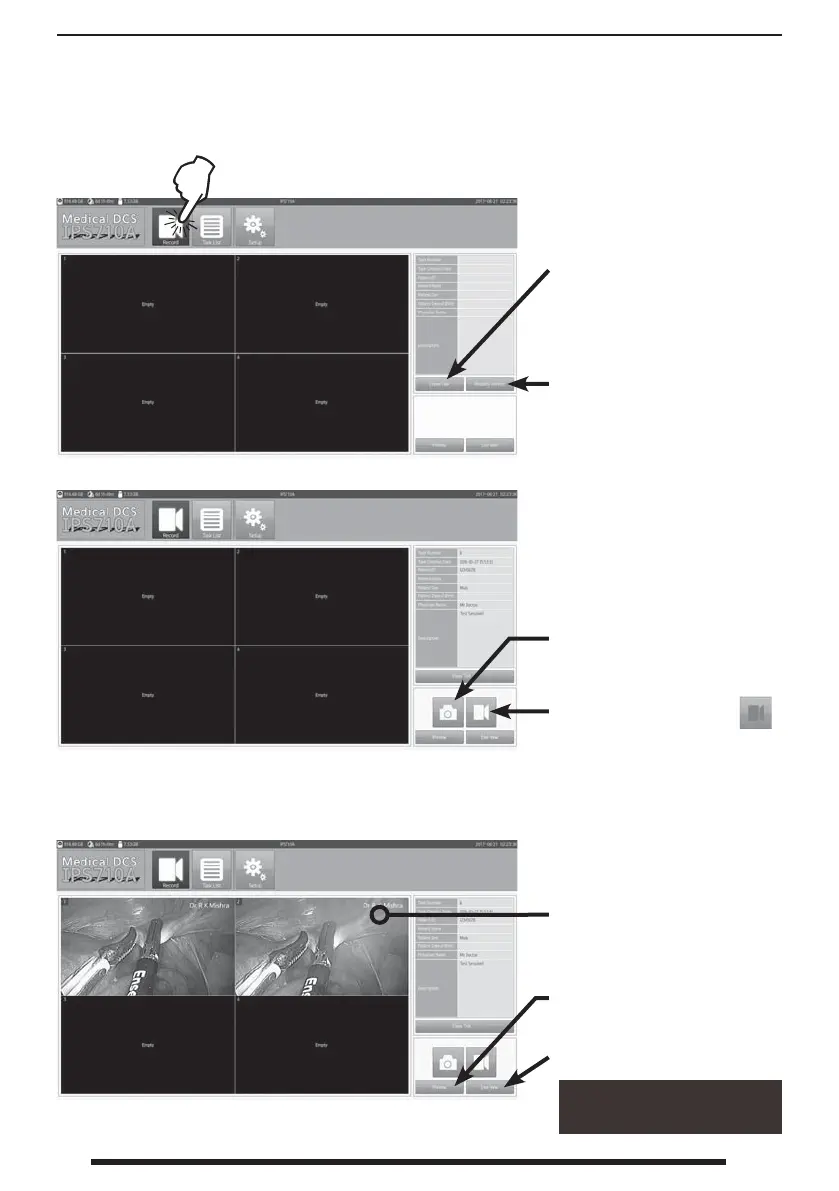
Press the Record button to open the dashboard
where capture and recording are initiated.
A new task must rst be
created before any recording
can take place.
After a task has been created, information associated with the
task is displayed. A task number is automatically generated.
The most recent still captures will be displayed on the dashboard.
Press and hold as a shortcut
to several commands.
Press to capture a still image.
Press to begin video
recording. The record-
ing icon will turn red.
Press again to stop recording.
View active source.
Close task when all
recordings are completed.
View most recent still capture
full screen. Double-tap to
return to dashboard.
When creating a task, speci c
patient and doctor informa-
tion can be entered manually
or automatically be added
from the modality worklist.


 To Next Page