PAG.
15
rev 1.0
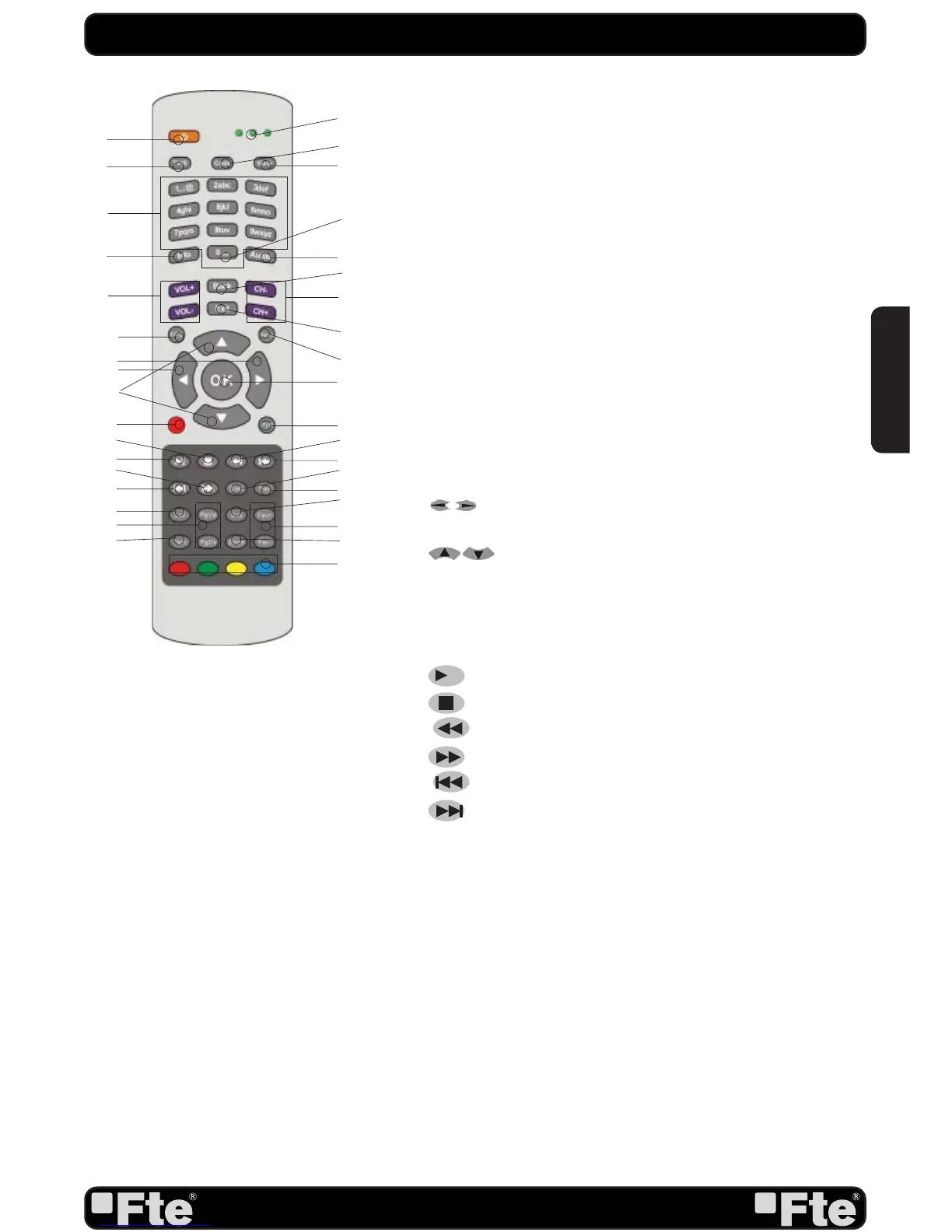
PANEL & REMOTE CONTROL DESCRIPTION
1
3
6
14
10
12
7
5
18
11
15
4
8
9
13
19
20
21
24
22
23
25
28
26
27
29
31
30
32
33
34
35
2
16
17
1.- POWER: Switches receiver ON or in stand-by-mode.
2.- LEDs: Shines as function control, showing the selected
transmission code 1, 2 or 3.
3.- TV/R: Switches between TV and Radio channels.
4.- CODE: Changes transmission code of the remote control.
5.- MUTE: Switches audio on and off.
6.- NUMERIC KEYS: For direct typing values and names.
7.- “0”
8.- INFO: Shows channel information with signal bar.
9.-Audio: Opens audio menu.
10.- VOL+ / VOL-: Adjusts audio volume up and down.
11.- CH+ / CH-: Changes channel up and down.
12.- Back: To toggle between the actual and the last selected
channel.
13.- EXIT: Exit menus or stop operations.
14.- EPG: Shows the EPG information.
15.- MENU: Opens the main menu.
16.-
: Adjusts audio volume or controls the cursor in
menus.
17.-
: Changes channels volume or controls the cur-
sor in menus.
18.- OK: Confi rms selections or opens channel list.
19.- REC: Quick start for recording.
20.- PVR: Opens PVR menu.
21.-
►
II
: Start / Stop button for recording and TimeShift.
22.-
■
: Stop button for recording and TimeShift.
23.-
■
: Backward button for recording and TimeShift.
24.-
■
: Forward button for recording and TimeShift.
25.-
■
: Back.
26.-
■
: Next.
27.- GoTo: To move to the specifi ed position.
28.- Fav: Opens favourite channel list.
29.- List: Opens channel list.
30.- Pup / Pdw: Moves cursor in block steps.
31.- Sub: Switches subtitle on and off.
32.- Fav+ / Fav-: Moves favourite channel up and down.
33.- TEXT: Opens and closes teletext.
34.- Zoom: Zoom function.
35.- Color keys: Controls menu options.
ENGLISH


 To Next Page