PAG.
27
rev 1.0
4. INSTALLATION
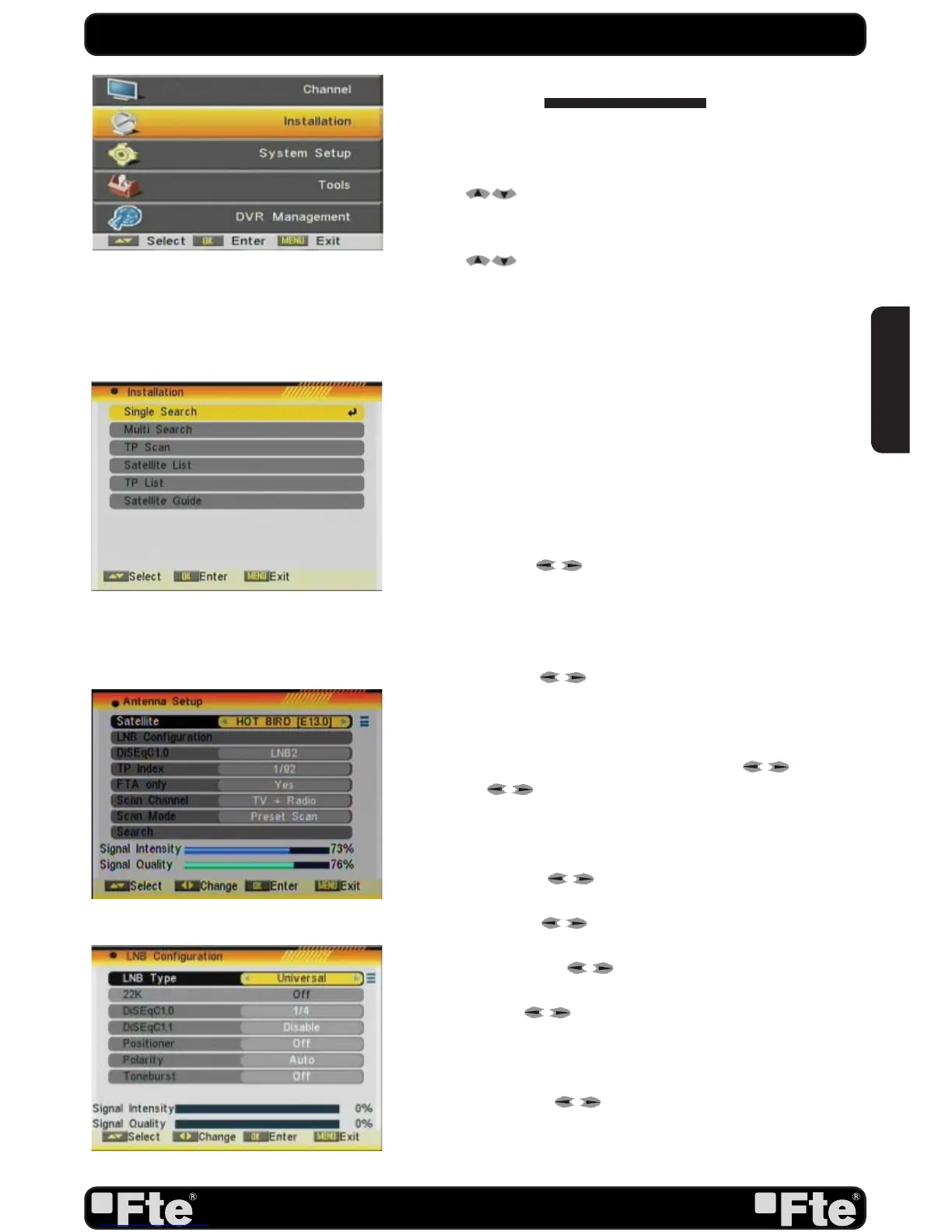
Press [Menu] in the TV mode to enter the main menu (OSD
44).
1. Press [ ] to select the Installation item.
2. Press [OK] to enter the selected item.
In the Installation menu (OSD 45):
3. Press [
] to select the wanted menu item.
4. Press [OK] to enter the selected item among.
- Single Search
- Multi Search
- TP Scan
- Satellite List
- TP List
- Satellite Guide
4.1. SINGLE SEARCH
After selecting Antenna Setup another window will be opened
(OSD 46).
You can edit the following items:
1. Satellite: Press [ ] to switch Satellites or press [OK] to
enter satellite list to select directly.
2. LNB Confi guration: Selecting this option and pressing [OK],
the LNB Confi guration menu will be displayed (OSD 47). In this
menu, next options can be modifi ed:
- LNB Type: Press [ ] to switch among “Standard”, “User”
and “Universal” mode. If you select “Standard” or “User”, the
frequency of the LNB can be changed. Pressing [OK] the
frequencies will appear to be edited. Select the frequency
you want to edit and change the value with [ ]
- 22K: Use [ ] to switch “ON” and “Off”. The 22 kHz sig-
nal is used in KU Universal LNBs to change between low
band and high band. After choosing LNB type “Universal”
you cannot modify 22K.
- DiSEqC1.0: Use [ ] to switch the options of DiSEqC
switches.
- DiSEqC1.1: Use [ to switch the options of DiSEqC1.1
switches.
- Positioner: Press [ to select between “None /
DiSEqC1.2 / USALS”.
- Polarity: Press [ ] to switch between “Auto / H / V”.
Once the LNB is confi gured, press [Exit] to save the changes
and go to the previous window to continue confi guring the
antenna.
- Toneburst: Press [ ] to switch this function “On” or
“Off”.
INSTALLATION
OSD 44
OSD 46
OSD 45
OSD 47
ENGLISH


 To Next Page