PAG.
6
rev 1.0
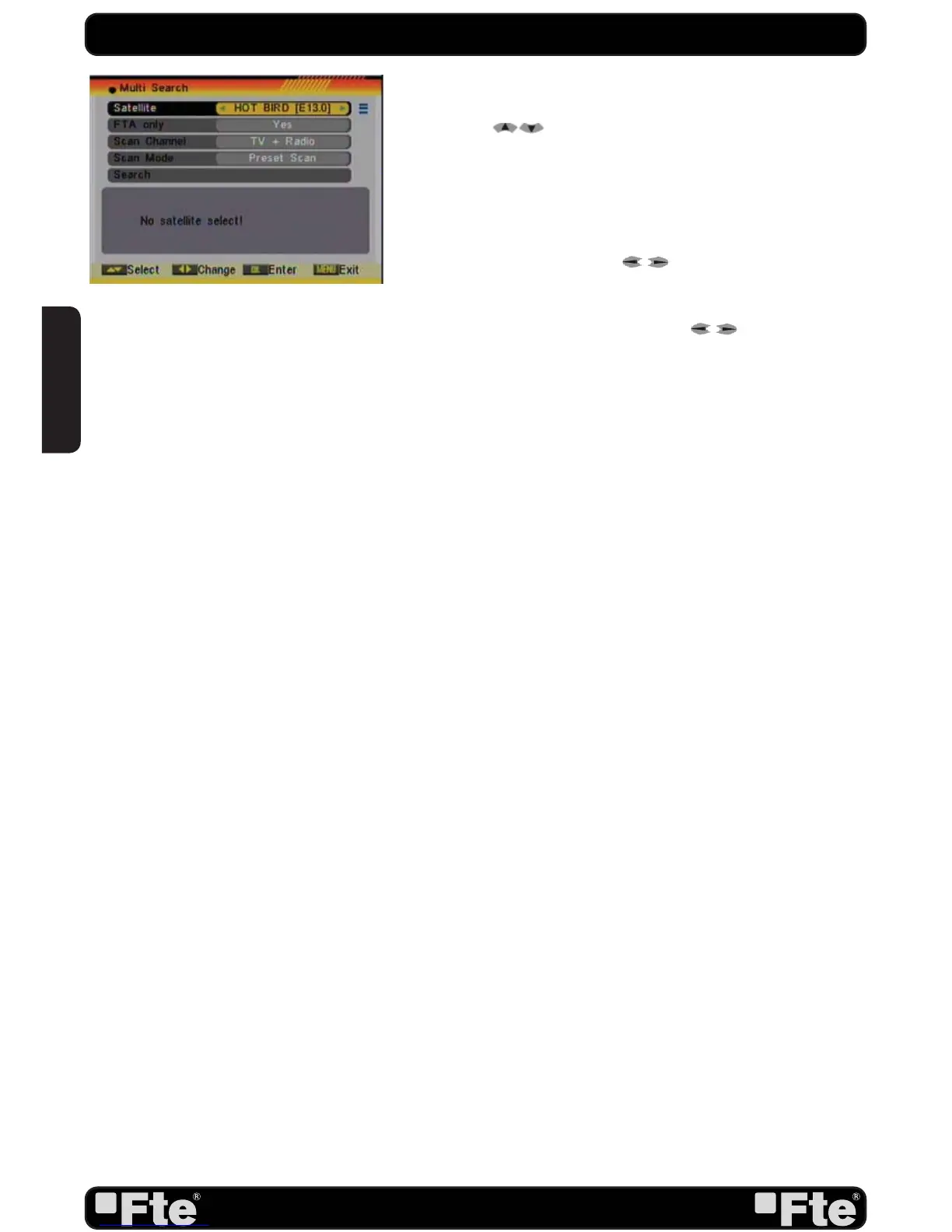
Multi search
: You can edit the following items (Image 4):
1. On “Satellite” item press [OK] to open the satellite list.
Then press [ ] to move the highlight and press [OK]
to mark/unmark and [EXIT] to fi nish the selection. You can
select several satellites in this menu. At the bottom of the
screen you can see the selected satellites. The system will use
DiSEqC1.0/1.1, DiSEqC1.2 and USALS functions to search
the marked satellites and scan channels.
2. On “FTA Only” item, press [
] to select scanning of all
channels or just scanning of free channels. If you select “Yes” it
will scan free channels only.
3. On “Scan Channel” item, press [ ] to select the
scanning range from TV + Radio Channels, only TV channels or
only Radio channels.
4. On “Scan Mode” item, you can select “Auto Scan” to make
a blind scan or “Preset Scan” to scan all preset transponders of
the selected satellites.
5. Select “Search” and press [OK] to start scanning. In the
lower part of the window the progress of scanning and the
found channels are displayed.
6. Press [Exit] to cancel or fi nish the scanning and saving the
found channels.
Main Menu: Selecting this option, the main menu will appear
on the TV.
QUICK INSTALLATION GUIDE
IMAGE 4
ENGLISH


 To Next Page