4
87
3
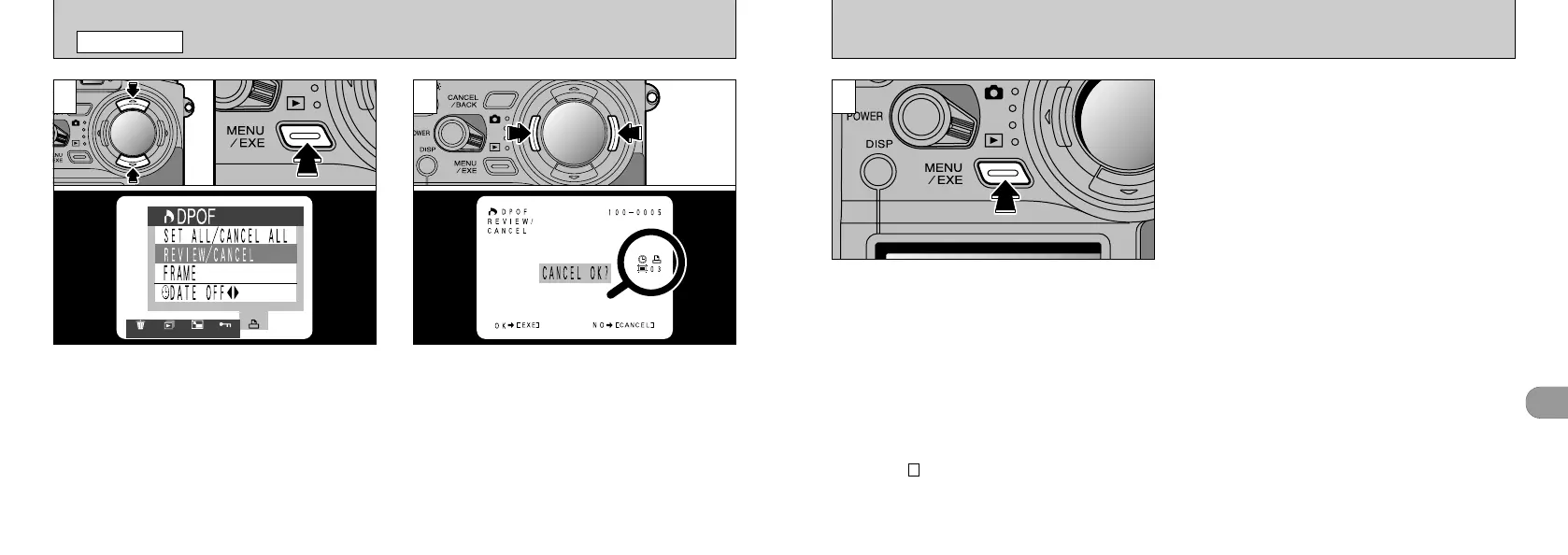
To delete the print setting, display the image for
which the setting is to be deleted and then press
the “MENU/EXE” button. When the print setting
has been deleted, the next image appears with
the “SET OK?” message displayed.
86
[
DPOF REVIEW
/
CANCEL
PLAYBACK MENU
➀
Use “a” or
“
b
”
to select “REVIEW/CANCEL”.
➁
Press the “MENU/EXE” button.
●
!
Multi-frame playback is an easy way to select
images (➡P.37).
●
!
If you do not want to check or delete the DPOF
settings, press the “CANCEL/BACK” button to return
to the menu. To exit the menu screen, press the
“CANCEL/BACK” button again.
●
!
To delete further print settings, repeat the procedure
from step .
●
!
If all the print specifications are cancelled, the “TOTAL”
display reverts to “00000” and the background turns
black.
2
You can confirm the settings for only those
frames with a specified number of prints by
pressing “d” or
“
c ”. The settings for each frame
are displayed on the right of the screen.
21
●
➀
●
➁







 To Next Page