EasyManua.ls Logo

FujiFilm EF-42 - Adjusting Flash Settings; Focal Length Display Settings; Manual Exposure Compensation; Zoom and Power Ratio Settings

FujiFilm EF-42
18 pages
Print Icon
To Next Page IconTo Next Page
To Previous Page IconTo Previous Page
Loading...
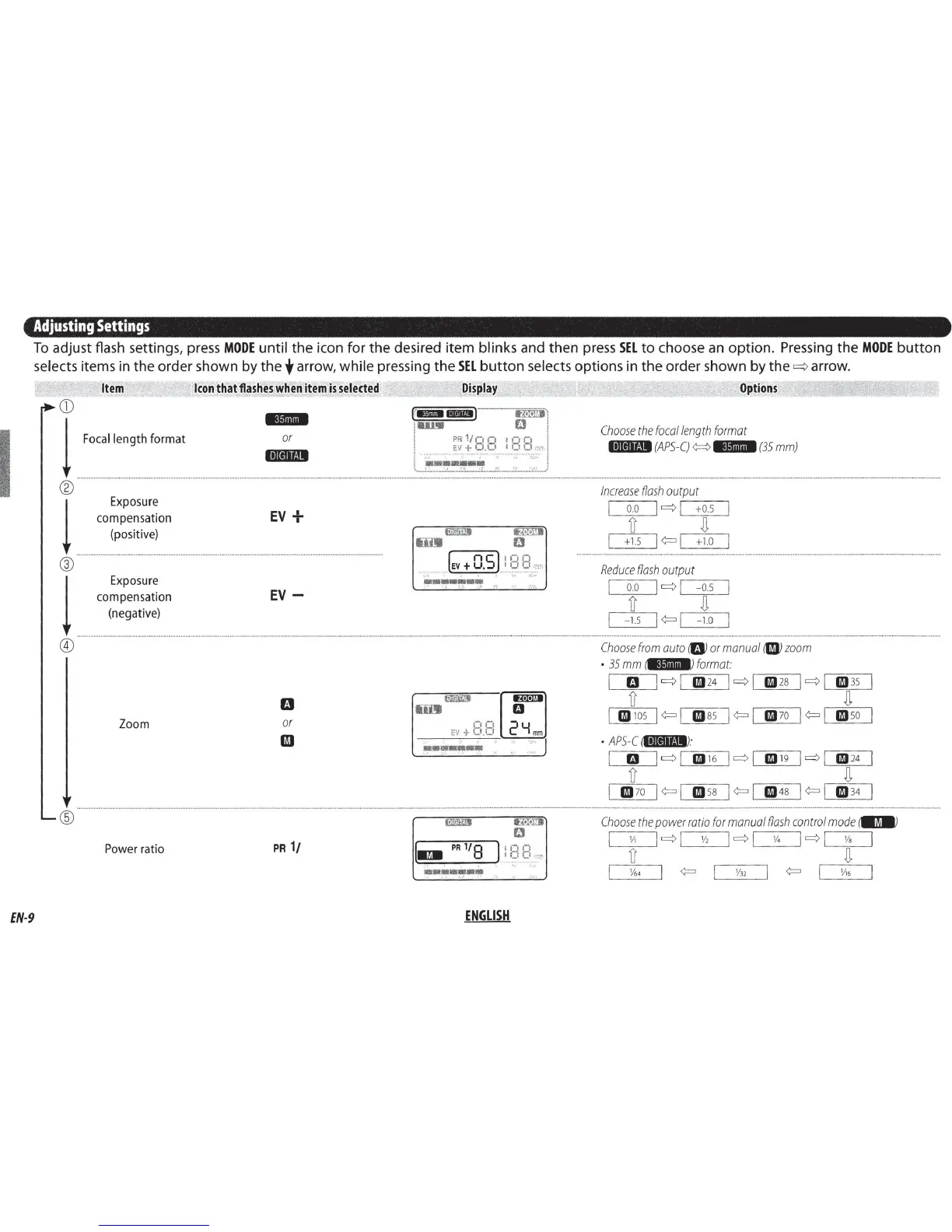
Adjusting
Settings
To
adjust
flash settings, press
MODE
until
the
icon
for
the
desired
item
blinks
and
then
press
SEL
to
choose
an
option.
Pressing
the
MODE
button
selects items
in
the
order
shown
by
the
t arrow,
while
pressing
the
SEL
button
selects
options
in
the
order
shown
by
the
~
arrow.
Item
CD
I 1
F:c:llengthf~rmat
1
Exposure
compensation
(positive)
®
Icon
that
flashes
when
item
is
selected
.,.,,,.
or
l•llctlt41
EV
+
l
Exposure
.....
c:~~~~:,~:~o~
................
.
.........
.
.....
.
...................
EV
~
-
Zoom
or
II
®
Power
ratio
PR
1/
EN-9
Display
[r
ua
IBID)
lfN!D
11m1
D
PR
1/n
Q I p Q
EV + O .
CI
I
_I
1_1
<:\:'"·
--------·--·---
-------~--------
-
------
•:
...
>..::.•
···-··
I - 4
<>~
, I \"':
•·
l!ll!1i1D
lfN!D
tim
D
________
__.lev+
0.5 l!
__
~
-
~
-~rc,
··
-
~
.
h•
:;;.r-
•••••••
...
, '
1"
- [
-··1
mw
a
00
EV + '-'·'-' 2 Y
mm
..
'
--~---~
(
..
PRl/8
•••••••
•;
'
fililrl
fJ
1
::2
s:
_::
''
ENGLISH
Options
Choose
the
focal
length
format
ltUeJif!11
(APS-C)
¢::::>
MJijl@i
(35
mm)
Increase
flash
output
I
o.o
I q
.-1
-+-o.-5
--.
iJ
n
+1.5
I<:=
I
+1.o
Reduce
flash
output
I
o.o
I q
,--1
---o.s____,
iJ
n
-
1.5
I
<:=
I
-1
.o
Choose
from
auto
8
or
manual
riJ)
zoom
•
35
mm
1.itiii•I•J
format:
m
lq
l
19
24
lql
19
28
lql
19
35
lJ
n
19
105
I
<:=
I
19
85
1<:=1
19
70
I<:=
I
19
50
•
APS-e
ii•JIIf!11
J:
m
lql
19
16
lql
19
19
lql
19
24
lJ
n
19
70
I
<:=
I
19
58
1
<:=
1
19
48
I<:=
I
19
34
....................
.
...............
.
...........
.
...
.
....
Choose
the
power
ratio
for
manual
flash
control
mode
iiDJI)
I
y,
lq l
Y2
lql
'14
lql
Vs
I
lJ
n
Y6•
<:=
VJ2
<:=
y,6